AOC C32G2AE Manual de usuario

1
www.aoc.com
©2020 AOC. All Rights Reserved.
LCD Monitor
User Manual
C32G2AE

i
Safety ................................................................................................................................................................................... 1
National Conventions ................................................................................................................................................ 1
Power ........................................................................................................................................................................ 2
Installation ................................................................................................................................................................. 3
Cleaning .................................................................................................................................................................... 4
Other ......................................................................................................................................................................... 5
Setup .................................................................................................................................................................................... 6
Contents in Box......................................................................................................................................................... 6
Setup Stand & Base.................................................................................................................................................. 7
Adjusting Viewing Angle............................................................................................................................................ 8
Connecting the Monitor ............................................................................................................................................. 9
Adaptive-Sync function ........................................................................................................................................... 10
Adjusting..............................................................................................................................................................................11
Hotkeys ....................................................................................................................................................................11
OSD Setting ............................................................................................................................................................ 12
Luminance ................................................................................................................................................... 13
Image Setup ................................................................................................................................................ 14
Color Setup.................................................................................................................................................. 15
Picture Boost ............................................................................................................................................... 16
OSD Setup................................................................................................................................................... 17
Game Setting............................................................................................................................................... 18
Extra ............................................................................................................................................................ 19
Exit............................................................................................................................................................... 20
LED Indicator .......................................................................................................................................................... 21
Troubleshoot....................................................................................................................................................................... 22
Specication ....................................................................................................................................................................... 23
General Specication .............................................................................................................................................. 23
Preset Display Modes ............................................................................................................................................. 24
Pin Assignments...................................................................................................................................................... 25
Plug and Play .......................................................................................................................................................... 27

1
Safety
National Conventions
The following subsections describe notational conventions used in this document.
Notes, Cautions, and Warnings
Throughout this guide, blocks of text may be accompanied by an icon and printed in bold type or in italic type. These
blocks are notes, cautions, and warnings, and they are used as follows:
NOTE: A NOTE indicates important information that helps you make better use of your computer system.
CAUTION: A CAUTION indicates either potential damage to hardware or loss of data and tells you how to avoid the
problem.
WARNING: A WARNING indicates the potential for bodily harm and tells you how to avoid the problem. Some warnings
may appear in alternate formats and may be unaccompanied by an icon. In such cases, the specic presentation of the
warning is mandated by regulatory authority.

2
Power
The monitor should be operated only from the type of power source indicated on the label. If you are not sure of the
type of power supplied to your home, consult your dealer or local power company.
The monitor is equipped with a three-pronged grounded plug, a plug with a third (grounding) pin. This plug will t
only into a grounded power outlet as a safety feature. If your outlet does not accommodate the three-wire plug, have an
electrician install the correct outlet, or use an adapter to ground the appliance safely. Do not defeat the safety purpose of
the grounded plug.
Unplug the unit during a lightning storm or when it will not be used for long periods of time. This will protect the
monitor from damage due to power surges.
Do not overload power strips and extension cords. Overloading can result in re or electric shock.
To ensure satisfactory operation, use the monitor only with UL listed computers which have appropriate congured
receptacles marked between 100-240V AC, Min. 5A.
The wall socket shall be installed near the equipment and shall be easily accessible.

3
Installation
Do not place the monitor on an unstable cart, stand, tripod, bracket, or table. If the monitor falls, it can injure a
person and cause serious damage to this product. Use only a cart, stand, tripod, bracket, or table recommended by
the manufacturer or sold with this product. Follow the manufacturer’s instructions when installing the product and use
mounting accessories recommended by the manufacturer. A product and cart combination should be moved with care.
Never push any object into the slot on the monitor cabinet. It could damage circuit parts causing a re or electric
shock. Never spill liquids on the monitor.
Do not place the front of the product on the oor.
If you mount the monitor on a wall or shelf, use a mounting kit approved by the manufacturer and follow the kit
instructions.
Leave some space around the monitor as shown below. Otherwise, air-circulation may be inadequate hence
overheating may cause a re or damage to the monitor.
See below the recommended ventilation areas around the monitor when the monitor is installed on the wall or on the
stand:
Installed with stand
12 inches
30cm
4 inches
10cm
4 inches
10cm
4 inches
10cm
Leave at lease this
space around the set

4
Cleaning
Clean the cabinet regularly with cloth. You can use soft-detergent to wipe out the stain, instead of strong-detergent
which will cauterize the product cabinet.
When cleaning, make sure no detergent is leaked into the product. The cleaning cloth should not be too rough as it
will scratch the screen surface.
Please disconnect the power cord before cleaning the product.

5
Other
If the product is emitting a strange smell, sound or smoke, disconnect the power plug IMMEDIATELY and contact a
Service Center.
Make sure that the ventilating openings are not blocked by a table or curtain.
Do not engage the LCD monitor in severe vibration or high impact conditions during operation.
Do not knock or drop the monitor during operation or transportation.

6
Setup
Contents in Box
*
*
*
*
*
*
Not all signal cables will be provided for all countries and regions. Please check with the local dealer or AOC branch
oce for conrmation.
CD Manual Warranty card Stand Base
Power Cable DP Cable HDMI Cable VGA Cable Audio Cable

7
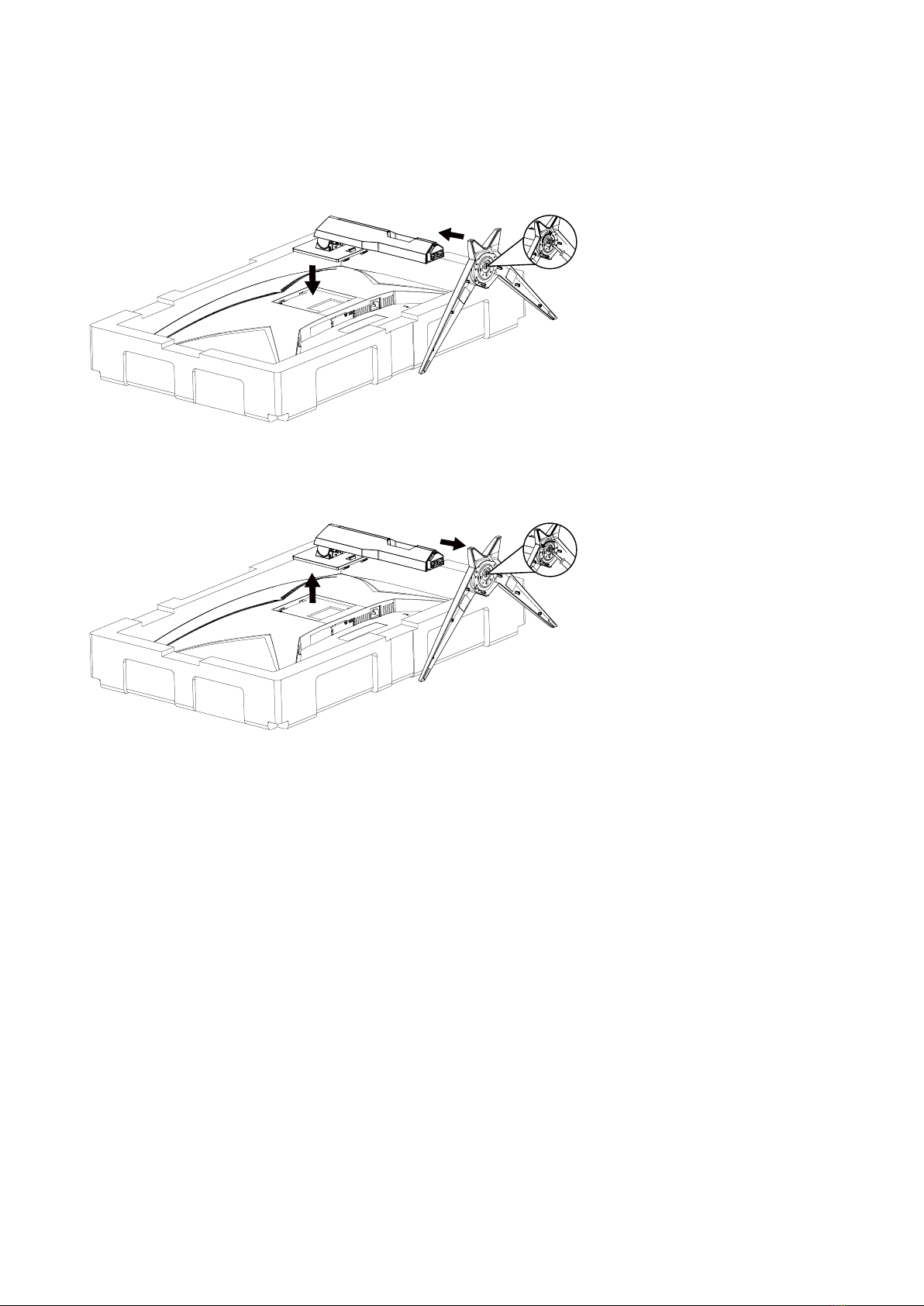
Setup Stand & Base
Please setup or remove the base following the steps as below.
Setup:
Remove:

8
Adjusting Viewing Angle
For optimal viewing it is recommended to look at the full face of the monitor, then adjust the monitor’s angle to your own
preference.
Hold the stand so you will not topple the monitor when you change the monitor’s angle.
You are able to adjust the monitor as below:
-5° ~ 23°
NOTE:
Do not touch the LCD screen when you change the angle. It may cause damage or break the LCD screen.
Este manual sirve para los siguientes modelos
1
Tabla de contenidos
Otros manuales de Monitor de AOC

AOC
AOC E936SWA Manual de usuario

AOC
AOC e1649Fwu Manual de usuario

AOC
AOC e1660Sw Manual de usuario

AOC
AOC e2260Sd Manual de usuario

AOC
AOC E943Swn Manual de usuario

AOC
AOC 201S Manual de usuario

AOC
AOC C32G2ZE Manual de usuario

AOC
AOC TS185LBE Manual de usuario

AOC
AOC e2343F Series Manual de usuario

AOC
AOC Q27P3QW Manual de usuario

AOC
AOC e1621Swb Manual de usuario

AOC
AOC 912Vwa-1 Manual de usuario

AOC
AOC AG352UCG Manual de usuario

AOC
AOC 24B3HM Manual de usuario

AOC
AOC N936S Manual de usuario

AOC
AOC LM725 Manual de usuario

AOC
AOC E719SDA Manual de usuario

AOC
AOC VS19X Series Manual de usuario

AOC
AOC 223VW Manual de usuario

AOC
AOC 50X8050 Manual de usuario