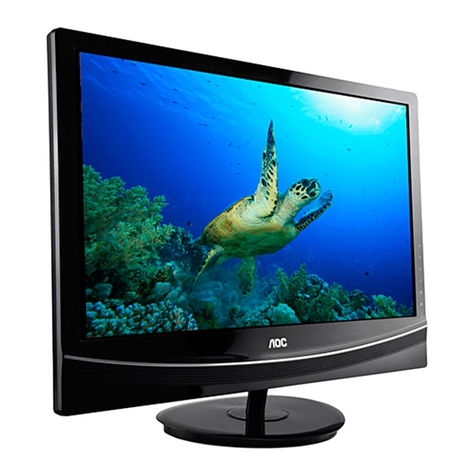
AOC LE32W037M Manual de usuario

31.5″LCDTV AOCLE32W037M
1
Service
Service
Service
Horizontal Frequency
43~53KHz
Table of Contents
Description Page
Table of Contents………………………………………....1
Important Safety Notice……………………………….…2
Revision List…………………………………..…….……3
1. General Specification...............................…….......4
2. Operating Instructions..............................................5
2.1. Controls &Connections ……..................................5
2.2. Remote Control………………................................6
2.3. Instructions for Use..............................................7
3. Input /Output Specification..........……………........20
3.1. Input Signal Connector............……....................20
3.2. Factory Preset Display Modes….........................21
4. Mechanical Instruction…………….………….….....22
5. Repair Flow Chart................................................25
6. PCB Layout...……..............................................32
Description Page
6.1. Main Board….......................................................32
6.2. Power Board…....................................................36
6.3. Key Board…........................................................38
6.4. IR Board………....................................................38
7. Adjustment……………………..……………………39
8. Block Diagram….....................................................40
9. Schematic Diagram...……......................................42
9.1. Main Board…………............................................42
9.2. Power Board……….............................................53
9.3. Key Board…........................................................56
9.4. IR Board…...........................................................57
10. Exploded View…..................................................58
11. BOM List……….………….………………..............60
SAFETY NOTICE
ANY PERSON ATTEMPTING TO SERVICE THIS CHASSIS MUST FAMILIARIZE HIMSELF WITH THE CHASSIS
AND BE AWARE OF THE NECESSARY SAFETY PRECAUTIONS TO BE USED WHEN SERVICING
ELECTRONIC EQUIPMENT CONTAINING HIGH VOLTAGES.
CAUTION: USE A SEPARATE ISOLATION TRANSFOMER FOR THIS UNIT WHEN SERVICING

2
Important Safety Notice
Proper service and repair is important to the safe, reliable operation of all AOC Company Equipment. The service
procedures recommended by AOC and described in this service manual are effective methods of performing service
operations. Some of these service operations require the use of tools specially designed for the purpose. The
special tools should be used when and as recommended.
It is important to note that this manual contains various CAUTIONS and NOTICES which should be carefully read in
order to minimize the risk of personal injury to service personnel. The possibility exists that improper service
methods may damage the equipment. It is also important to understand that these CAUTIONS and NOTICES ARE
NOT EXHAUSTIVE. AOC could not possibly know, evaluate and advise the service trade of all conceivable ways in
which service might be done or of the possible hazardous consequences of each way. Consequently, AOC has not
undertaken any such broad evaluation. Accordingly, a servicer who uses a service procedure or tool which is not
recommended by AOC must first satisfy himself thoroughly that neither his safety nor the safe operation of the
equipment will be jeopardized by the service method selected.
Hereafter throughout this manual, AOC Company will be referred to as AOC.
WARNING
Use of substitute replacement parts, which do not have the same, specified safety characteristics, might create
shock, fire, or other hazards.
Under no circumstances should the original design be modified or altered without written permission from AOC.
AOC assumes no liability, express or implied, arising out of any unauthorized modification of design.
Servicer assumes all liability.
FOR PRODUCTS CONTAINING LASER:
DANGER-Invisible laser radiations when open AVOID DIRECT EXPOSURE TO BEAM.
CAUTION-Use of controls or adjustments or performance of procedures other than those specified herein may
result in hazardous radiation exposure.
CAUTION -The use of optical instruments with this product will increase eye hazard.
TO ENSURE THE CONTINUED RELIABILITY OF THIS PRODUCT, USE ONLY ORIGINAL MANUFACTURER'S
REPLACEMENT PARTS, WHICH ARE LISTED WITH THEIR PART NUMBERS IN THE PARTS LIST SECTION OF
THIS SERVICE MANUAL.
Take care during handling the LCD module with backlight unit
¾Must mount the module using mounting holes arranged in four corners.
¾Do not press on the panel, edge of the frame strongly or electric shock as this will result in damage to the screen.
¾Do not scratch or press on the panel with any sharp objects, such as pencil or pen as this may result in damage
to the panel.
¾Protect the module from the ESD as it may damage the electronic circuit (C-MOS).
¾Make certain that treatment person’s body is grounded through wristband.
¾Do not leave the module in high temperature and in areas of high humidity for a long time.
¾Avoid contact with water as it may a short circuit within the module.
¾If the surface of panel becomes dirty, please wipe it off with a soft material. (Cleaning with a dirty or rough cloth
may damage the panel.)

3
Revision List
Version Release Date Revision Instructions Customer Model TPV Model
A00 Nov.17,2010 Initial Release LE32W037M E32A22NCWEA1NN

4
1. General Specification
Model LE32W037M
Display Size of the Panel 800mm (31.5")
Embedded Resolution 1366 x 768
Viewing Angle Horizontal 176° vertical 176°
Brightness 400 cd/m2
Dynamic Contrast 20,000,000:1
Speaker 10W x 2
Video System PAL D/K B/G I; NTSC M/N
Audio System K/K, I, B/G. M, L. L’
Antenna Impedance 75Ω
Input Voltage 100V~240V, 50/60Hz
Power Consumption of the Full TV Set 110W
Power Consumption at Standby Mode ≤1W
Dimension (W x H x D)
(with stand and supporting rack in mm) 773 x 560 x 210
Dimension (W x H x D)
(without stand and supporting rack in mm) 773 x 521 x 48
Wall Mount Accessories Optional
Wall Mount Dimension 200 x 100mm four pieces of M4 screws
Operation Temperature 0° ~ 35°
Operation Humidity -10 ~ 90%
Storage Temperature 20° ~ 50°
Storage Humidity 10 ~ 90%
Net Weight (Kg) 9.38
Gross Weight (Kg) 11.78
Note: Design and specifications are subject to change without notice.

5
2. Operating Instructions
2.1 Controls & Connections
Controls
Item Description
VOL Press to increase or decrease the sound volume level.
CH Press to select the next higher or lower program number.
MENU Press to open or exit the OSD menu.
Signal Source Press to select the input source.
power Switch the product on/standby or off.
The product is not powered off completely unless it is physically unplugged.
Connections
Item Description
Headphone Jack Connect to you headphones. While headphones are connected, the TV speakers
are muted.
AV (Audio/Video) Input Connect Audio (L/R)/Video output from an external device to these jacks.
AV Output For connecting the Audio (L/R)/Video signal of the TV to other display devices as
their source signal.
HDMI Input
Connect a HDMI signal to HDMI port. The HDMI (High Definition Multimedia
Input) connector provides No-compressed and fully digital audio/video data
transmission between TV set and any HDMI audio/video devices, including the
set top box, DVD player, Blue-ray player, A/V receiver and computer.
PC VGA IN (RGB) & PC
Audio IN
It is used to connect the video output port of a personal computer with a 15-pin
D-SUB (Analog RGB) VGA cable. It can be connected to other simulated RGB
devices.
Connect separate audio cable between PC and TV to get sound.
Component Input Connect a component video (YPbPr)/audio (L/R) device to these jacks.
Component provides better picture quality than the composite video connections.
RF Input The RF input is for connecting to the cable or VHF/UHF antenna.
USB Connect USB storage device to enjoy a multimedia feature.

6
2.2 Remote Control
Before you use the remote control, please install the batteries.

7
2.3 Instructions for Use
2.3.1 Power on and off
Reminder
1. Your TV set continues consuming powers at a very low consumption rate. When you will not use it for extended
period of time, disconnect the power cable between the TV set and power socket.
2. When the remote control is not available and if you want to turn on your TV set from the standby model, please
press the CH+/- key or the source key at its side.
3. When turning your TV set off with the power switch of your TV set, it enters the power saving mode and
displayers no indicator light. You can turn on your TV set only with its power switch.
2.3.2 First time settings
While turning on your TV for the first time, you will be prompted to select a menu language and to install TV.

8
1. Press the ▲/▼button to select your desired language and press the OK.
2. Press the ▲/▼button to select your desired location and press the OK. We recommend select Home. Shop
mode is only for the dealers, who will display the TV in showroom.
3. Press the OK to start automatic channel installation. Press the MENU button to close the menu.
Switch between input sources
You can select signal sources to your AOC TV set directly with your remote controller. You can also press the
Source key in the display menu to select signal source.
1. Directly select the input signal sources by using
2. Select signal source with the Source key:

9
2.3.3 Picture Setting
Items Description
Personal The user can set their favorite setting.
Vivid For enhances picture contrast and sharpness.
Standard For standard picture settings. Recommended for home entertainment.
Movie For viewing film-based content. Most suitable for viewing in a
theater-like environment.
Game For game and entertainment content.
Auto Picture
Energy saving Decrease backlight level to save the power.
Contrast To sharpen the picture quality.
Brightness To brighten the dark parts of the picture
Color To add or reduce color
Sharpness To improve detail
Off
Minimum
Medium
Noise Reduction To filter out and reduces the image noise and
improve picture quality.
Maximum
Normal
Cool
Color Temp. To select pre-defined color tones.
Warm
Dynamic Contrast Automatically enhance the image contrast when set up on.
Dynamic Backlight To choose between Best Power, Best Picture, Off.
Advanced
Picture
Color Enhancement Make colors more vivid, bright colors in the details section to
improve the resolution when set up on.
Auto format
Super zoom
4:3
Subtitle zoom
Movie expand 14:9
Movie expand 16:9
Picture Format To select the available display format.
Wide screen
Note: Certain screen setups may be unavailable or have different options in accordance with the input sources.

10
Only for PC source
Items Description
Contrast To sharpen the picture quality.
Brightness To brighten the dark parts of the picture
Normal
Cool
Color Temp. To select pre-defined color tones.
Warm
4:3
Picture Format To select the available display format.
Wide screen
Horizontal Shift Adjusts the picture horizontally for PC-VGA input.
Vertical Shift Adjusts the picture vertically for PC-VGA input.
Note: If the PC is connected to the TV and no signal has been input from the PC for more than 30 seconds, the TV
enters the standby mode automatically.
2.3.4 Audio Setting
Tabla de contenidos
Otros manuales de Televisor LCD de AOC

AOC
AOC L19W661 Manual de usuario

AOC
AOC L32W431 Manual de usuario

AOC
AOC N27W551T Manual de usuario

AOC
AOC LE19A1333 Manual de usuario

AOC
AOC Envision L32W761 Manual de usuario

AOC
AOC Envision L42W665 Manual de usuario

AOC
AOC V22T Manual de usuario

AOC
AOC L22W898 Manual de usuario

AOC
AOC L22W765 Manual de usuario

AOC
AOC LE32D3350 Manual de usuario

AOC
AOC L37W861 Manual de usuario

AOC
AOC LE32W157 Manual de usuario

AOC
AOC LE46H158I Manual de usuario

AOC
AOC C LE32H158I Manual de usuario

AOC
AOC LC32W163 Manual de usuario

AOC
AOC LE40A5730/61 Manual de usuario

AOC
AOC Prava LC32K0D3D Manual de usuario

AOC
AOC L42W781HS Manual de usuario

AOC
AOC L32H961 Manual de usuario

AOC
AOC D32W931 Manual de usuario