Amway Ambreeze Manual de instrucciones

USER MANUAL & WARRANTY INFORMATION


1
2
4
5
6
6
7
7
9
9
10
11
13
13
14
CONTENTS
WARNINGS
AIR PURIFICATION SYSTEM
STRUCTURE
BEFORE FIRST USE
PLACING THE FILTERS
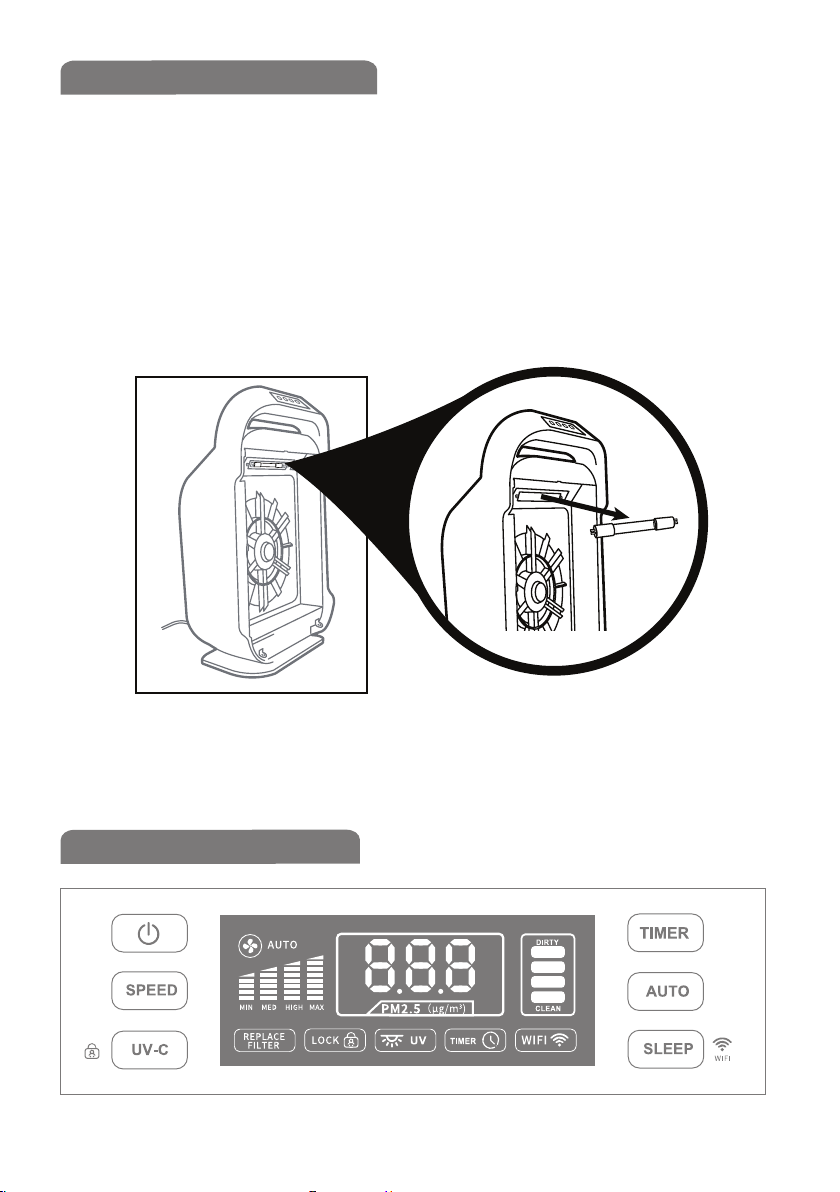
UV LAMP REPLACEMENT
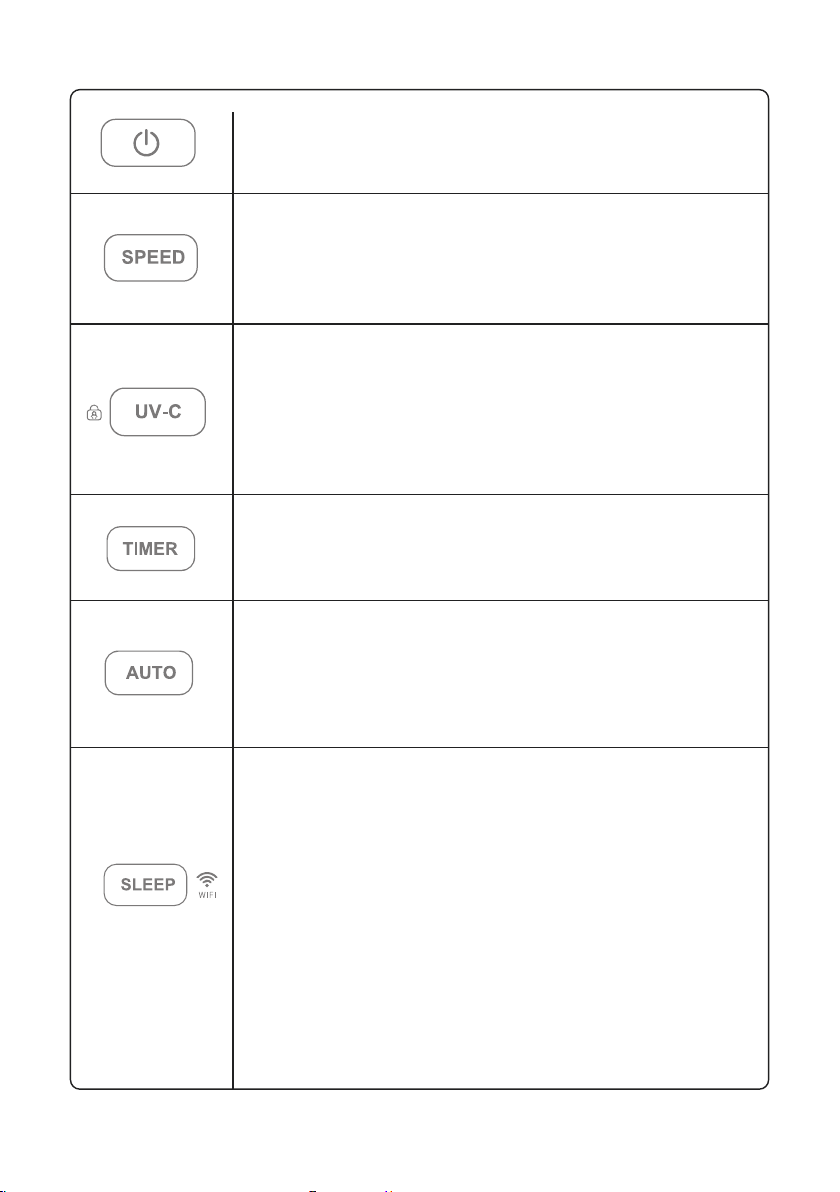
OPERATION GUIDANCE
CONTROL PANEL INDICATORS
CONNECTING TO WI-FI®
MAINTENANCE & CLEANING
FILTER REPLACEMENT
WARRANTY
WARRANTY REGISTRATION
NINETY (90) DAY SATISFACTION GUARANTEE

2
READ AND SAVE THESE INSTRUCTIONS & WARNINGS
Failure to comply with the warnings listed below may result in electric
shock or serious injury.
This product should be used only in accordance with the specifications
outlined in this manual. Usage other than what has been specified here
may result in serious injury.
To reduce the risk of electrical shock, fire or injury to users: Read all
instructions before using the Air Purification System.
Always disconnect from power source before cleaning or performing
maintenance,including filter replacement.
Do not open the housing. Internal parts are not to be serviced by the user.
Repairs should be done by authorized service personnel only.
Do not allow liquids or any objects in any of the unit openings. Keep openings
free of excessive dust, lint, hair or debris that may reduce the air flow.
Do not expose the unit to rain, and do not use in a wet area. Do not place the
unit near a bathtub or a kitchen sink.
This appliance is not intended for use by people (including children) with
reduced physical, sensory or mental capabilities, or lack of experience and
knowledge, unless they are being supervised or instructed by a person
responsible for their safety.
Do not operate with a damaged cord or plug. If the cord or plug is damaged,
it must be replaced by a new cord and plug before use by qualified technicians
to avoid any electrical hazard.
Do not run the cord under carpeting. Do not cover with throw rugs, runners,
or similar coverings. Do not route cord under furniture or appliances. Arrange
cord away from traffic area, where it will not be tripped over.
Do not cut, damage, or modify the cord. Do not place the cord underneath or
between heavy objects, and always keep the cord away from heated surfaces.
If the unit is not working properly or has been dropped or damaged, contact
Customer Support.

3
Do not insert fingers or foreign objects into the intake or air outlet.
Do not use water, solvents or chemicals to clean the unit. Do not spray
aerosols on the unit.
Do not let water or any other liquid or flammable substance enter the
appliance, in order to avoid electric shock and/or a fire hazard.
Please have at least 20cm of free space around the appliance and maintain
30cm free space above the appliance.
Please place the unit at least 2m away from televisions, radios or wave clocks,
in order to reduce electrical interference to such equipment.
Remove the power plug from the wall outlet before cleaning the unit and
when not in use, electrical shock from bad insulation and or fire from short
circuit may occur as a result.
When removing the power plug, always hold the plug and never pull the cord.
electrical shock and/or fire from short circuit may occur as a result.
Do not use the Air Purification System if the power cord or plug is damaged
or the connection to the wall outlet is loose.
Do not use this Air Purification System near gas appliances or fireplaces.
Do not place the appliance directly below an air conditioner to prevent
condensation from dripping into the appliance.
Do not use this appliance when you have used indoor smoke-type insect
repellents or in places with oily residues, burning incense or chemical fumes.
Do not use the appliance in a room with major temperature changes, as this
may cause condensation inside the appliance.
Do not use the appliance in wet surroundings or in surroundings with high
ambient temperatures, such as the bathroom, toilet or kitchen.
Note: The AMBREEZE Air Purification System is not intended for use in
commercial environment, such as nail salon, shopping centers, factories, or
where continuous tobacco smoke is present, such as bars and restaurants.
Usage in these environments could result in poor performance and shortened
filter life.

4
AIR PURIFICATION SYSTEM
Improve your indoor air quality with your new AMBREEZE Air
Purification System. Multiple levels of cleaning include a com-
bination HEPA filter that captures allergens, activated carbon
filter to remove odours. UV-C light technology enhances
germ-killing.
1. Washable pre-filter: Trapping big particles like human hairs and
pet hairs to help extend the life of the HEPA and activated carbon
filters.
2. True HEPA filter with anti-bacterial coating: The high-perfor-
mance composite HEPA filter is over 99.97% efficient in trapping
all allergens and airborne contaminant down to 0.3 micron in size
such as lung damaging dust, mould spores, plant spores, pet
dander, pollen etc.
3. Activated carbon filter: The activated carbon filter filters out
odours and other volatile organic compounds (VOCs) effectively.
4. UV-C: UV Light (254NM) destroys micro-organisms such as
germs, some bacteria and fungi.

1 2 3 4
5
6
7
9
8
5
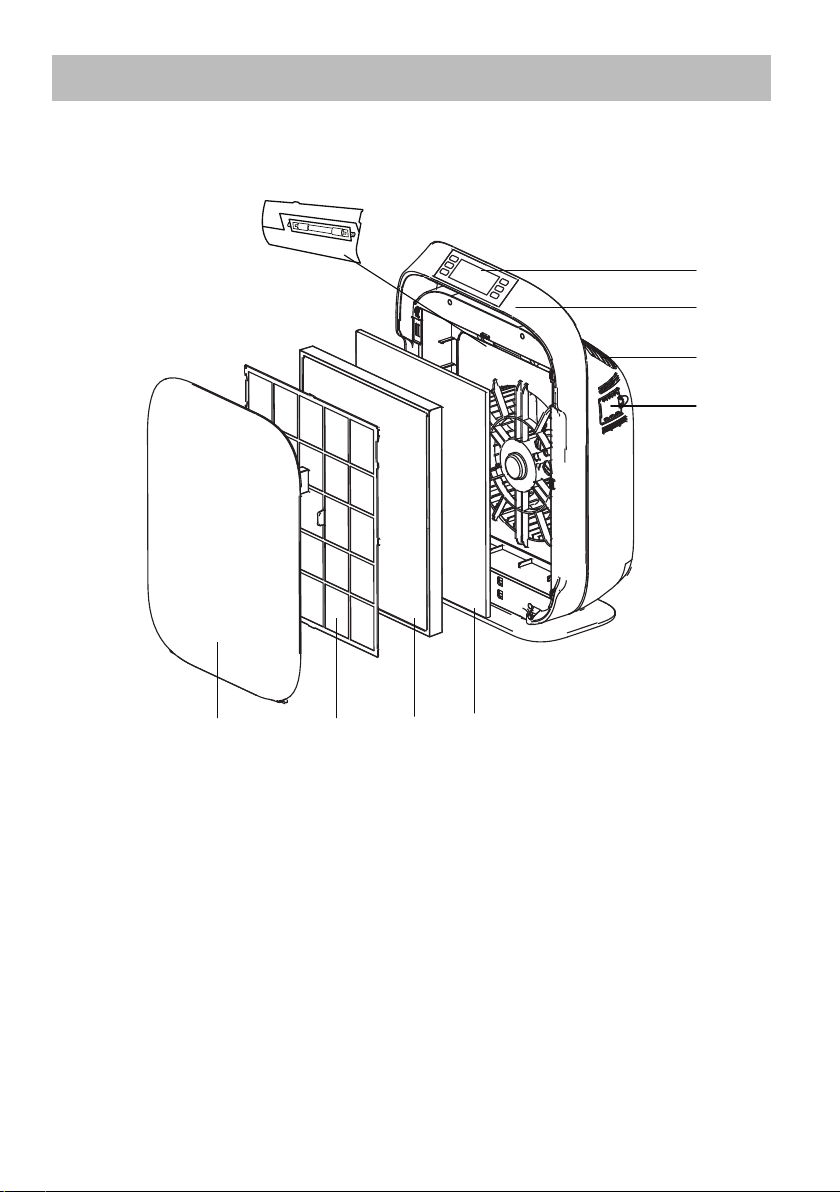
STRUCTURE
1. Front cover
2. Pre-filter
3. HEPA filter
4. Activated carbon filter
5. Control panel
6. Handle
7. Air outlet
8. UV-C lamp
9. Dust sensor and filter reset button

6
BEFORE FIRST USE
PLACING THE FILTERS
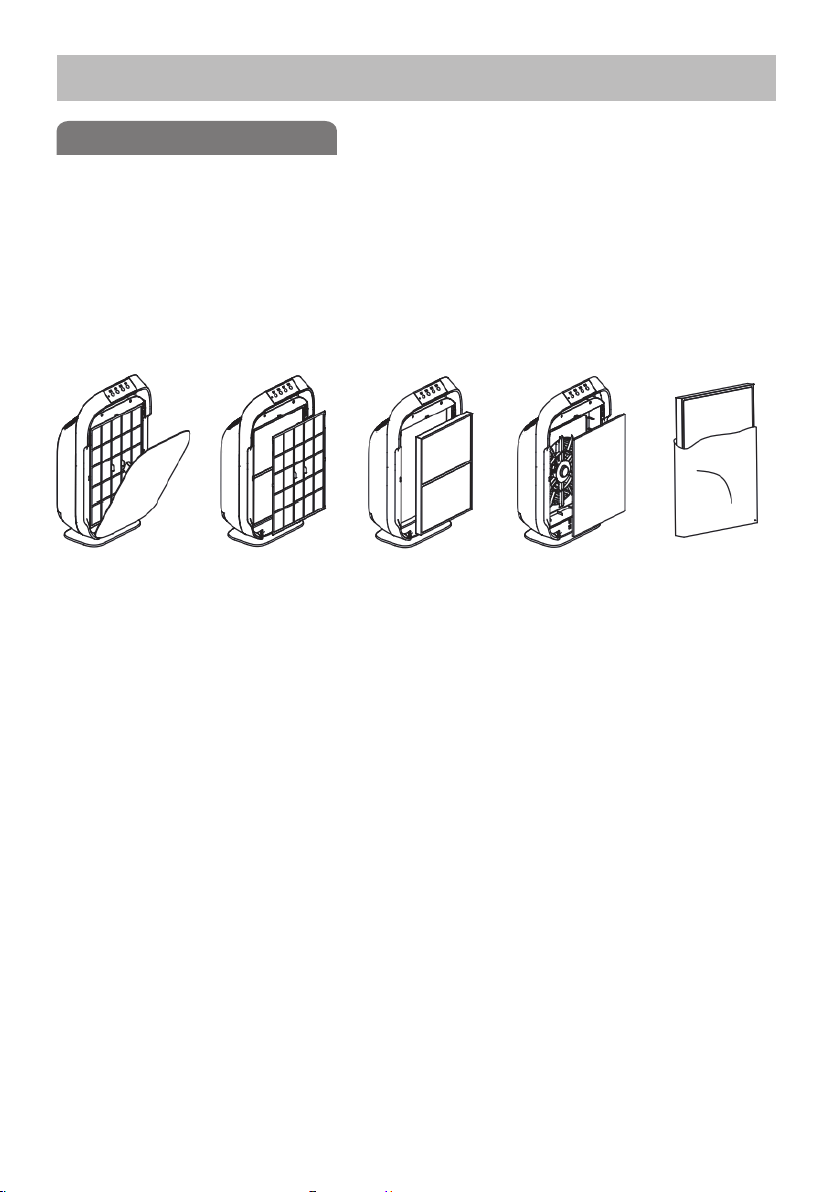
The appliance comes with all filters fitted inside, but you must
remove the packaging of the filters before using the appliance.
Remove all filters, unpack them and place them back into the
appliance as described below.
Step 1. Place your fingers in the recesses of the side panels and
gently pull the top part of the front panel towards you. Then lift the
hooks at the bottom of the panel out of the bottom of the appliance.
Step 2. Remove pre-filter from the appliance.
Step 3. Remove HEPA filter from the appliance.
Step 4. Remove activated carbon filter from the appliance.
Step 5. Remove all packaging material from the filters.
Step 6. Place activated carbon filter back into the appliance, making
sure the side with strip faces towards you.
Step 7. Place HEPA filter back into the appliance, making sure the
side with strip faces towards you.
Step 8. Place pre-filter back in the appliance, making sure the side
with flange faces towards you.
Step 9. To reattach the front panel, insert the bottom hooks into the
bottom of the appliance first. Then, push the panel against the body
of the appliance.
Note:
Make sure you insert the filters in the correct position.
① ② ③ ④ ⑤

7
UV LAMP REPLACEMENT
OPERATION GUIDANCE
The UV-C bulb should be replaced approximately every 10,000
hours.
1. Open the UV lamp cover by a screwdriver.
2. The UV bulb is removed by carefully grasping the bulb
with a clean cloth or tissue and twisting the bulb 1/4 turn.
Remove from unit.
3. Install the new UV lamp and re-attach the cover.
Note:
DO NOT look into the UV lamp when it is ON.

8
Power button: press this button to start and shut
down the appliance. The device will remember
settings before the last shutdown.
Fan speed button: press this button one or more
times to select the desired fan speed. The corre-
sponding fan speed light indicates the fan speed
(MIN, MED, HIGH, MAX).
UV-C / child lock button: press this button to turn
the UV-C lamp on / off. Hold this button for 3-5
seconds to turn on / off the child lock function.
Note: When child lock is on, the control panel
will be locked and unresponsive.
Timer button: press this button one or more times
to toggle. The corresponding light will indicate the
operation time you set ranging from 1-12 hours.
Auto button: pressing this button will adjust the fan
speed according to the current air quality in the
room. The Air Purification System continually scans
the air quality and adjusts function to best purify
the air.
Sleep mode / Wi-Fi button: press once to turn on
sleep mode. The indicator will blink for 10 seconds
then switch of all lights on the LED display and the
speed will reduce to the lowest speed setting. The
appliance will still be operational. Press any button
on the LED display to turn on the lights again. To
turn off sleep mode, press the Sleep button again.
Hold this button for 5 seconds to activate
Wi-Fi function. The Wi-Fi icon should blink
rapidly and play a short tone to signify it is
ready to connect to your smart device.
Tabla de contenidos
Otros manuales de Purificador de aire de Amway