
AmazonBasics B07RWMLKFM Manual de usuario


English .................................................... 3
Español ................................................. 17
Français ................................................ 30
3
Welcome Guide •English
Contents:
Before getting started, ensure the package contains the following components:
Mise en sourdine
G
H
J
A
B
C
D
E
F
L
K
I
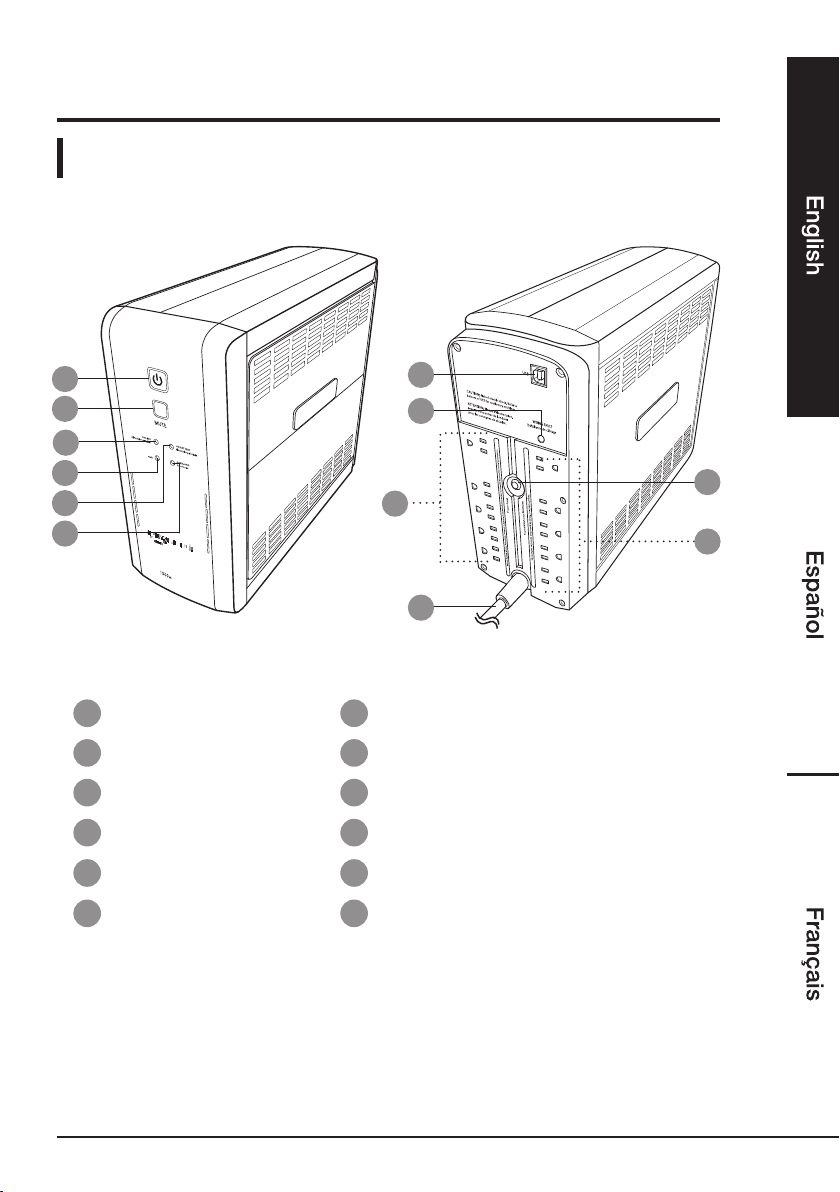
APower button GUSB type B socket
BMUTE button HWIRING FAULT indicator
CONLINE indicator IBattery backup & surge protection outlets
DAVR indicator JPower cord with plug
EON BATTERY indicator KSurge protection outlets
FOVERLOAD indicator LRESET button/circuit breaker

4
SAVE THESE INSTRUCTIONS
Read these instructions carefully and retain them for future use. If this
product is passed to a third party, then these instructions must be
included.
When using electrical appliances, basic safety precautions should always be followed
to reduce the risk of fire, electric shock, and/or injury to persons including the
following:
CAUTION Risk of Energy Hazard! 24 V, 9 Ampere-hour batteries. Before
replacing batteries, remove conductive jewelry such as chains, wrist
watches, and rings. High energy through conductive materials could
cause severe burns.
CAUTION Risk of explosion! Do not dispose of batteries in fire. The batteries
may explode.
CAUTION Risk of injury! Do not open or mutilate batteries. Released material
is harmful to the skin and eyes. It may be toxic.
CAUTION Risk of electric shock! A battery can present a risk of electrical
shock and high short-circuit current. The following precautions
should be observed when working on batteries:
a) Remove watches, rings, or other metal objects.
b) Use tools with insulated handles.
c) Wear rubber gloves and boots.
d) Do not lay tools or metal parts on top of batteries.
e) Disconnect charging source prior to connecting or disconnecting
batteries terminals.
• Disconnect Device Requirement - for PLUGGABLE EQUIPMENT, the socket-
outlet shall be installed near the equipment and shall be easily accessible.
• The maximum ambient operating temperature of the product is 104 °F (40 °C).
• Do not use surge protectors or extension cords with the product.
• Do not use for medical or life support equipment.
• Do not use with or near aquariums.
• Do not use the product on transportation means.
• Intended for installation in a temperature controlled, indoor area free of conductive
contaminants.
WARNING Risk of fire, explosion, or burns! Do not disassemble, heat above
140 °F (60 °C), or incinerate the battery.
CAUTION Risk of electric shock! Do not remove the cover except to replace
the battery. Turn off and unplug the product before replacing the
batteries. There are no user serviceable parts inside except for the
battery.
CAUTION
Risk of fire! To reduce the risk of fire, connect only to a circuit provided
with 20 amperes maximum branch circuit overcurrent protection in
accordance with National Electric Code, ANSI/NFPA 70.

5
CAUTION Not for use in a computer room as defined in the Standard for the
protection of information Technology Equipment, ANSI/NFPA 75.
Additional Battery Warnings
• Keep batteries out of the reach of children.
• If the battery leaks avoid contact with skin and eyes. Rinse affected areas
immediately with plenty of clean water, then consult a doctor.
• If the product appears to be bulging or shows other undesirable phenomena (e.g.
excess noise), stop using it immediately.
• Do not cover while in operation.
• Charge this product once every 3 months to avoid shortening its battery life.
Symbols
Provided battery contains Lead. Dispose of the battery according
to local regulations.
Direct current.
Alternative current.
Before First Use
• Check for transport damages.
• Before connecting the product to the power supply, check that the power supply
voltage and current rating corresponds with the power supply details shown on
the product rating label.
• Choose a wall outlet that’s in a branch circuit protected by a fuse or a circuit
breaker and does not connect in parallel to appliances or equipment with a large
power consumption.
DANGER Risk of suffocation! Keep any packaging materials away from
children – these materials are a potential source of danger, e.g.
suffocation.
NOTICE To ensure the maximum batteries’ capacity, it is recommended to
charge the battery for at least 24 hours before first use.
NOTICE The product is equipped with a delivery safety lock. The product
needs to be connected to the power supply before the initial
start-up.

6
Operation
Connecting an external equipment
CAUTION Risk of damage! Do not connect equipment with a combined
power consumption of more than 1500 VA/900 W.
NOTICE It is suggested not to exceed 80% of the product’s total capacity
when connecting to the battery backup & surge protection
outlets (I). Do not connect larger appliances, such as laser printers,
paper shredders, heaters etc. to battery backup & surge protection
outlets (I). The power requirement of such equipment might
overload and potentially damage the product.
• Connect the external equipment to the product’s outlets (I) or/and (K).
• Connect the power plug (J) to the appropriate wall outlet.
Switching on/off
Battery backup & surge protection outlets (I)
The outlets (I) provide battery backup and surge protection. In case of a power
outage, battery power is automatically provided to these 5 outlets.
Battery Backup & Surge Protection / Prises de la batteries de secours et prises dotées du dispositif de protection contre les surtensions
Surge Protection / Prises de protection contre les surtensions
Press to Reset
USB
WIRING FAULT
CAUTION: Risk of electric shock, Refer to
bottom of UPS for cautionary markings.
ATTENTION: Risque d'électrocution,
reportez-vous au bas de l'onduleur
pour les consignes de sécurité.
Défaillance de câblage
Touche/disjoncteur Réinitialiser
Battery backup & surge
protection outlets (I)
Surge protection
outlets (K)
• Press the power button (A). The product beeps and the ONLINE indicator (C)
lights up. The product supplies the power to the connected equipment.
• The product now supplies the power to the connected equipment.
• In case of a power outage, the ON BATTERY indicator (E) lights up and the
product beeps twice in 7 seconds to indicate the battery backup mode operation.

7
NOTICE If an overload is detected the product stops operation and the
OVERLOAD indicator (F) lights up and the product beeps. Switch
off the product and unplug at least one connected equipment so
that the maximum capacity is not exceeded. Wait 10 seconds and
press the RESET button (L). Then switch on the product again.
Surge protection outlets (K)
The outlets (K) provide only surge protection. Those outlets do not provide power
during a power outage.
NOTICE The surge protection (K) are constantly on, whenever the product is
connected to the power supply.
NOTICE The upper 2 outlets are positioned away from the other outlets in
order to allow bulky AC power adapters to be connected.
Status
1. Power outage The product operates in the battery backup mode.
2. Low battery The battery capacity is low. The battery will be drained
quickly during power outage.
3. Overload
Product rated capacity is exceeded. Switch off the
product and unplug at least one connected equipment
so that the maximum capacity is not exceeded. Wait 10
seconds and press the RESET button (L). Then switch on
the product again.
4. Short fault
Switch off the product and unplug at least one connected
equipment from the battery backup outlets. Then switch
on the product again.
5. Charge fault The battery charging voltage is too high or too low.
Contact professional repair centre.

8
Indicators patterns
Status Online (C) On
Battery (E) AVR (D) Overload (F) Alarm
1. OFF
Flashes
while
beeping
OFF OFF
Beeps twice
every 30
seconds
2. OFF
Flashes
while
beeping
OFF OFF Beeps rapidly
3. ON OFF OFF ON Constant alarm
OFF ON
4. ON OFF OFF OFF Constant alarm
OFF ON
5. ON OFF OFF OFF Beeps every 2
seconds
OFF ON
Automatic voltage regulation
The product features AVR (Automatic Voltage Regulation) that allows to stabilize
the inconsistent power input to the nominal level (110-120 V~) that is safe to the
connected external equipment. Once the AVR protection is activated the AVR
indicator (D) lights up.
Sensitivity Adjustment
In line mode, the AC input voltage can not be stable all the time. To prevent the
connected equipment from damage caused by the unexpected voltage fluctuations,
adjust the sensitivity of the product.
• Switch the product on in the line mode.
• Press the MUTE button (B) for 6 seconds. All indicators flash rapidly.
• The product indicates the current sensitivity setting:

9
Indicators Sensitivity Description
Red Low
If the connected equipment can tolerate more
power events (e.g. unstable power in a stormy
weather), select Low Sensitivity and the product
will go to Battery Mode less often.
Yellow, red Medium
(Default)
The product will go to Battery Mode if the power
is unstable.
Green, yellow,
red High
If the connected equipment is more sensitive to
power events, select High Sensitivity and the
product will go to Battery Mode more often.
• To change the setting, press the MUTE button (B) repeatedly.
• To save the setting, press and hold the MUTE button (B) until the
ONLINE indicator (C) lights up.
NOTICE The product exits the sensitivity setup automatically if no button is
pressed for 7 seconds.
Connecting to a computer
NOTICE The PowerPanel®Personal software enables to view the connection
and energy consumption status as well as configure the product.
Use the type B to type A USB cable to connect the product to a
computer.
Download and installation
• Visit www.amazon.com website.
• Search the B07RWMLKFM product number.
• Scroll down to “Technical Specification” section and download the
PowerPanel®Personal software.
• Launch the software and follow the on-screen setup instructions.

10
Replacing the battery
CAUTION Risk of Energy Hazard! 24 V, maximum 9 Ampere-hour battery.
Before replacing batteries, remove conductive jewelry such as
chains, wrist watches, and rings. High energy through conductive
materials could cause severe burns.
CAUTION Risk of explosion! Do not dispose of batteries in a fire. The
batteries may explode.
CAUTION Risk of injury! Do not open or mutilate batteries. Released material
is harmful to the skin and eyes. It may be toxic.
CAUTION Risk of electric shock! A battery can present a risk of electrical
shock and high short circuit current. The following precautions
should be observed when working on batteries:
1) Remove watches rings, or other metal objects.
2) Use tools with insulated handles.
NOTICE When replacing batteries, replace with the same number of the
following battery: amazonbasics/ABRB1290X2.
• Switch off and unplug all the connected equipment.
• Switch off the product and disconnect it from the power supply.
• Place the product on its side, on a solid and stable surface.
• Loosen the battery compartment cover screws.
• Press on the locking latch and slide the battery compartment cover.
Tabla de contenidos
Otros manuales de Unión Postal Universal de AmazonBasics


Manuales populares de Unión Postal Universal de otras marcas

Pylontech
Pylontech Victron & Pylontech US5000 Manual de usuario

Tecnoware
Tecnoware EVO DSP PLUS MM 6.8 Manual de usuario

Mecer
Mecer ME-1000-WTU Manual de usuario

Mustek
Mustek PowerMust 530(B) Plus Manual de instalación y operación

Emerson
Emerson Liebert NXL series Manual de usuario

MAKELSAN
MAKELSAN BOXER SERIES Manual de usuario


