
AllSee Technologies PCAP Multi Touch Screen Display Manual de usuario

PCAP Multi Touch Screen Display with Dual OS
User’s Manual
Manual Version AOE1.0

PCAP Multi Touch Screen Display with Dual OS User’s Manual
Page 1
Safety Instructions
Please keep the display away from any heat sources such as electric
radiators or direct sunlight. Place the display in a stable and
well-ventilated place.
Please handle with care so as to not damage the LCD panel.
The holes or openings on the display are designed for ventilation. Do not
cover or block the ventilation holes or openings with any objects.
Remove protective covering from the screen before you use the display.
As the display surface is vulnerable to scratches, avoid touching the
surface with sharp pen point.
Shut off the power supply before cleaning. Use a soft lint-free cloth
instead of a tissue to wipe the screen.
You may use a glass cleaner to clean the product as required. However,
never spray the cleaner directly onto the display surface.
Do not attempt to repair this product yourself! Improperly disassembly of
the product may invalidate the warranty and lead to possible danger!

PCAP Multi Touch Screen Display with Dual OS User’s Manual
Page 2
Quick Start Guide (switching between Windows & Android)
Begin by connecting a USB keyboard to your screen using one of the following USB ports:
Switching from Windows to Android
1 of 8. Open the Start Menu by tapping the Windows button, then tap the Power button,
then “Restart”:
2 of 8. Using the keyboard start continually pressing the “DELETE” key until you see the
following screen:
3 of 8. The rest of the steps will use the keyboard only. Please use the navigational keys
(←,↑,↓ and →) to move around and the “ENTER” key to make a selection. Navigate to and

PCAP Multi Touch Screen Display with Dual OS User’s Manual
Page 3
select the “Advanced” tab then go to and select “System Component”:
4 of 8. Select “OS IMAGE ID” and then select “Android”:
5 of 8. Press the “Esc” key to close option.
6 of 8. Navigate to and select the “Boot” tab, then select “Boot Option #1” and choose
“Android-IA”:
7 of 8. Finally to save and exit press the “F10” key and then select “Yes”:
8 of 8. When your Touch Screen restarts it will do so in the Android operating system.
PCAP Multi Touch Screen Display with Dual OS User’s Manual
Page 4
Switching from Android to Windows
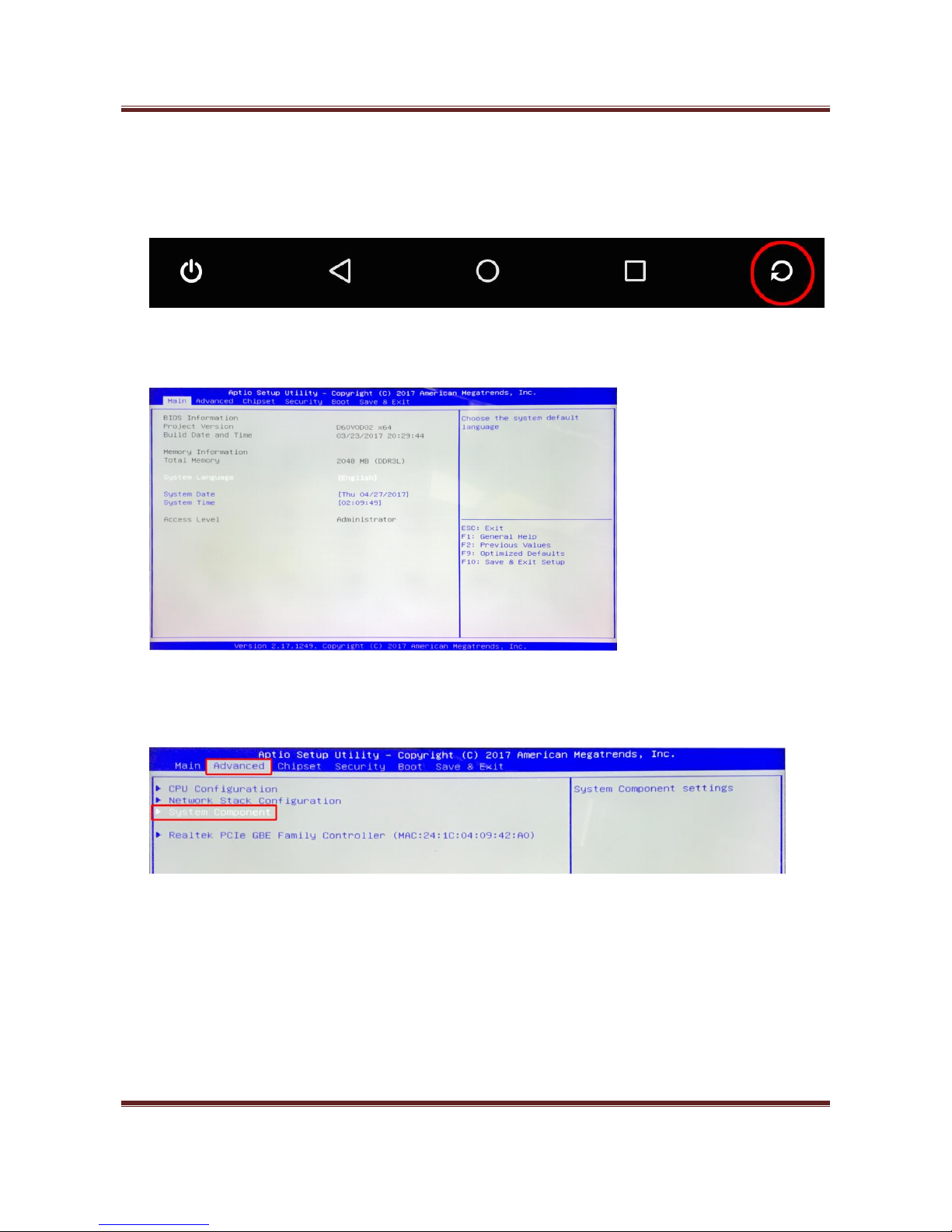
1 of 8. From the bottom navigation menu tap the “Restart” icon:
2 of 8. Using the keyboard start continually pressing the “DELETE” key until you see the
following screen:
3 of 8. The rest of the steps will use the keyboard only. Please use the navigational keys
(←,↑,↓ and →) to move around and the “ENTER” key to make a selection. Navigate to and
select the “Advanced” tab then go to and select “System Component”:

PCAP Multi Touch Screen Display with Dual OS User’s Manual
Page 5
4 of 8. Select “OS IMAGE ID” and then select “Windows”:
5 of 8. Press the “Esc” key to close option.
6 of 8. Navigate to and select the “Boot” tab, then select “Boot Option #1” and choose
“Windows Boot Manager”:
7 of 8. Finally to save and exit press the “F10” key and then select “Yes”:
8 of 8. When your Touch Screen restarts it will do so in the Windows operating system.

PCAP Multi Touch Screen Display with Dual OS User’s Manual
Page 6
Quick Start Guide (connecting to an external PC/Media Player)
Although the screen has a built in PC you can also connect it to an external source. The touch
screen must be connected to the PC in two ways: visually and interactively. The recommended
visual connection is via the HDMI Cable meaning that the display acts like a monitor for the PC. The
touch function is achieved by linking the PCAP panel on the screen directly to the PC via the USB
Cable (included).
Figure 1 Screen to PC Connections
Connect the screen to the PC via HDMI cable and USB cable (as shown above). Once these
connections have been made and the PC powered ON take the power lead and insert it into the
screen and connect to mains outlet. The unit will power ON automatically. Before taking any more
steps ensure that the screen is sourcing its display from the PC. This is done by first pressing
“SOURCE” on your remote and then scrolling down to the desired input source (HDMI) and select
by pressing “PLAY”.
PC-RGB
OPS
HDMI

PCAP Multi Touch Screen Display with Dual OS User’s Manual
Page 7
Contents:
Switching from Windows to Android .........................................................................................2
Switching from Android to Windows .........................................................................................4
1. Introduction................................................................................................................................9
1.1 Box Contents ...................................................................................................................9
1.2 Product Overview..........................................................................................................10
1.3 Remote Control .............................................................................................................11
1.4 Replacing the Remote Control Battery .........................................................................12
2. Menu Operation .......................................................................................................................13
2.1 Inputs ............................................................................................................................17
3. Switching between Android and Windows ..............................................................................18
3.1.1 Switching from Windows to Android.....................................................................18
3.1.2 Switching from Android to Windows.....................................................................21
3.2 Connecting to an external PC/Media Player .................................................................24
4. F.A.Qs and Troubleshooting Guide ...........................................................................................26
4.1 My Screen is not displaying what is on my PC/external source....................................26
4.1.1 Input Source...........................................................................................................26
4.1.2 Display/monitor button on PC keyboard ...............................................................26
4.2 My monitor's image is unstable, unfocused or swimming ...........................................26

PCAP Multi Touch Screen Display with Dual OS User’s Manual
Page 8
Table of Figures
Figure 1 Screen to PC Connections ......................................................................................................6
Figure 2 Product Overview.................................................................................................................10
Figure 3 Screen Inputs........................................................................................................................17
Figure 5 Screen to PC Connections ....................................................................................................24

PCAP Multi Touch Screen Display with Dual OS User’s Manual
Page 9
1. Introduction
Congratulations on your purchase of our product. Please read carefully and follow all instructions
in the manual before first use.
The product should not be exposed to liquids dripping or splashing and no objects filled with
liquids, such as vases, should be placed on the product.
For user convenience, a number of operations can be performed through the remote control.
Attention:
1. Do not change any default setting when it is unnecessary.
2. Keep the product far away from water during installation and use.
1.1Box Contents
1xPCAP Multi Touch Screen (PC integrated)
1xPower Cable
1xWi-Fi Aerial
1xRemote Control (with AAA batteries)
1xUSB Male to Male Cable
1xCD (User Manual)
IMPORTANT: Please retain your screen’s packaging for the duration of your warranty.
Tabla de contenidos
Otros manuales de Monitor de AllSee Technologies

AllSee Technologies
AllSee Technologies 32" High Definition Digital Advertising... Manual de usuario

AllSee Technologies
AllSee Technologies P2-B Manual de usuario

AllSee Technologies
AllSee Technologies TL H7 Series Manual de usuario

AllSee Technologies
AllSee Technologies PF46HD-B Manual de usuario

AllSee Technologies
AllSee Technologies DV-LED Manual de usuario

AllSee Technologies
AllSee Technologies FR8A Manual de usuario

AllSee Technologies
AllSee Technologies Slimline Manual de usuario


