Algo 8180 Manual de usuario

- 1 -
8180 SIP Audio Alerter
User Guide
FW Version 2.7.4
Algo Communication Products Ltd.
www.algosolutions.com
90-00041L

- 2 -
Table of Contents
Overview....................................................................................3
Introduction ..................................................................................................3
Key Features................................................................................................3
Front and Back Views..................................................................................6
Setup and Installation ..............................................................7
Wall Mounting ..............................................................................................7
Outputs ........................................................................................................7
Programming and Conguration..................................................................8
Program Buttons..........................................................................................9
Soft Reset ....................................................................................................9
Web Interface Basic Settings ................................................10
SIP .............................................................................................................10
Ring............................................................................................................14
Page...........................................................................................................15
Multicast Overview.....................................................................................17
Multicast Technical Information..................................................................19
Multicast Master.........................................................................................20
Multicast Slave...........................................................................................22
Web Interface Advanced Settings.........................................24
Network......................................................................................................24
Admin.........................................................................................................26
Provisioning ...............................................................................................28
Tones .........................................................................................................32
Advanced Ring/Alert Settings ....................................................................34
Input/Output ...............................................................................................36
Advanced SIP ............................................................................................38
Advanced Multicast .................................................................................. 40
Web Interface System Settings .............................................42
Maintenance ..............................................................................................42
Upgrade 8180 Firmware ............................................................................43
System Log................................................................................................44
Appendix .................................................................................45
Hardware Specications ............................................................................45
Wiring 8180 to other Algo Devices.............................................................46
Dimensions ................................................................................................47
FCC Compliance........................................................................................51
Important Safety Notice .............................................................................51

- 3 -
Overview
Introduction
The 8180 SIP Audio Alerter is a SIP compliant & multicast IP speaker for
loud ringing, alerting, and voice paging. The 8180 can be integrated with
any Communication Server (hosted or enterprise) that supports 3rd party
SIP Endpoints or multicast paging.
For loud ringing, the 8180 is assigned a Ring extension. When this SIP
extension is called the 8180 will play a WAV le (tone, announcement,
etc.) over the speaker. Several ring tones are included in the 8180 and
custom WAV les may also be uploaded (e.g. safety, security, emergency
alerts). For extra volume, noisy, or wet locations, the optional 1186
horn speaker can be used and connected to the 8180 Speaker Output.
More features are available under advanced settings for multiple ring
extensions (up to 5) and rules-based ringing based on CLID.
For voice paging a separate Page extension can be assigned. When
this SIP extension is called, the 8180 will auto-answer and play the
callers voice announcement over the speaker. The 8180 supports G.722
wideband HD Voice for enhanced intelligibility and clarity.
A multicast feature allows one 8180 to broadcast page or ring audio
to multiple Slave 8180 endpoints. Multicasting allows for a scalable
and cost effective means of building large scale paging and alerting
solutions, with minimal network trafc and as few as one SIP extension
for the registered Master endpoint sending the multicast. Any number
and combination of Algo IP speakers, paging adapters and strobes can
be part of an RTP multicast. Polycom Group Page and SA Announce
are other multicast formats supported in the 8180 and related Algo
endpoints.
Key Features & Capabilities
Loudness
Equipped with a high efciency integrated amplier and tuned high
quality loud speaker, the 8180 is typically eight times louder than a
telephone speaker. If the optional Algo Horn Speaker is used, then the
8180 can be 20 times louder.

- 4 -
Multicasting
Allows multiple units to simultaneously play Ring or Page audio. One
8180 may be congured to broadcast an audio stream (Master) to
any number and combination of Algo IP speaker, paging adapter, or
strobe endpoint congured as multicast Slaves. This feature provides
scalability without requiring each endpoint Slave to be registered as a
SIP extension.
Ambient Noise Compensation
The 8180’s SoundSure™ technology automatically adjusts loud ring
and paging volume to compensate for background ambient noise. If
SoundSure™is enabled, the alert volume will get louder or quieter by the
same dB level as the ambient noise measured just prior to the alert.
Outputs for External Equipment and Devices
Outputs for external speaker, slave amplier, or visual alerter plus
multicasting capability enable many more options to enhance notication
and alert capabilities.
Conguration & Provisioning
Congure the 8180 through a web interface control panel or by using the
program buttons on the back of the unit. Central provisioning may also
be used to allow units to be precongured for a specic server prior to
deployment in the eld. Conguration les are automatically downloaded
from a server (via TFTP, FTP, or HTTP) using DHCP.
Paging Talkback
Allows bidirectional communication between the 8180 and the phone.
Talkback is ideal for conrmation that page announcements have been
received.
Ring Tones
Several audio les are pre-loaded into the 8180 internal memory for ring
sounds. Users may also record or upload custom audio les, music,
sound effects, or voice announcements for other types of notication
(e.g. safety, security, emergency, customer assistance, shift changes,
etc.)

- 5 -
Blue Indicator Light
This LED light is on during initialization, boot, message waiting or while
active. Ring and Page modes, when active, will turn the LED on steady. If
the optional Talkback mode is enabled, the LED will ash instead (during
a page event) to provide a clear indication that the microphone is active.
If Message Waiting is supported and active, the light will ash, or be
on steady (depending on its setting). The LED heartbeat option, when
enabled, will ash the LED every 30 seconds as visual conrmation of
PoE power and SIP server registration.
SIP Extensions
The 8180 connects to an on-premise or hosted communication server in
the same way as a SIP telephone. To register the 8180 with the server
requires the following information:
1. IP address (eg 192.168.1.1) or domain name (eg myserver.com) of
the SIP Server
2. SIP extension (eg 3790)
3. Password
The 8180 supports two SIP extensions which behave differently – RING
and PAGE. One or both may be used depending on the application. If the
RING extension is called the 8180 will not answer. Instead it will play the
selected WAV le until the ringing stops. Typically the RING extension
is programmed as part of a hunt group so that it receives ring signal
simultaneously with one or more phones to function as a loud ringer in
noisy or large areas.
If the PAGE extension is called, the 8180 will answer and allow
paging over its internal speaker. When the 8180 answers it will play
a congurable tone to the caller so they know when they can begin
speaking. A pre-announce tone is also sent over the speaker. If Paging to
a single 8180, talkback may be enabled using the integrated microphone.
The audio direction is determined by the speech activity of the caller.

- 6 -
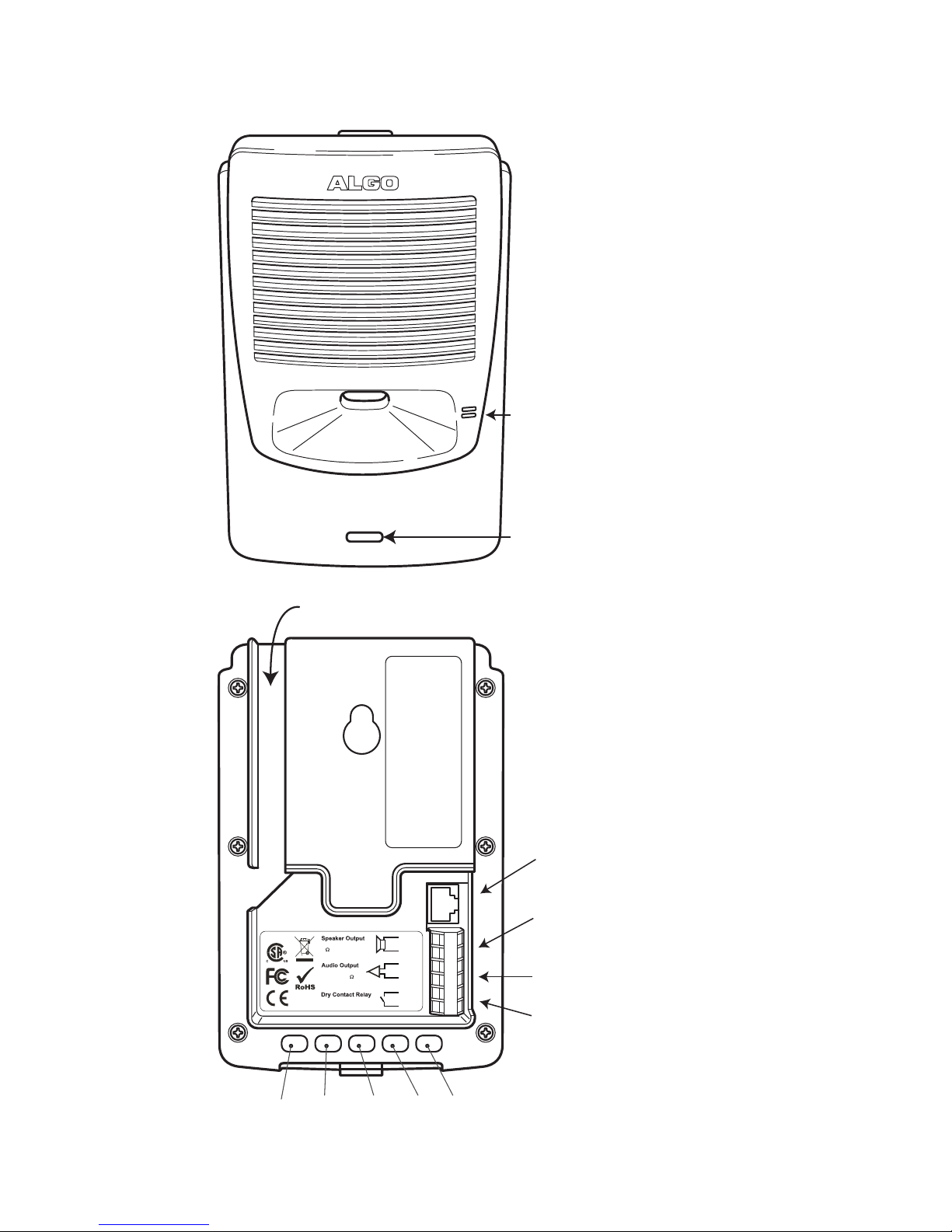
Blue Indicator
Light
Microphone
Program Buttons
Relay Output
Audio Output
Speaker Output
or optional Relay
Input
Surface Mount Wiring Channel
Play Menu Select Dn Up
RJ45 Network
(for LAN & PoE)
LR95233
Speaker Audio Relay
1 2 3 4 5 6
To External Speaker(s)
8 8 Wrms
To Slave Amplifier
0 dbm 600
Max 30V 50mA
67-00047D
Front and Back Views

- 7 -
Setup and Installation
Wall Mounting
Mount the wall bracket securely and snap the 8180 into the bracket
by engaging the top and then pushing the bottom rmly into place. To
remove the 8180 from the bracket, press rmly on the tab of the bottom
catch, then lift the cover.
Outputs
Relay
May be enabled for ring, paging or both to activate a visual alerter, mute
background music, or enable a slave amplier.
Auxiliary Speaker
For connection to the optional Algo horn speaker (e.g. for outdoor/wet
locations) or to ceiling speakers wired in a series-parallel conguration
to maintain minimum 8 Ω. The presence of an external speaker(s) will
automatically disable the internal speaker to preserve power.
Audio
High impedance output for driving 600 Ω load up to 0 dBm. Internal
speaker may be active simultaneously, but levels cannot be adjusted
separately.

- 8 -
Programming and Conguration
Primary conguration of the 8180 is through the web interface control
panel. In addition, there are program buttons on the unit itself for basic
setup options.
Connection to Network and Obtaining IP Address
After connecting the 8180 to a network PoE port, the blue indicator light
will turn on during initialization. The 8180 will then attempt to obtain an IP
address from the DHCP server. If unsuccessful, the 8180 will default to
the xed IP address 192.168.1.111. When the IP address is selected, the
8180 will chime and turn off the blue light.
If you don’t have a PoE switch, you’ll need a PoE injector that
installs between the 8180 and network switch. The PoE injector
will supply 48 Vdc to the 8180. Most PoE injectors are capable
of providing more power than the 8180 requires (12.95 W).
Ensure that the PoE injector is fully compliant to the IEEE 802.3af
standard.
Web Interface Control Panel
The 8180 is congured using a web interface tool accessed by entering
the 8180 IP address into a browser.
To nd this IP address, press the Menu button until the option for
“IP Address” is reached. Then press Select to hear the address.
Alternatively, search the network using the Algo Network Device Locator
Tool available for download from www.algosolutions.com/locator.

- 9 -
Program Buttons
Play Menu Select Dn Up
Choose Tone
Record Tone
Get Device Info
The Program buttons on the back of the 8180 allow local adjustment of
alert tones and alert volume. The buttons are intentionally hidden from
view after installation and can be disabled using the web interface.
The button plays the current ring tone and allows volume adjustment
using the and buttons. Press to exit.
The button steps through the following three options:
1. Choose ring tone
2. Record ring tone using microphone
3. Get device information (IP address and MAC address)
Press the button to choose option or to exit.
Soft Reset
A soft reset will restore all device settings back to the original factory
default conditions. To do this, disconnect the network cable from the
8180. Push and hold the Volume Down button and reconnect the network
cable. Hold the button until the front light ashes three times.

- 10 -
Web Interface Control Panel
Using the SIP Audio Alerter web interface control panel, congure the
8180 network settings and select the desired options. These settings
survive power cycling and may be programmed in advance prior to site
installation.
After changing settings, click Save (in the bottom right corner of
the window). Note that this may end any active call.
Basic Settings
SIP
Monitor “Ring” Event (default)
In this mode the bottom of the page will request credentials for a SIP
Ring extension. When this SIP extension is called the 8180 will play the
audio le selected under the Basic Settings gRing tab.
Subscribe/Notify (dialog)
In this mode the 8180 will communicate with the SIP server to receive
status information for another phone/device/extension connected to the
system. The server must support Subscribe/Notify per RFC 4235.
The Ring/Alert Extension is the extension to be monitored for events,
and the event of interest (ring or in-use or both) can be selected under
Ring/Alert Events. While the event is active, the 8180 will play the audio
le selected under the Basic Settings gRing tab continuously. Custom
WAV les may be padded with silence to achieve the desired notication
frequency.
Note that for Subscribe/Notify to work a SIP extension is required for the
8180 itself. If the Page Function is enabled then the Page Extension will
provide the necessary access. If Page Function is disabled, then the web
page will request a SIP Extension to support Subscribe Notify.
Otros manuales para 8180
5
Tabla de contenidos
Otros manuales de Oradores de Algo

Algo
Algo 8198 Manual de usuario

Algo
Algo 8190 Manual de usuario

Algo
Algo 8186 Manual de usuario

Algo
Algo 8188 Manual de usuario

Algo
Algo 8188 Manual de usuario

Algo
Algo 8189 Manual de usuario

Algo
Algo 8188 Manual de usuario

Algo
Algo 8180 Manual de usuario

Algo
Algo 8180 Manual de usuario

Algo
Algo 8190S Manual de usuario