
Alba RDVD1002 Manual de usuario

User Guide
RDVD1002
DVD Recorder
RDVD1002.book Page 1 Tuesday, January 24, 2006 12:25 PM

RDVD1002
2
Introduction
Thank you for purchasing this DVD Recorder which has been designed
and manufactured to give you many years of trouble-free service.
You may already be familiar with using a similar product but please take
time to read these instructions which have been written to ensure you
get the very best from your purchase.
Safety is Important
To ensure your safety and the safety of others, please read the Safety
precautions before you operate this DVD Recorder.
Keep this information in a safe place for future reference.
Region Code
If you load a disc which has a different region code to your DVD
Recorder you will see the region code notice on the screen. The disc will
not playback and should be unloaded. The region code for this DVD
Recorder is 2 (refer to the symbols below).
WARNING! THIS DVD RECORDER UTILISES A CLASS 1
LASER. USE OF CONTROLS, ADJUSTMENTS OR
PROCEDURES NOT LISTED IN THIS USER GUIDE MAY
RESULT IN HAZARDOUS RADIATION EXPOSURE.
NOTE: This DVD Recorder incorporates copyright
protection technology that is protected by method claims of
certain U.S. patents and other intellectual property rights
owned by Macrovision Corporation and other rights owners.
Use of this copyright technology must be authorised by
Macrovision Corporation, and is intended for home and
other limited viewing uses only, unless otherwise
authorised by Macrovision Corporation. Reverse
engineering or disassembly is prohibited.
RDVD1002.book Page 2 Tuesday, January 24, 2006 12:25 PM

DVD Recorder
3
Contents
Introduction ............................................................................................. 2
Safety is Important ......................................................................................2
Region Code ...............................................................................................2
Contents................................................................................................... 3
Safety Information................................................................................... 5
Electrical Information ............................................................................. 6
Wiring Instructions.......................................................................................6
Location of the Controls......................................................................... 7
Remote Control ...........................................................................................8
Getting Started ........................................................................................ 9
In the Box ....................................................................................................9
Compatible Discs ........................................................................................9
Remote Control .........................................................................................10
Connecting External Equipment.......................................................... 11
Using the DVD Recorder ...................................................................... 13
Turning the Unit On/Off .............................................................................13
Initial Setup............................................................................................ 14
Basic Operation..................................................................................... 17
Changing the TV Channel .........................................................................17
Muting the Volume ....................................................................................17
Selecting a Source ....................................................................................17
Getting Help ..............................................................................................18
Playing Discs.............................................................................................18
To Stop Play..............................................................................................19
To Pause Play...........................................................................................19
Fast Forward and Rewind .........................................................................19
Next/Previous Chapter ..............................................................................20
Slow-motion Play ......................................................................................20
Repeat Play...............................................................................................20
Zoom .........................................................................................................22
Subtitle ......................................................................................................22
Audio .........................................................................................................23
Angle .........................................................................................................23
GOTO Function.........................................................................................23
Viewing the On Screen Display (TV).........................................................26
Viewing the On Screen Display (DVD)......................................................26
Viewing the Disc Information Display (DVD Only).....................................26
The Title Function (DVD Only) ..................................................................26
The Program Function (Audio CD Only) ...................................................27
Manual Recording ................................................................................. 29
Setting the Recording Quality ...................................................................29
Setting the Auto Chapter Marker...............................................................30
OTR Recording .........................................................................................31
Timer Recording.................................................................................... 33
Setting the Correct Date and Time............................................................33
RDVD1002.book Page 3 Tuesday, January 24, 2006 12:25 PM

RDVD1002
4
Setting a Timer Event................................................................................34
To Check/change a Timer Recording .......................................................37
To Delete a Timer Recording ....................................................................38
The Disc Menu....................................................................................... 39
To Play a Title ...........................................................................................39
To Erase a Title (DVD-RW Only) ..............................................................39
To Select a Title ........................................................................................40
To Select an Input Mode ...........................................................................40
To Label a Title .........................................................................................40
To Edit Chapters .......................................................................................41
To Add a Chapter......................................................................................42
To Play a Chapter .....................................................................................43
To Delete a Chapter..................................................................................43
To Hide a Chapter.....................................................................................44
To Unhide a Chapter.................................................................................44
To Change the Chapter Index Picture.......................................................45
The Channel Menu ................................................................................ 46
Auto Tuning System..................................................................................46
Fine Tune ..................................................................................................47
Programme Swap .....................................................................................48
Erase Programme .....................................................................................49
Country Setup ...........................................................................................49
The Record/Disc Menu .............................................................................50
Record Quality ..........................................................................................51
Auto Chapter .............................................................................................51
Disc Info ....................................................................................................51
Make Compatible ......................................................................................51
Protect Disc...............................................................................................52
Unprotect Disc...........................................................................................52
Erase / Format ..........................................................................................52
Finalise Disc..............................................................................................52
The Video Menu..................................................................................... 54
TV Type.....................................................................................................54
TV System.................................................................................................55
Video Output .............................................................................................55
DVD Subtitle..............................................................................................55
The System Menu.................................................................................. 56
Rating........................................................................................................57
Password ..................................................................................................57
Version ......................................................................................................58
Factory Reset............................................................................................58
Help and Advice .................................................................................... 59
Product Support ........................................................................................60
How Do I Dispose of this Product? ...........................................................60
Technical Specification ........................................................................ 61
Guarantee .............................................................................................. 62
RDVD1002.book Page 4 Tuesday, January 24, 2006 12:25 PM

DVD Recorder
5
Safety Information
Power Source
This DVD Recorder requires a 230-240V AC, 50Hz mains supply. Do
not use any other supply.
Safety Considerations
Position the power cable and other connected cables so that they are
not likely to be walked on, pinched or where items can be placed on or
against them.
Do not use this DVD Recorder in humid or damp conditions. Do not
allow the DVD Recorder to get wet, i.e. dripping or splashing. Do not
place water filled items, such as a vase, on top of the DVD Recorder.
Do not place naked flame sources, such as candles on top of the DVD
Recorder.
Cleaning
Disconnect the DVD Recorder from the mains supply before cleaning.
Do not use any liquids or aerosol cleaners, as this may damage the
DVD Recorder. Use a soft, damp (not wet) cloth.
Ventilation
Do not cover any of the ventilation slots on the unit, as this may cause
the DVD Recorder to overheat.
Never allow children to insert foreign objects into holes or slots on the
DVD Recorder.
Battery Disposal
Please ensure that used batteries are disposed of safely.
Servicing
There are no user serviceable parts in your DVD Recorder. When
servicing, refer to qualified service personnel.
Consult your dealer if you are ever in doubt about the installation,
operation, or safety of your DVD Recorder.
WARNING! ENSURE THAT YOU READ ALL OF THE SAFETY
INSTRUCTIONS BEFORE USING YOUR DVD RECORDER.
RDVD1002.book Page 5 Tuesday, January 24, 2006 12:25 PM

RDVD1002
6
Electrical Information
This appliance is fitted with a BS1363/A 13 amp plug. If it is not suitable for
your supply sockets it must be removed and replaced with an appropriate plug.
If the plug becomes damaged and/or needs to be replaced please follow the
wiring instructions below. The plug removed must be disposed of immediately.
It must not be plugged into a supply socket as this will be an electrical hazard.
If the fuse needs to be replaced it must be of the same rating and ASTA
approved to BS1362. If the plug is changed, a fuse of the appropriate rating
must be fitted in the plug, adapter or at the distribution board. If the fuse in a
moulded plug is replaced, the fuse cover must be refitted before the appliance
can be used.
Wiring Instructions
The supply cable will be either a BS1362. Follow the appropriate wiring
instructions given below. In both cases ensure that the outer sheath of the
cable is firmly held by the cable clamp.
2 - CORE
3 - CORE
BLUE
(Neutral) BROWN
(Live)
GREEN and
(Earth)
This symbol indicates that this 2-core
appliance is Class ll and does not
require an earth connection.
Fuse
Cable
clamp
Fuse
Cable
clamp
!
WARNING! Do not connect either
wire to the earth terminal.
!
WARNING! This appliance must
be earthed.
BROWN
(Live)
BLUE
(Neutral)
YELLOW The wire coloured green and yellow must
be connected to the terminal marked with
the letter E, or by the earth symbol, , or
coloured green or green and yellow.
The wire coloured blue must be connected
to the terminal marked with the letter N or
coloured black.
The wire coloured brown must be connected
to the terminal marked with the letter L or
coloured red.
The wire coloured blue must be connected
to the terminal marked with the letter N or
coloured black.
The wire coloured brown must be connected
to the terminal marked with the letter L or
coloured red.
RDVD1002.book Page 6 Tuesday, January 24, 2006 12:25 PM

DVD Recorder
7
Location of the Controls
Record LED
CVBS Input
Audio Input Left
Audio Input Right
S-Video Input
Record
Stop
Aerial Input
Coaxial Output
Audio Output Right
CVBS Output
S-Video Output
RGB Component Video Output
Power Cable
Aerial Output (To TV)
SCART Socket 2
Standby
Play
Source
Disc Drawer
Eject
Standby LED
Audio Output Left
(Connection to
External Device)
SCART Socket 1
(Connection to TV)
RDVD1002.book Page 7 Tuesday, January 24, 2006 12:25 PM
RDVD1002
8
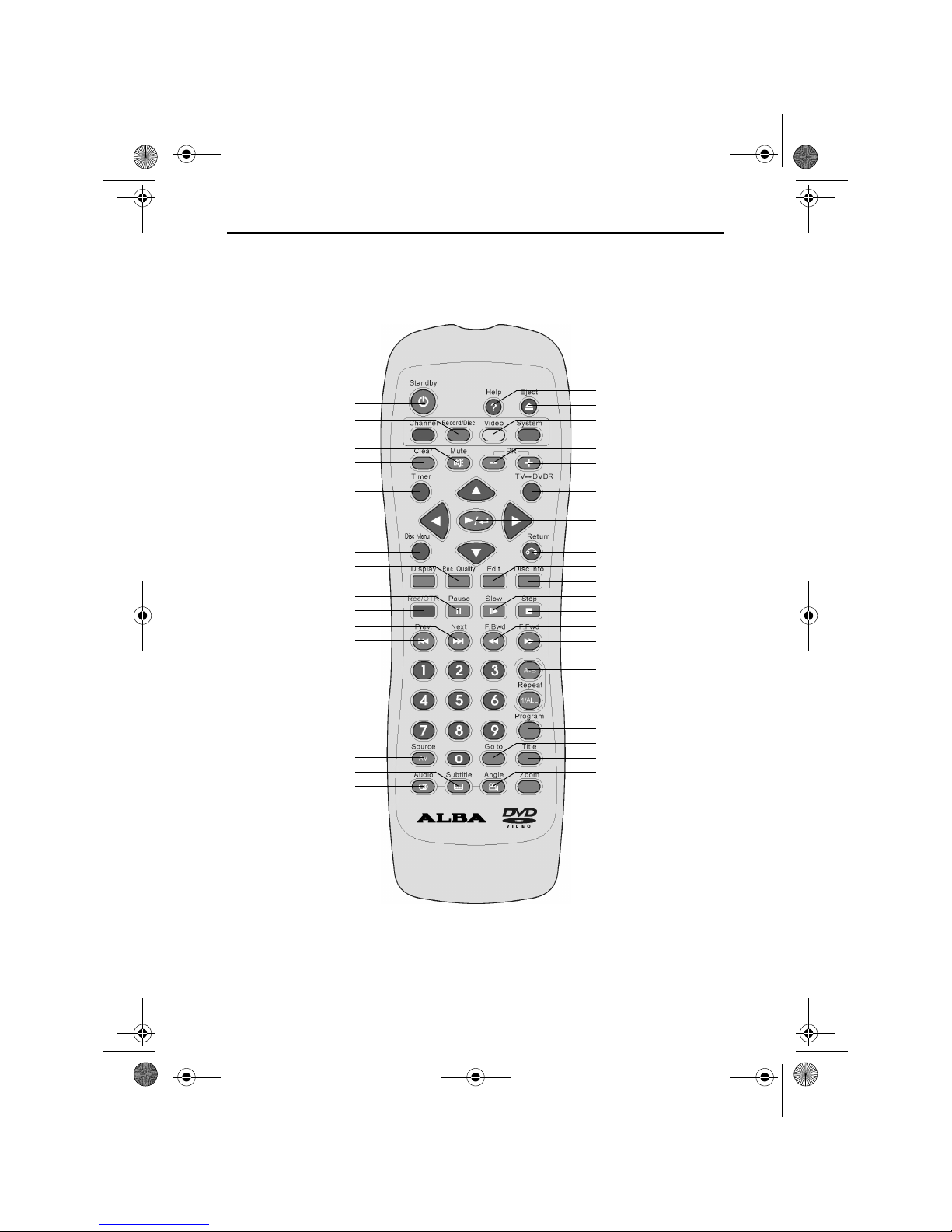
Remote Control
Video
PR+
PR-
System
Play/Enter
Return
Disc Info
Edit
Slow
Stop
F. B W D
1/All Repeat
Program
Title
Angle
Zoom
Pause
Rec. Quality
Display
Disc Menu
Arrow Buttons
Channel
Standby Help
Eject
Record/Disc
Mute
Clear
Timer
Record/OTR
Next
Prev
Numeric Buttons
Source AV
Subtitle
Audio
TV/DVDR
F.F W D
A-B Repeat
Goto
RDVD1002.book Page 8 Tuesday, January 24, 2006 12:25 PM

DVD Recorder
9
Getting Started
Remove your DVD Recorder carefully from the box. You may wish to
store the packaging for future use.
In the Box
Included in this package should be:
• Alba DVD Recorder
• Remote Control (including batteries)
• Blank DVD-RW Disc
• RF Aerial Cable
• Scart Lead
• RCA audio/video cable
• RGB Component video cable
• User Guide
Should any of these items be missing, please contact Product Support:
Telephone: 0870 873 0078
Internet: www.alba-radio.co.uk
Compatible Discs
Your DVD Recorder can play discs that are marked with the following
logos:
8cm/12cm DVD Video Discs including DVD-R/RW and
DVD+R/RW.
8cm/12cm Compact Disc Audio Discs including CD-R and
CD-RW.
8cm/12cm Photo Compact Discs including JPEG and Kodak
picture CDs.
Your DVD Recorder can record onto discs that are marked with the
following logos:
12cm DVD+RW rewritable DVD discs.
12cm DVD+R write once DVD discs.
RDVD1002.book Page 9 Tuesday, January 24, 2006 12:25 PM

RDVD1002
10
Remote Control
Remove the battery compartment cover on the rear of the remote
control. Insert 2 x AAA batteries (supplied), ensuring you follow the
polarity diagram inside the compartment.
Replace the battery compartment cover.
Using the Remote Control
To use the remote control, point it at the front of the DVD Recorder.
The remote control has a range of up to 6 metres from the DVD
Recorder and at an angle of up to 60 degrees.
Do not block the path of the beam from the remote control to the DVD
Recorder.
NOTE: Remove the batteries from the remote control if not in use
for a long period of time. Do not mix normal batteries with
rechargeable batteries. When batteries become weak the remote
control may not work properly.
We recommend the
of Ever Ready
Energizer batteries
use
RDVD1002.book Page 10 Tuesday, January 24, 2006 12:25 PM
Tabla de contenidos


