
ALA Coach MB100 Manual de usuario

1

2
English
ALA MB100 User Manual
Warning: Changes or modifications to this unit not expressly approved by the party responsible for
compliance could void the user authority to operate the equipment.
“This device complies with Part 15 of the FCC Rules. Operation is subject to the following two
conditions:
(1) this device may not cause harmful interference, and (2) this device must accept any
interference received, including interference that may cause undesired operation.”
NOTE: This equipment has been tested and found to comply with the limits for a Class B digital
device, pursuant to Part 15 of the FCC Rules. These limits are designed to provide reasonable
protection against harmful interference in a residential installation. This equipment generates,
uses and can radiate radio frequency energy and, if not installed and used in accordance with the
instructions, may cause harmful interference to radio communications.
However, there is no guarantee that interference will not occur in a particular installation. If
this equipment does cause harmful interference to radio or television reception, which can be
determined by turning the equipment off and on, the user is encouraged to try to correct the
interference by one or more of the following measures:
• Reorient or relocate the receiving antenna.
• Increase the separation between the equipment and receiver.
• Connect the equipment into an outlet on a circuit different from that to which the receiver is
needed.
• Consult the dealer or an experienced radio/TV technician for help.
MB100 Specification :
• Frequency : 2.4 GHz
• Power: 3.7V Li Battery
• Operating Tempeature: -10 ~ +50 C
• USB 2.0 Full Speed
• 2 GB NAND FLASH
• FM Tunner: 87.5MHz~108MHz
• Music Format:MP3/WMA/ASF/APE/FLAC
• Voice Record: WAV
• FM Record: WAV
• Battery Life: about 24 hrs
CS004 Specification :
• Frequency : 2.4GHz
• Op. Voltage: 3V
• Operating Tempeature: -10 ~ +50 C
• Battery: CR2032
• Battery Life: about 500 hrs (working)
• Heart rate sensor sensitivity: above 1mV
GS001 Specification :
• Frequency : 2.4GHz
• Op. Voltage: 3V
• Operating Tempeature: -10 ~ +50 C
• Battery: CR2032

3
Before Use
We thank you for purchasing the Music Sporty
Recorder. In order to correctly and effectively use the functions of
this device, please read this manual carefully and keep it in a safe
place for future reference.
Package Contents
Disclaimer
• The MB100 is for
general applications; it is not designed for medical
treatment.
• To ensure correct display values, make the adjustments and enter your
personal data when you use this device for the first time and sensor
unworkable (lose link). Please refer to the chapter on user configuration.
• The values measured and displayed should be treated as reasonably
accurate.
• Alatech is not responsible for any claims of loss or damage from third
parties incurred from the use of this device.
• Alatech reserves the right to change the specifications of the hardware
and software described in this manual at any time without prior notice.
(optional)
(optional)
• Music Sporty Recorder (MB100)
• Heart Rate Transmitter (CS004)
• G-Sensor (GS001)
• User Manual
• Accessories
• Warranty Certificate
• Sporty Fixture (optional)
• Aluminum Carabiner (optional)
• Speed Sensor (SP001- optional)
• Cadence Sensor
(CA001- optional)

4
English
ALA MB100 User Manual
Safety message
This manual describes how to properly use your music
sporty recorder.In order to avoid damage to the unit and
to yourself, please read the following safety warning items
carefully:
Protecting yourself
• Please do not disassemble, fix or modify the music sporty recorder by yourself.
• Please do not let the music sporty recorder get damp or wet.If the unit accidently
got wet, please do not turn it on to avoid the risk of getting shocked. Please
contact the customer service center immediately.
• In order to avoid the risk of damage or electric shock, please do not use this
product during lightning storms.
• For your safety, while exercising or taking a walk, please ensure that the
headphone cable isn’t hung on any other surrounding objects.
• Please be careful of the USB terminal while in use, if the USB terminal is bulging
out it might cause damage.
• In order to avoid fire or electric shock, please do not place the player in humid,
dusty or polluted environments.
• Using earphones or headphones for long periods of time may cause severe
damage to your hearing. Listening to music over 85 decibels for long periods of
time may cause adverse effects to your hearing. The louder the volume, the more
severe the damage is caused to your hearing.
• If ringing in your ears occurs, please lower the volume or temporarily stop using
the earphones.
Protecting your music sporty recorder
• Please do not place the recorder in environments over 35 degrees Celsius; for
example steam rooms or inside parked cars.
• Do not jar or place heavy objects on the recorder.
• Prevent any foreign matter or sharp objects from entering the recorder.
• Do not place the recorder near magnetic objects.
• Please backup your important data, our company will not be held responsible for
any data loss.
• Please do not spray water on this product; please do not use chemicals such
as benzene or thinners to clean the recorder as this might cause damage to the
surface or the unit.
• Please follow the instructions in the manual, or else it might cause damage to the
unit or the recorder.
• When using for the first time, please fully charge the battery for up to 3 hours in
order to maintain the battery and recorder’s life span.
Warning
Warning
Warning
Warning

5
Features
Simple, generous, fashionable exterior design, allowing your exercise to be more
stylish.The small unit brings you more convenience, top-end technology along with
your exercise brings you the best music enjoyment; you will love your music sporty
recorder, which allows you to download your favorite music at any time, listen to
your favorite FM radio broadcast, and even bring you step by step benefits for your
exercise training.
Friendly user interface
The MB100 comes with a USB connector, which eliminates the need for extra USB
cables and allows high speed transfer and ease of charging.
Fitness trainer mode
This mode allows you to choose different training exercises according to your
habits, and during the exercise process, it allows you to monitor your heartbeat,
continual time, heart rate intensity, distance, speed, number of laps, number of
paces, calories burned and achieved goal rate.
Thoughtful user settings
Set the most suitable exercise strength and goal according to your personal
information.
Diverse exercise trainings
Depending on your exercise habits, along with different sensors, not only allows
exercise training to be more diverse, it also adds the selection for personal training,
helping you gain physical benefits.
Long playback time; high speed transfer
The fully charged battery allows continual music playback for 12 hours; the player
uses USB2.0 data transfer.
Lightweight and convenient, easy to get started
The MB100 has a very stylish appearance and the interface is flexible and easy to
get started; it is also convenient for you to travel with, allowing music and exercise
to enrich your life.
Music Sporty Recorder

6
English
ALA MB100 User Manual
0 Thank you for purchasing this product
0-1 Before use ............................................................................................03
0-2 Package contents .................................................................................03
0-3 Warning ............................................................................................... 03
0-4 Safety message ................................................................................... 04
0-5 Music exercise recorder ........................................................................05
0-6 Table of contents ...................................................................................06
1 Getting familiar with the music exercise recorder
1-1 How to wear the wirelessheart rate transmitter chest strap ..................08
1-2 How to wear the integrated three-axis gravity sensor ...........................09
1-3 Basic functions .................................................................................... 10
1-4 Screen description ...............................................................................12
1-5 Exercise Mode ..................................................................................... 13
2 Setting
7-1 Setting/Music mode ..............................................................................16
7-2 Setting/FM Radio ................................................................................. 17
7-3 Setting/User settings mode/Unit setting ................................................18
7-4 Setting/User settings mode/Gender setting ..........................................19
7-5 Setting/User settings mode/Age ........................................................... 20
7-6 Setting/User settings mode/High .......................................................... 21
7-6 Setting/User settings mode/Weight ...................................................... 22
7-7 Setting/User settings mode/HR Intensity ...............................................23
7-8 Knowing and customizing training strength suitable for you ................24
7-9 Setting/User settings mode/Wheel Setting ........................................... 27
7-10 Setting/User settings mode/Lap setting .............................................. 29
7-11 Setting/Sound .................................................................................... 30
7-12 Setting/Display ................................................................................... 31
7-13 Setting/Language ............................................................................... 32
7-13 Setting/Date & Time ........................................................................... 33
7-13 Setting/system/Sensor testing .......................................................... 34
7-13 Setting/system/Format ....................................................................... 35
7-13 Setting/system/About MB100 ............................................................ 36
Table of contents

7
3 Exercise mode
2-1 Directly start training ..............................................................................37
2-2 Fitness training .................................................................................... 39
2-3 Walking training ................................................................................... 42
2-4 Jogging training ....................................................................................45
2-5 Running training ................................................................................... 48
2-6 Marathon training ................................................................................. 51
2-7 Bike training ......................................................................................... 52
2-8 VO2 max setting .................................................................................. 55
2-8-1 Aerobic fitness index and aerobic ability testing (VO2max) .............. 56
2-8-2 Physical activity table ........................................................................57
2-8-3 Body aerobic ability percentile rating scale ......................................58
2-9 Stride Calibration ..................................................................................59
2-10 Performance ...................................................................................... 60
4 Music mode ...................................................................................... 61
5 Radio mode ...................................................................................... 62
6 Recording mode ............................................................................. 62
7 File Browser ................................................................................... 63
8.Maintenance ................................................................................... 64
8
English
ALA MB100 User Manual
Getting familiar with the music sporty recorder-MB100
1. This product has six built-in exercise training modes; it can display the user’s exercise
process - directly start training, fitness training, walking training, jogging training, running
training, marathon training and bike training total time, calories burned value, real-time
heartbeat - and use the user’s personal information such as gender, age, weight, high
and highest heart rate as the measuring standard, further helping the monitoring of the
training strength of self-fitness processes. This product brings your exercise step by step
benefits, combining music allowing users to further enjoy the atmosphere of the exercise
process, helping you achieve excellent physical performances.
2. Please reset the various sensors’ sensing status and personal information setting when
using the product for the first time, after exchanging the battery or after resetting and
restarting in order to ensure the accuracy of the values.
How to wear the wireless heart rate transmission chest
strap (CS004)
The wireless heart rate transmission chest strap can detect your real-time heartbeat, and
send the heart rate signal to the display on the MP3 screen.Before using the exercise
heart rate mode, please follow the following instructions to properly wear the wireless
heart rate transmission chest strap.
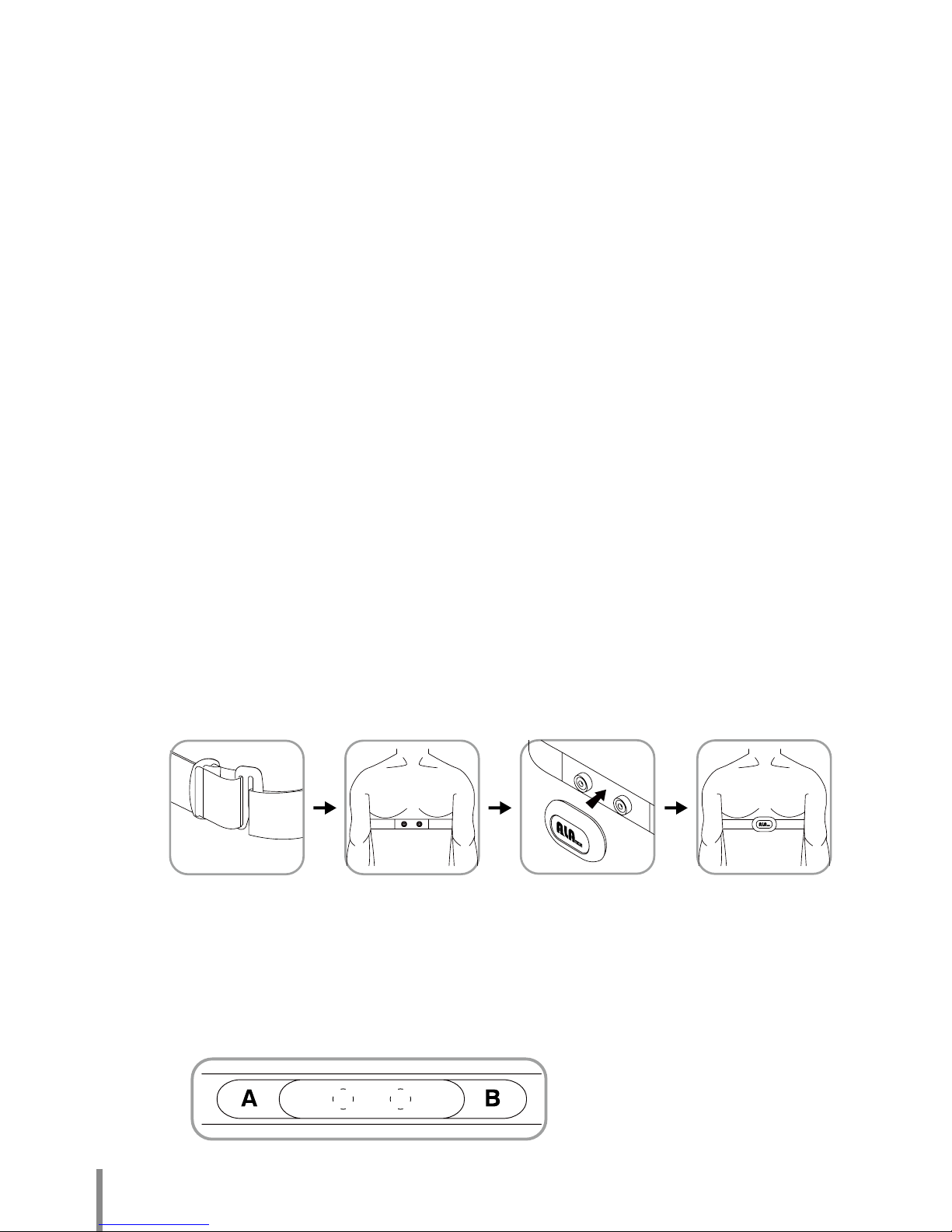
1. Adjust the chest strap length to a suitable personal length, wrap the chest strap around
the lower chest circumference, and fix the chest strap by inserting the buckles of the
chest strap into each other.
2. Take the CS004 and face the logo forward, and face the rear toward the back.
3. Face the sowed in button part of the chest strap directly behind the CS004, when the
position is confirmed, push the buttons on both sides behind the CS004 down until you
hear them click; then confirm that it is locked in the notch and fixed.
Note: Please confirm again whether the CS004 is properly connected with the chest strap
and whether the buttons are firmly fastened.
Appearance description:
1. ALA logo printed on the front, there is a metal button on both the left and right sides on
the back, used to fix onto the chest strapThere are a total of four screws on the top and
bottom; unscrew them to manually exchange the battery (CR2032).
2. Fasten it onto the chest strap, you can add a suitable amount of water on the A and B
sections behind the chest strap, and then wear it.
Back of chest strap diagram:
9
Appearance description:
1. The ALA logo is printed in front of the G-Sensor, there is a circular back cover
towards the bottom of the back; press the two notches on both the left and right
sides and rotate to the left to open the back cover and manually exchange the
battery component.
2. The holder can be used with the shoelaces of sneakers; it can be firmly fixed to
the G-Sensor’s position. There is no burden since it is lightweight.
How to properly wear the integrated three-axis gravity
sensor (GS001)
Using the ALATECH G-SENSOR (GS001) can help the exerciser record their
exercise step numbers, total step numbers, total exercise distance and average
speed etc. during the exercise process.
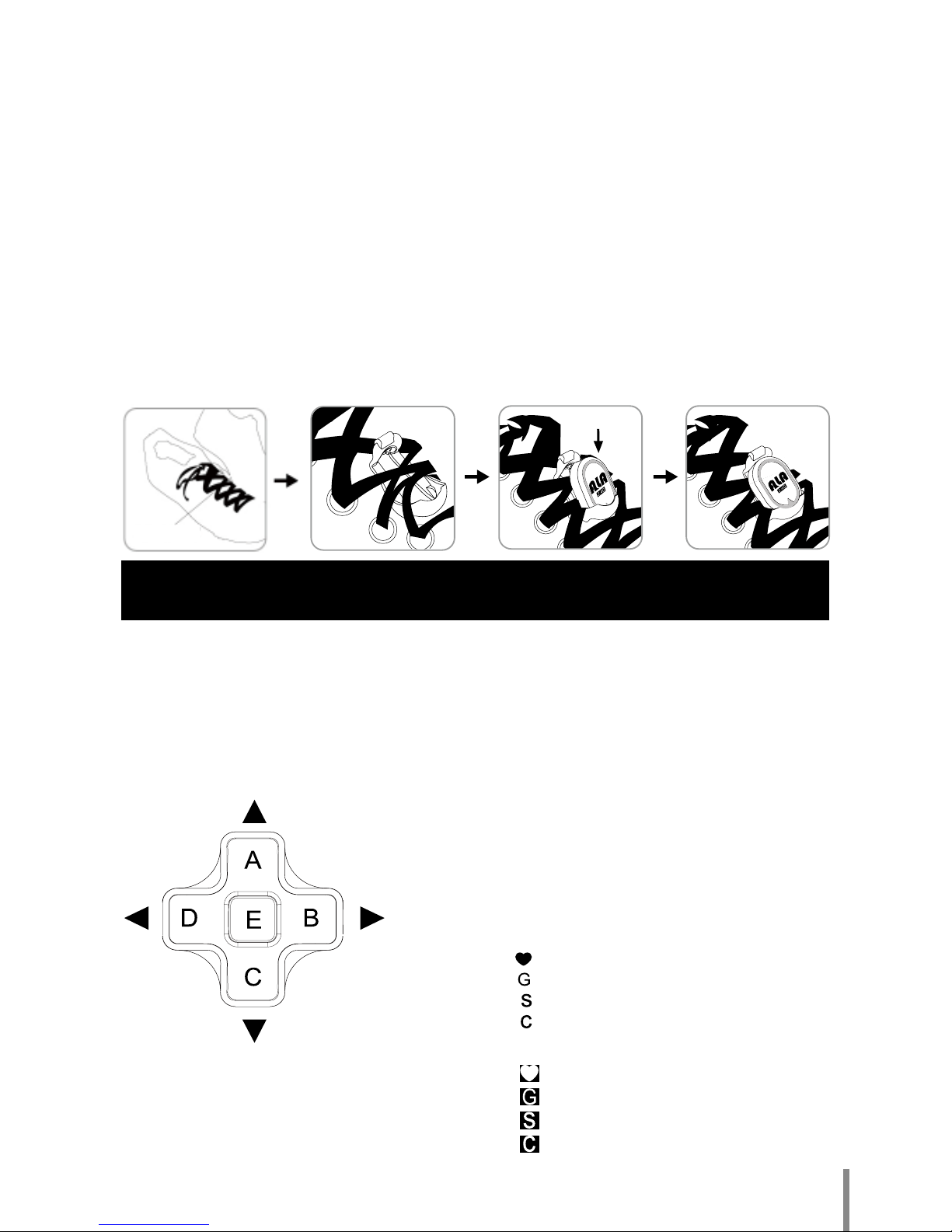
1. Users must wear sneakers with shoelaces in order to install the G-Sensor for use
during the exercising process.
2. Select the position to wear the GS001 and insert the holder from bottom upwards
into the bottom of the shoelace’s X crossing and through the top.
3. Face the front of the G-Sensor upwards, and insert the bottom into the bottom of
the holder.
4. When the bottom is inserted, buckle the top part down until you hear a click to
confirm the completion of the assembling.
Select wearing
position
Buttons description:
1. The E button is the confirm selection
button.
2. The A-C buttons are the up and down
selection buttons.
3. The B-D buttons are the left and right
selection buttons.
Icon description:
1. The heart-shaped icon is the CS004’s icon.
2. G is the GS001’s icon.
3. S is the speed sensor’s icon.
4. C is the cadence sensor’s icon.
Low battery icon description:
1. The heart-shaped icon is the CS004’s icon.
2. G is the GS001’s icon.
3. S is the speed sensor’s icon.
4. C is the cadence sensor’s icon.
Note: Please remember to pair the sensor with device for the first time
or sensor unworkable (lose link) after sporting in while.
10
English
ALA MB100 User Manual
Basic functions
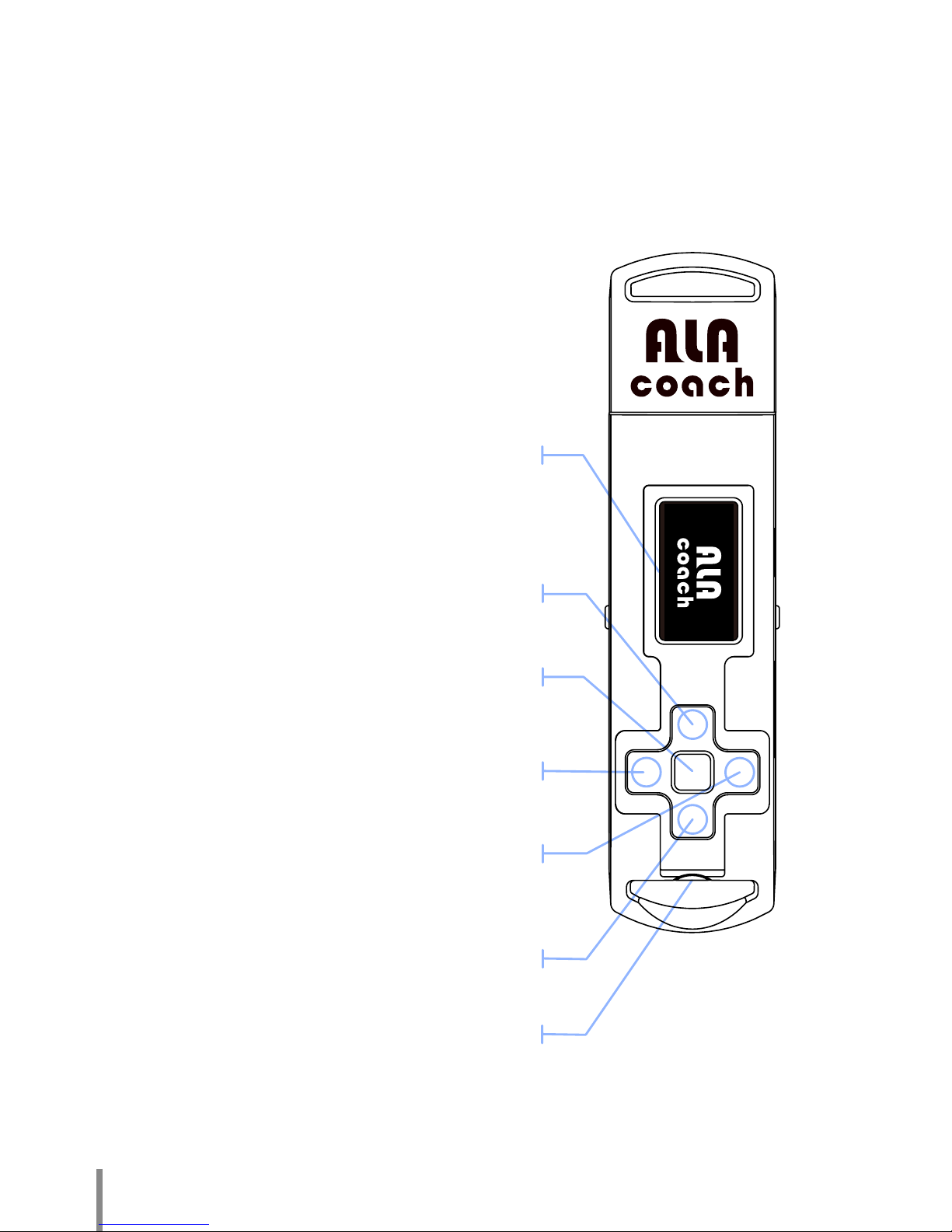
This product has a total of 9 operating buttons; the screen introduction is as
follows.
Browse to the left document button [B]
Press to move to the next selection.
Headphone jack
Increase volume button [A]
Press to increase the volume or return to
the previous option.
Lower volume button [C]
Press to lower the volume or move to the
next option.
Play/Pause/Select button [E]
Press to select the Play/Pause functions,
or move to the next menu.
Browse to the left document button [D]
Press to return to the previous option.
Screen display
Otros manuales para MB100
1
Tabla de contenidos
Otros manuales de Equipo de grabación de ALA Coach

Manuales populares de Equipo de grabación de otras marcas


Strymon
Strymon NIGHTSKY Manual de usuario

Mitsubishi Electric
Mitsubishi Electric 16CH DIGITAL RECORDER DX-TL5000U Manual de usuario

Tews Technologies
Tews Technologies TPMC465 Manual de usuario

Honeywell
Honeywell Excel 50 Manual de usuario

SeaLevel
SeaLevel COMM+8.LPCI Manual de usuario

Arturia
Arturia AUDIOFUSE STUDIO Manual de usuario


