
AIPTEK Bluetooth Headset Manual de usuario

User’s Manual
English

2
Introduction .................................................................................................... 3
1. The Headset ............................................................................................ 3
2. LED Indicator Status ............................................................................... 3
3. Compatible Mobile Phones ..................................................................... 4
4. Button Functions ..................................................................................... 5
Charging the Headset ................................................................................... 7
Powering ON/OFF (the Headset) .................................................................. 9
Power ON .................................................................................................... 9
Power OFF .................................................................................................. 9
Pairing the Headset for the first time......................................................... 10
What is Bluetooth Pairing? ........................................................................ 10
Answering / Ending / Rejecting Calls .........................................................11
Answering Calls .........................................................................................11
Ending Calls ...............................................................................................11
Rejecting Calls (Hands-free Profile Only) ..................................................11
Speaker Volume/ Muting the Microphone ................................................. 12
Adjusting the Speaker Volume .................................................................. 12
Muting the Microphone .............................................................................. 12
Making/ Cancelling Calls ............................................................................ 13
Making Calls .............................................................................................. 13
Cancelling Calls ........................................................................................ 13
Troubleshooting .......................................................................................... 14
Maintenance ................................................................................................. 16
Specifications .............................................................................................. 17
Table of Contents

3
EN
1. The Headset
2. LED Indicator Status
LED Color LED Blinking Pattern Headset Status
Red Steady Battery Charging
Blue 5 times Powering ON
Blue Once every 3 seconds Not Connected (power
saving mode)
Red & Blue Blink alternately Pairing mode
Blue Once every 4 seconds Connected (standby) - Sony
Ericsson
Blue 3 times per 4 seconds Connected (standby) - Nokia
Blue 4 times per 4 seconds Calling out/During a call
Red 5 times Powering OFF
Introduction
LED indicator
Power button
Charging Port
Microphone
Ear hook mount
Speaker
Volume down
button (Mute)
Volume up
button (Mute)
Ear hook x 1

4
3. Compatible Mobile Phones
The headset is compatible with mobile phones supporting Hands-free
Profile or Headset Profile. Nokia phones support Hands-free Profile
and Sony Ericsson phones support Headset Profile. The two Profiles
correspond to different LED status (see previous page) and button
functions (see next page) of the headset. The table below lists some
models and the profiles compatible with this headset.
Nokia
(Hands-free Profile)
Sony Ericsson
(Headset Profile)
Siemens
6600 T610 P900 S55 (Headset Profile)
6230 T630 P800
3650 T68i SX1 (Heads-free
Profile)
6310 T68
6310i T39
8910 R39m
8910i Z600

5
EN
4. Button Functions (For Nokia Phones: Hands-free
Profile)
The headset features 3 buttons: Power button, Volume Up (Vol+)
button and Volume Down (Vol-) button. The table below lists the
function of theses buttons.
Power Button Vol+ or Vol- Buttons
Headset
Status
Short Press
and Release
Long Press
and Hold
Short Press
and Release
Long Press
and Hold
Off (no function) Power ON (7
sec)
Pairing (10 sec)
(no function) (no function)
Standby Initiate voice
dialing
Power OFF (3
sec)
Adjust Volume Redial the last
number (3 sec)
Dialing Cancel dialing Power OFF (3
sec)
(no function) (no function)
Ringing Answer Reject (3 sec) (no function) (no function)
Talking End a call Power OFF (3
sec)
Adjust Volume/
Cancel Muting
Mute (3 sec)
A Call
Waiting
End a call Power OFF (3
sec)
Adjust Volume Adjust Volume

6
Button Function (For Sony Ericsson Phones:
Headset Profile)
The headset features 3 buttons: Power button, Volume Up (Vol+)
button and Volume Down (Vol-) button. The table below lists the
function of theses buttons.
Power Button Vol+ or Vol- Buttons
Headset
Status
Short Press
and Release
Long Press
and Hold
Short Press
and Release
Long Press
and Hold
Off (no function) Power ON (7
sec)
Pairing (10 sec)
(no function) (no function)
Standby (no function) Power OFF (3
sec)
(no function) (no function)
Dialing Cancel dialing Power OFF (3
sec)
(no function) (no function)
Ringing Answer Reject (3 sec) (no function) (no function)
Talking End a call Power OFF (3
sec)
Adjust Volume/
Cancel Muting
Mute (3 sec)
Charging the Headset

7
EN
The battery attached is not fully charged. Please charge the headset
at least 8 hours for first time use. Afterwards, it will take approximately
2 hours to fully recharge the battery. It can be used for 8 hours of talk
time and 240 hours of standby time.
1. Plug the AC adapter into a wall outlet.
2. Connect the AC adapter with the charging port of the headset.
3. The LED will show a steady red light.
4. When the battery is fully charged, the red light will be off. Please
unplug the AC adapter.
Note: The headset doesn’t work while charging.
Charging the Headset
Figure 1
Charging Port
8
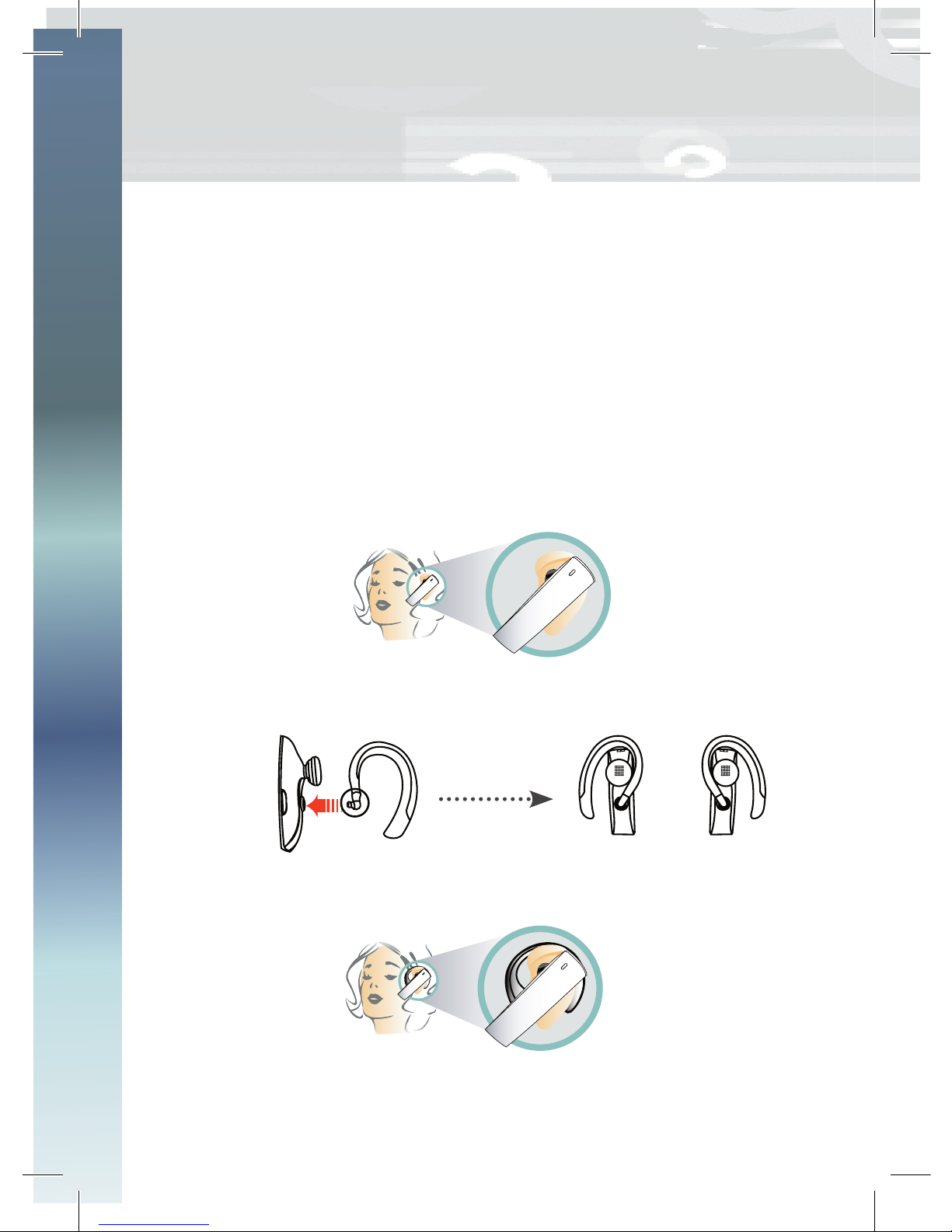
The headset can be worn on either ear and the ear hook is
detachable. Simply remove and shift it in the appropriate direction to
fit your ear.
1. Directly place the headset in your ear without the ear hook. (Figure
2)
- OR -
2. Plug in the ear hook through the mount. (Figure 3)
3. Place the ear hook behind your ear. (Figure 4)
Powering ON/OFF (the Headset)
Figure 2
Figure 4
Figure 3
for left ear for right ear
swivel
plug

9
EN
Power ON:
1. Press and hold the Power button for 7 seconds.
2. The LED flashes blue light for 5 times and the headset beeps twice
to indicate that the headset is turned on successfully.
Power OFF:
1. Press and hold the Power button for 3 seconds.
2. The LED flashed red light for 5 times as the headset beeps two
tones indicating that the headset is powered off successfully.
Note: The headset will automatically enter power saving mode if
there is no connection.
Powering ON/OFF (the Headset)
Power button
( ON/OFF)

10
What is Bluetooth Pairing?
You have to pair the headset with a particular Bluetooth mobile phone
before first time use. Pairing means authentication. The users of the
Bluetooth enabled devices should use the same passcode for both
devices in order to pair them.
1. Make sure the headset is OFF.
2. Turn on your mobile phone.
3. Follow the manual of your mobile phone to activate Bluetooth
device pairing process.
4. Press and hold the Power button of the headset for at least 10
seconds until the LED flashes red and blue alternately.
5. Your phone will found the headset device “HSII” in the device list.
Select it for pairing.
6. The phone display will prompt you for pairing PIN CODE. Enter
“0000”. Follow the instruction on the phone to complete Bluetooth
connection.
7. The LED will flash blue 3 times per 4 seconds (Nokia phones)
or once every 4 seconds (Sony Ericsson phones) to indicate a
successful connection.
8. If you turn off either the mobile phone or the headset, they will be
disconnected. The connection will be resumed automatically, if the
two devices are both on and the bluetooth function of your mobile
phone is activated.
Note:
Step 5 and 6 should be completed within 1 minute as the LED
flashing red and blue alternately. Otherwise, please turn off the
headset and repeat step 4 again.
Your headset can only memorize 8 different mobile phones.
The 9th phone will replace the first.
Pairing the Headset for the first time Answering / Ending / Rejecting Calls
Tabla de contenidos
Idiomas:


