
Aim SmartyCam HD Manual de usuario

SmartyCam D
USER GUIDE
SMARTYCAM HD MANUALE ENG _Layout 1 24/07/13 20.40 Pa ina 2

02
GETTING STARTED
T E VIDEO CAMERA
T E CONFIGURATION SOFTWARE
T E TRACK MANAGER
TEC NICAL DRAWINGS
04
12
26
34
44
SmartyCam D
SMARTYCAM HD MANUALE ENG _Layout 1 24/07/13 20.40 Pa ina 3

Thanks
Dear Customer,
SmartyCam D, the AiM on board camera
with data overlay, is a product of our extensive
experience in developing data acquisition
systems for motorsport applications.
With SmartyCam D you can review your
laps on a PC or TV, merging crystal clear
video images with graphical data overlays
coming from GPS, from accelerometer,
from the ECU or from an AiM logger.
SmartyCam D can be used in any situation,
on any sort of vehicle.
Acquired data is overlaid on to the video in
real time, with a multitude of gauge choices,
all configurable by the user.
We recommend regularly checking
www.AIM-Sportline.com for software
and/or firmware updates or subscribing to
the AIM-Sportline FaceBook page to
receive all updates in real time.
03
SMARTYCAM HD MANUALE ENG _Layout 1 24/07/13 20.40 Pa ina 4

What is SmartyCam HD?
SmartyCam D is a video recorder
developed for motorsports envi-
ronments. SmartyCam D
automatically overlays graphical
indications of the vehicle data to an
D video.
Its components have been speci-
cally designed to meet the
demands of the extremes of
motorsports environments:
specialty lenses, CMOS sensor, relia-
bility under vibrations, connectivity
to the vehicle data, and capability
to start and stop video recording
automatically are among the
features customized for our sport.
Which data does it show?
Data shown in overlay come from
your vehicle ECU, from the internal
accelerometers, from GPS and from
datalogger analog/digital inputs.
It is also possible to display the map
of the track and personal images
(i.e. logos).
Is it possible to congure the gra-
phical overlays?
You can choose from a wide library
of graphical overlays and set the
position of each of them.
End of scales and measure units can
also be easily dened using the
SmartyManager software included
in the kit.
To which AiM systems can
SmartyCam HD be connected?
It is possible to connect SmartyCam
D, through CAN network, to all the
AiM Loggers, that is to say, to MXL,
EVO, MyChron, SoloDL and ECU
Bridge.
Does it work in a stand alone
mode?
Yes, SmartyCam D has an internal
battery and can work also without
being connected to the AiM CAN
network.
Of course, in this case, only lateral
acceleration coming from Smarty-
04
CHAPTER 1
SMARTYCAM HD MANUALE ENG _Layout 1 24/07/13 20.40 Pa ina 5

Cam D’s internal sensor can be
shown in overlay.
If a GPS receiver is connected,
SmartyCam D can show also the
position on the track, speed and lap
times.
Is it possible to connect more
SmartyCam HD cameras on the
same CA network?
Yes, every SmartyCam D has its
own conguration and automati-
cally retrieves the data it needs
from the network, without interfe-
ring with the others.
Is it possible to synchronize video
and data recorded by the loggers?
Yes. Using the new RaceStudio3,
ready in the second half of 2013, it
will be possible to automatically
synchronize video and data, and
show them on the same dedicated
view.
RaceStudio2 enables you to ma-
nually synchronize data and video.
Which video format does
SmartyCam HD generate?
SmartyCam D generates .mov les
with 264 compression.
You can choose from three dierent
compression levels (low, medium,
high) and two dierent frame rates
(25 and 30 frames per second).
Does SmartyCam HD start and
stop automatically?
Yes. SmartyCam D oers dierent
logics for starting and stopping
video recording.
Acceleration or speed can be used
for triggering when to start and to
stop the activities.
You can choose your preference
using the on-board Menu or
through SmartyManager software.
05
GETTI G STARTED SMARTYCAM HD
SMARTYCAM HD MANUALE ENG _Layout 1 24/07/13 20.40 Pa ina 6
CHAPTER 1
06
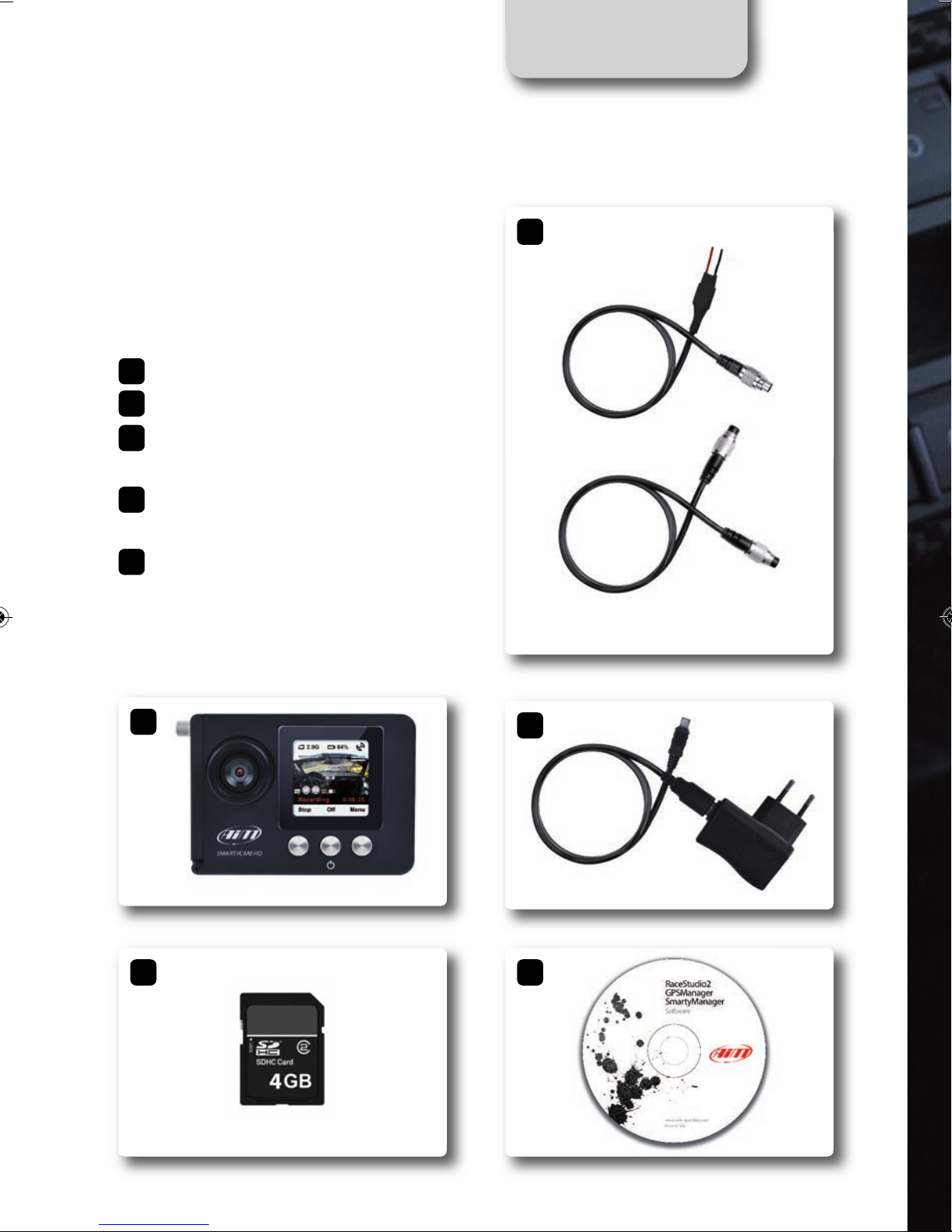
- SmartyCam D
- SD Card 4GB
- External CAN Cable or
External power cable
- 110/220v Battery Charger
with AC power adapter
- Software RaceStudio2 CD
SmartyCam HD kit
includes:
1
2
3
4
5
1
2
3
4
5
SMARTYCAM HD MANUALE ENG _Layout 1 24/07/13 20.40 Pa ina 7

07
GETTI G STARTED SMARTYCAM HD
SMARTYCAM HD MANUALE ENG _Layout 1 24/07/13 20.40 Pa ina 8

CHAPTER 1
08
Front mount color TFT viewfinder
Multifunctional Pushbuttons
High performance optics
SmartyCam D
SMARTYCAM HD MANUALE ENG _Layout 1 24/07/13 20.41 Pa ina 9
09
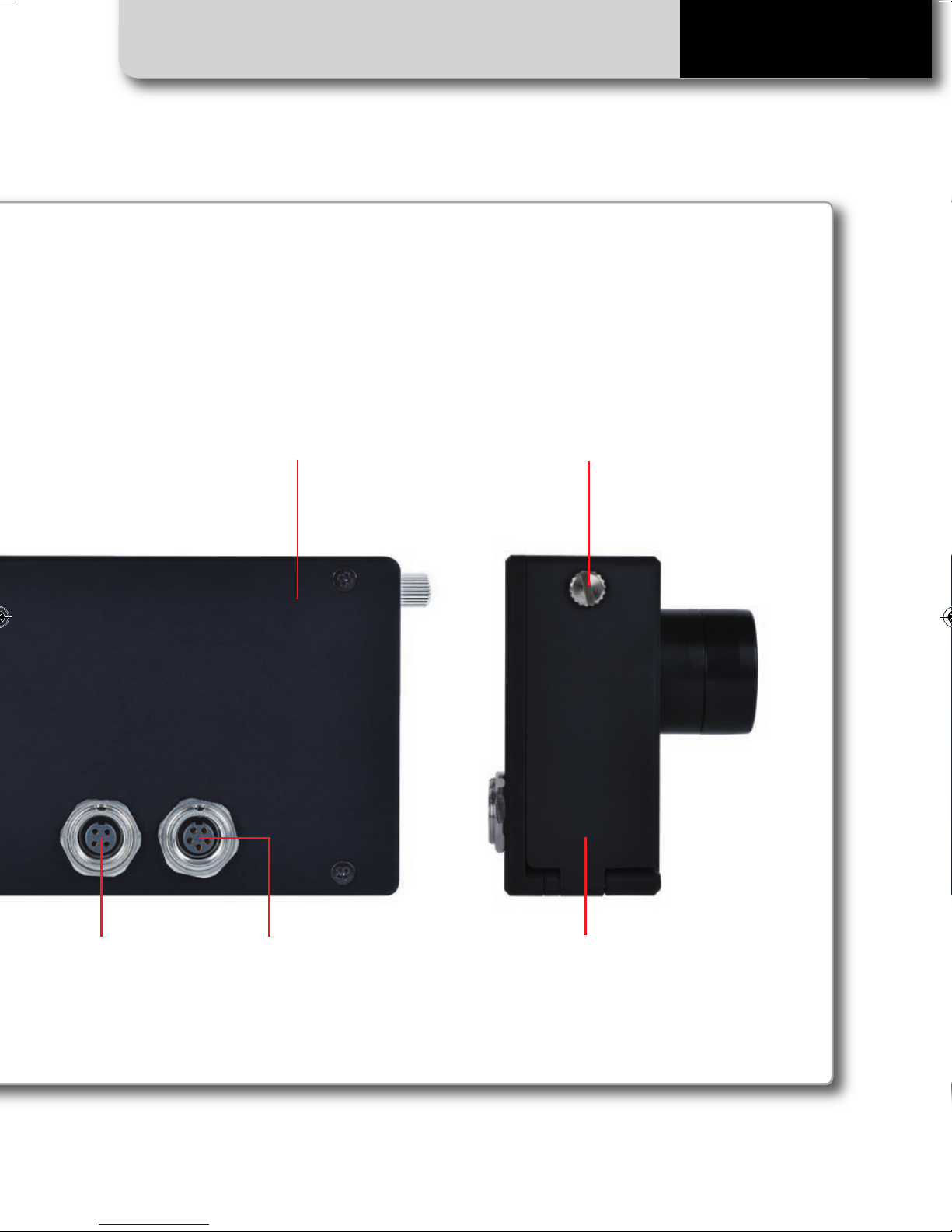
CA - Power Connection SD and USB capable
Watertight door latch design
Aluminum Body
GPS05B Connection
GETTI G STARTED SMARTYCAM HD
SMARTYCAM HD MANUALE ENG _Layout 1 24/07/13 20.41 Pa ina 10

SmartyCam HD connections
SmartyCam D features two connectors in
the back.
The four-pin connector is used only for con-
necting an external GPS receiver (module
AiM GPS05B).
CHAPTER 1
10
CA - Power ConnectionGPS05B Connection
The five-pin connector is used for connec-
ting an external power and the CAN net.
SMARTYCAM HD MANUALE ENG _Layout 1 24/07/13 20.41 Pa ina 11
Otros manuales para SmartyCam HD
4
Tabla de contenidos


