
Agilent Technologies G1978B Manual de usuario

Agilent Technologies
Agilent G1978B
Multimode Source for
6100 Series Single Quad
LC/MS
Set-Up Guide

2 Multimode Source for 6100 Series Single Quad LC/MS Set-Up Guide
Notices
© Agilent Technologies, Inc. 2008
No part of this manual may be reproduced in
any form or by any means (including elec-
tronic storage and retrieval or translation
into a foreign language) without prior agree-
ment and written consent from Agilent
Technologies, Inc. as governed by United
States and international copyright laws.
Manual Part Number
G1978-90070
Edition
First Edition, December 2008
Printed in USA
Agilent Technologies, Inc.
5301 Stevens Creek Blvd.
Santa Clara, CA 95051 USA
Warranty
The material contained in this docu-
ment is provided “as is,” and is sub-
ject to being changed, without notice,
in future editions. Further, to the max-
imum extent permitted by applicable
law, Agilent disclaims all warranties,
either express or implied, with regard
to this manual and any information
contained herein, including but not
limited to the implied warranties of
merchantability and fitness for a par-
ticular purpose. Agilent shall not be
liable for errors or for incidental or
consequential damages in connec-
tion with the furnishing, use, or per-
formance of this document or of any
information contained herein. Should
Agilent and the user have a separate
written agreement with warranty
terms covering the material in this
document that conflict with these
terms, the warranty terms in the sep-
arate agreement shall control.
Technology Licenses
The hardware and/or software described in
this document are furnished under a license
and may be used or copied only in accor-
dance with the terms of such license.
Restricted Rights Legend
U.S. Government Restricted Rights. Soft-
ware and technical data rights granted to
the federal government include only those
rights customarily provided to end user cus-
tomers. Agilent provides this customary
commercial license in Software and techni-
cal data pursuant to FAR 12.211 (Technical
Data) and 12.212 (Computer Software) and,
for the Department of Defense, DFARS
252.227-7015 (Technical Data - Commercial
Items) and DFARS 227.7202-3 (Rights in
Commercial Computer Software or Com-
puter Software Documentation).
Safety Notices
CAUTION
A CAUTION notice denotes a haz-
ard. It calls attention to an operat-
ing procedure, practice, or the like
that, if not correctly performed or
adhered to, could result in damage
to the product or loss of important
data. Do not proceed beyond a
CAUTION notice until the indicated
conditions are fully understood and
met.
WARNING
A WARNING notice denotes a
hazard. It calls attention to an
operating procedure, practice, or
the like that, if not correctly per-
formed or adhered to, could result
in personal injury or death. Do not
proceed beyond a WARNING
notice until the indicated condi-
tions are fully understood and
met.
Windows®and MS Windows®are U.S.
registered trademarks of Microsoft Corpora-
tion.
Windows NT®is a U.S. registered trade-
mark of Microsoft Corporation.

Multimode Source for 6100 Series Single Quad LC/MS Set-Up Guide 3
In This Guide
This guide explains how to install, maintain and troubleshoot your
nanoelectospray ion source.
1Installation
This chapter tells you how to install the multimode ion source.
2Verification
This chapter tells you how to install the multimode ion source.
3Methods
This chapter describes basic operation and maintenance for the multimode
ion source.

4 Multimode Source for 6100 Series Single Quad LC/MS Set-Up Guide

Multimode Source for 6100 Series Single Quad LC/MS Set-Up Guide 5
Content
1 Installation 7
Installation 8
Step 1. Prepare to install 8
Step 2. Install the HV control PCA and cables 9
Changing Sources 13
To remove the multimode source 13
To convert from multimode to ESI, APCI or APPI 14
To convert from ESI, APCI or APPI to the multimode source 15
2 Verification 21
To verify sensitivity for 6120 Quad - G1978B Multimode, Positive SIM
Modes 22
To verify sensitivity for 6130 and 6140 Quads - G1978B Multimode, Positive SIM
Modes 24
To verify sensitivity for 6130 and 6140 Quads - G1978B Multimode, Positive
Scan Modes 27
To verify sensitivity for the G1978B Multimode using Multiple FIA method in
Mixed Mode operation 30
To do an autotune 32
Example of multimode verification report 33
3 Methods 35
To setup a method to use the multimode source 36
To create a method for positive/negative mixed mode operation 37
To create a method for alternating ESI and APCI operation 39

6 Multimode Source for 6100 Series Single Quad LC/MS Set-Up Guide
Contents

7
Agilent G1978B Multimode Source for 6100 Series Single Quad LC/MS
Set-Up Guide
Agilent Technologies
1
Installation
Installation 8
Step 1. Prepare to install 8
Step 2. Install the HV control PCA and cables 9
Changing Sources 13
To remove the multimode source 13
To convert from multimode to ESI, APCI or APPI 14
To convert from ESI, APCI or APPI to the multimode source 15
This chapter contains instructions to install the multimode source on a 6100
Series Single Quad LC/MS system, and also to remove and replace the source.

8 Multimode Source for 6100 Series Single Quad LC/MS Set-Up Guide
1 Installation
Installation
Installation
This section explains how to install the G1978B multimode source on a 6100
Series Single Quad LC/MS instrument. The G1978A multimode source is not
supported on these instruments.
The 6100 Series Single Quad LC/MS with multimode source is supported on
ChemStation B.03.01 or higher, or the ChemStation B.01.03 with a patch.
Step 1. Prepare to install
The Multimode Enablement Kit, G1978-60451, is shipped with the multimode
source. This kit needs to be installed before the multimode source is used.
Note that the multimode source and its accessories are to be installed by an
Agilent Customer Engineer.
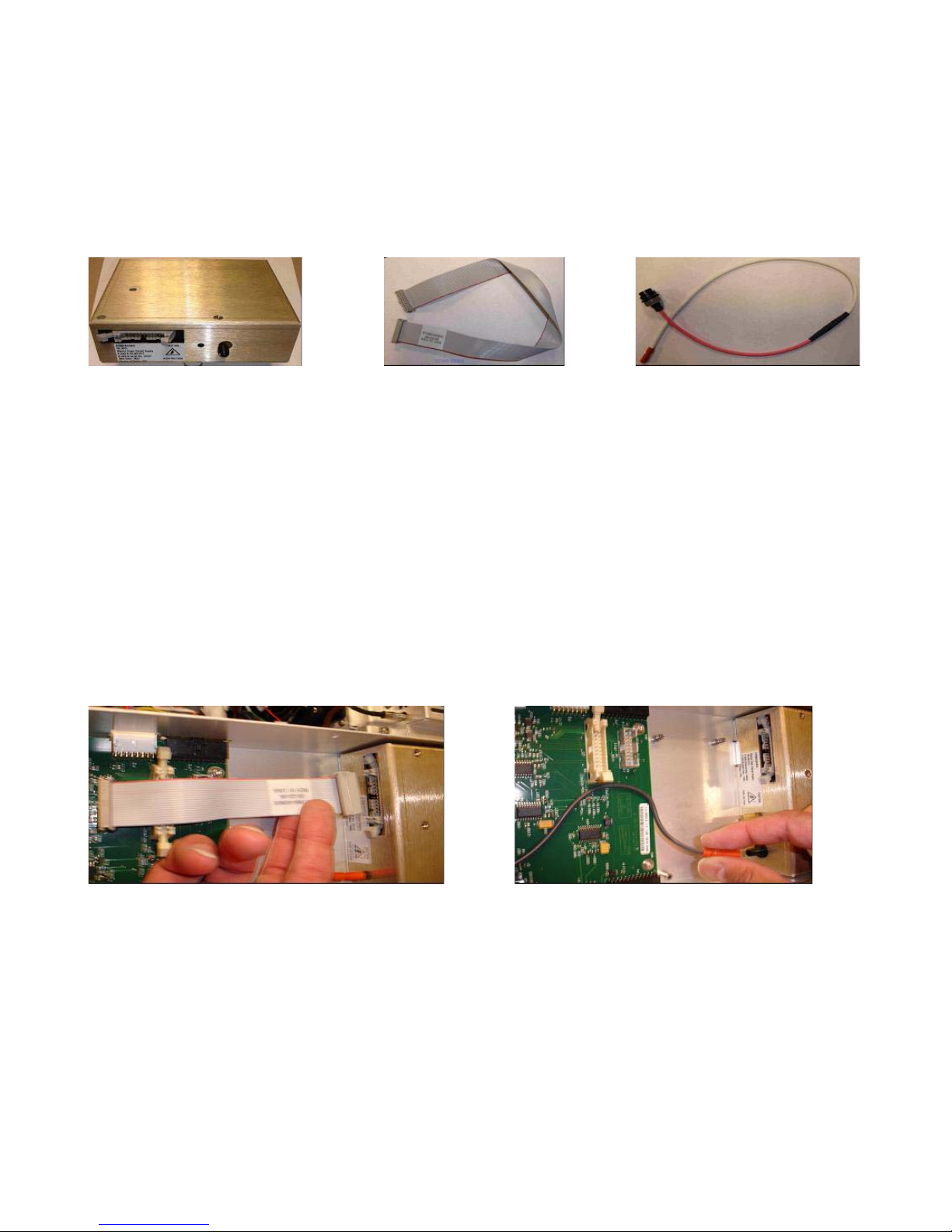
1Check that the Multimode Enablement Kit contains the following parts:
•Multimode Bd HV cable, p/n G1960-60858
•Multimode HV PCA, p/n G1960-61015
•Multimode Bd Power/Data Cable, p/n G1960-60873
Figure 1 From left to right: G1960-60858, G1960-61015 and G1960-60873
2Install the APCI Enablement Kit, G1947-60451, which is shipped with the
multimode source.
The APCI Enablement kit contains the following parts:
•Fast APCI HV Supply, p/n G1946-80058
Multimode Source for 6100 Series Single Quad LC/MS Set-Up Guide 9
Installation 1
Step 2. Install the HV control PCA and cables
•Valve BD-APCI supply, p/nG1960-60802
•Valve BD-APCI Needle Interlock, p/n G1960-60856
Figure 2 From left to right: G1946-80058, G1960-60802 and G1960-60856
Step 2. Install the HV control PCA and cables
1Turn off the system power and remove the system power cord.
Keep the power cord intact if the vacuum control switch box is used. The
switch box is intended to keep the vacuum on while a CE works on the
electronics. The switch box is for CE use only.
2Remove the CDS cover, top, side, front, and the Aux Module cover.
3Disconnect the ribbon cable that connects the valve PCA to the
Vcap/Vchamber power supply. Then disconnect the Vcap and Vchamber
cable from the power supply.
Figure 3 Disconnecting the Vcap/Vchamber power supply from the valve PCA (left) and the Vcap/Vchamber.
4Place the multimode HV power supply PCA in the slot between the valve
PCA and the Vcap/Vchamber. Secure the board by pressing it down into its
slot and then attach it with two screws.
5Connect the short gray cable from valve PCA to the multimode HV power
supply.

10 Multimode Source for 6100 Series Single Quad LC/MS Set-Up Guide
1 Installation
Step 2. Install the HV control PCA and cables
Figure 4 Connecting the valve PCA to the multimode HV power supply.
6Install the APCI HV power supply. The APCI HV power supply is located at
the end of the AUX Module.
7Connect ribbon cable between valve PCA and Vcap/Vchamber power
supply.
Figure 5 Connecting the valve PCA to the Vcap/Vchamber power supply.
8Connect the Vcap and Vchamber cables to the Vcap/Vchamber power
supply.
Otros manuales para G1978B
1
Tabla de contenidos
Otros manuales de Accesorios de computadora de Agilent Technologies


