Agilent Technologies G2615A Manual de operación

Agilent Technologies
Agilent G2615A
Bar Code Reader
User Information

2Bar code reader
Notices
© Agilent Technologies, Inc. 2002
No part of this manual may be reproduced in
any form or by any means (including elec-
tronic storage and retrieval or translation
into a foreign language) without prior agree-
ment and written consent from Agilent
Technologies, Inc. as governed by United
States and international copyright laws.
Manual Part Number
G2615-90007
Edition
First edition, May 2002
Printed in USA
Agilent Technologies, Inc.
2850 Centerville Road
Wilmington, Delaware 19808-1610 USA
Safety Notices
CAUTION
A CAUTION notice denotes a
hazard. It calls attention to an
operating procedure, practice, or
the like that, if not correctly
performed or adhered to, could
result in damage to the product or
loss of important data. Do not
proceed beyond a CAUTION notice
until the indicated conditions are
fully understood and met.
WARNING
A WARNING notice denotes a
hazard. It calls attention to an
operating procedure, practice, or
the like that, if not correctly per-
formed or adhered to, could result
in personal injury or death. Do not
proceed beyond a WARNING
notice until the indicated condi-
tions are fully understood and
met.

3
Agilent G2615A Bar Code Reader
Agilent Technologies
User Information
Parts identification 4
Installation 5
About bar codes 7
Label and vial information 13
Applying labels 14
In case of difficulty 18
The Agilent G2615A Bar Code Reader (BCR) attaches to the tray
of a 7683 Automatic Sampler. It reads labels attached to sample
vials for positive sample identification.
•The reader attaches directly to the 7683 tray. A provided
spacer may be required to attach some trays.
•The G2615A Bar Code Reader is not compatible with trays
for 18596A, 18596B or 18596C samplers.
•The 7683 tray must be delivered from Agilent with A.01.04 or
greater firmware. Field upgrade to A.01.04 or greater is not
adequate.
You can verify your tray firmware using the 6890N keypad and
display. Select Options/Diagnostics/Instrument status. Scroll
to observe what firmware is installed on the G2614A tray.
6890A and 6890 Plus GCs will not display the tray firmware.
Contact your local Agilent office for assistance.

4Bar code reader
User Information
Parts identification
Figure 1 identifies those parts in the installation kit that may
not be easily recognized.
Figure 1 Parts identification
Label applicator
Vial plates
Roll of labels
Labeled vial
Long screws
Short screws
2-mm hex wrench
Bar code reader with mounting bracket
Spacer
Cable

User Information
Bar code reader 5
Installation
1Locate the recess in the bottom front of the tray. The BCR
must be located at this location. See Figure 2.
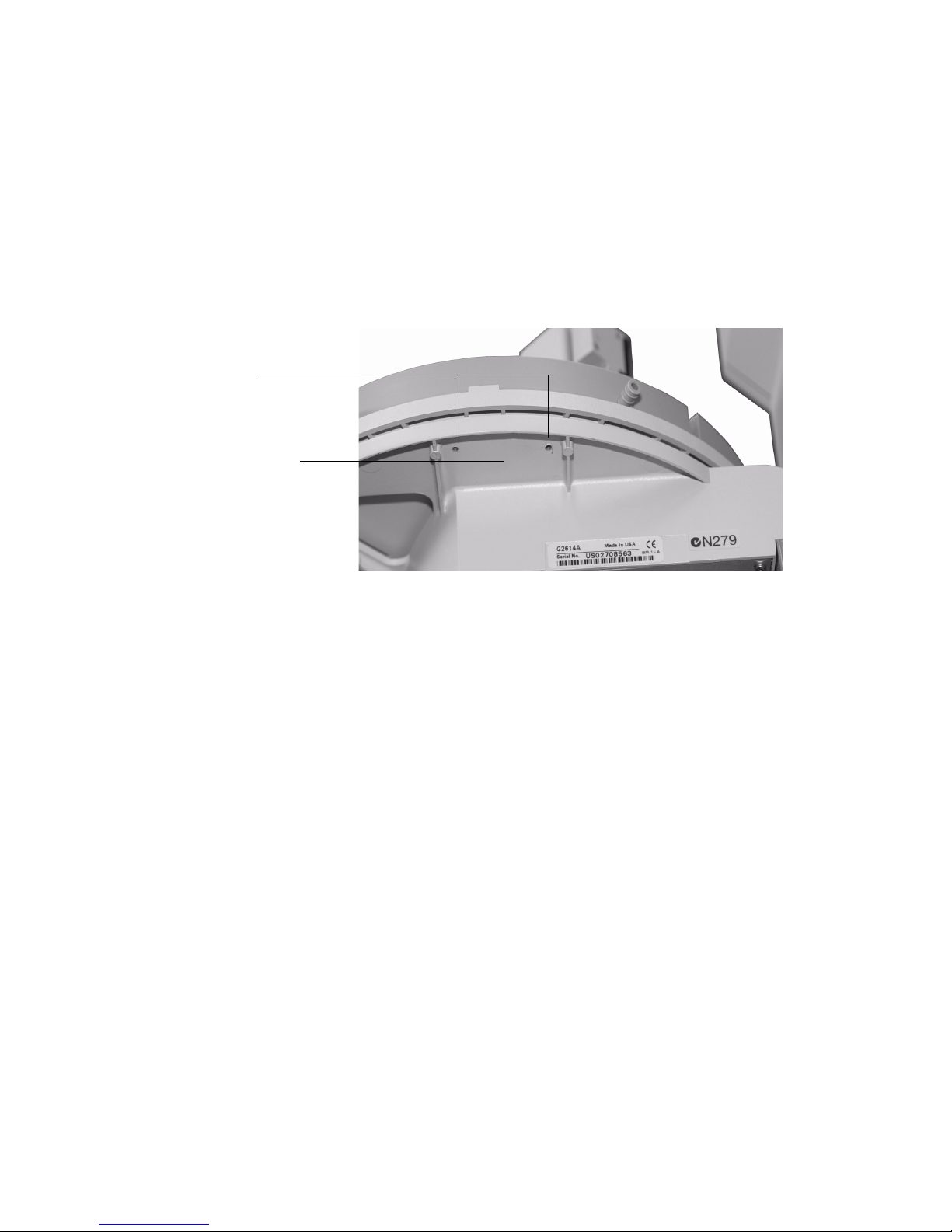
2Locate the mounting screw holes. Some trays have two holes
that are flush with the bottom of the recess. Those trays
require the spacer. Other trays have raised areas around
three mounting holes and do not need the spacer.
The tray shown in Figure 2 is the two hole version. This style
tray requires use of the spacer to mount the BCR.
3If the spacer is needed, align the holes in the spacer with the
mounting holes in the bottom of the tray. Place the mounting
bracket under the spacer, insert the two long screws and
tighten them firmly.
If the spacer is not needed, place the mounting bracket
under the mounting holes in the bottom of the tray. Insert the
three short screws and tighten them firmly.
4Run the cable to the back of the tray and connect it to the
Barcode receptacle. Tighten the two securing screws. See
Figure 3.
Figure 2 Mounting location
Mounting screw holes
Spacer mounts in this recess
if needed

6Bar code reader
User Information
5This completes bar code reader installation. See the section
on Automatic Samplers in your Agilent 6890 Series Gas
Chromatograph user information to configure the bar code
reader.
Figure 3 Connecting the cable
Barcode receptacle

User Information
Bar code reader 7
About bar codes
A bar code is a printed pattern of bars and spaces that encodes
information. The most frequently encountered bar code is the
UPC code (Universal Product Code) that appears on most
packaged products in the supermarket.
The information in a UPC symbol is not the price of the product;
it is simply a number that has been assigned to that product to
distinguish it from all others. The supermarket checkout
register obtains the price by looking up the code in a master list
(actually, the store computer does it).
The Agilent Bar Code Reader (BCR) reads and decodes several
different bar codes. The most useful one for general laboratory
use is the Standard 3 of 9 Code, which encodes both letters and
numbers and allows variable message length. The others may
prove useful in special cases. The preprinted labels available
from Agilent are in Standard 3 of 9 Code without a checksum.
See Table 1.
Bar code elements
All codes represent the characters as a pattern of dark bars and
light spaces. Some codes only distinguish between narrow and
wide bars, some have several possible bar widths, some use
spaces to encode characters, others use spaces only as bar
separators, and so on. Why so many different ways of
accomplishing the same simple task? They were developed by
different groups at different times and for different purposes.

8Bar code reader
User Information
Standard 3 of 9 code
Each character is represented by five bars and the four spaces
between them. The bar/space patterns are defined so that
exactly three are wide and the rest narrow. Characters are
separated by a narrow space. See Table 1.
The three wide and six narrow requirement makes each
character self-checking, but an additional checksum character
may be inserted in the message if desired. The checksum is
generated by adding the check values for all the message
characters, dividing by 43, and using the remainder to select the
checksum character. If a checksum is used, the character is
placed after the message characters.
When a checksum is used, the bar code reader verifies that the
checksum in the message matches the checksum calculated
from the message characters, but does not include the
checksum character in the returned message.
An extended 3 of 9 code includes the complete ASCII character
set, but it is not read by the bar code reader.
Ta b l e 1 Standard 3 of 9 code properties
Character set Capital letters: A to Z (check values 10 to 35)
Numerals: 0 to 9 (check values 0 to 9)
Other characters:
- . space $ / + % (check values 36 to 42)
Message length Variable
Checksum Optional

User Information
Bar code reader 9
Interleaved 2 of 5 code
Message length, including the checksum character if used, must
be an even number. If it is not, a leading zero is inserted. See
Table 2.
Each character is represented by five elements, of which two
are wide and three are narrow. Characters in odd-numbered
positions are encoded with five bars. Characters in even
numbered positions are encoded with the five spaces associated
with the preceding even character. There is no character
separator.
EAN/JAN-13 codes
The printed EAN/JAN-13 symbol is divided into left and right
halves by a pattern of narrow bars and spaces. Two different
code pattern sets are defined for the left side and one for the
right side. Bars and spaces may be 1, 2, 3, or 4 units wide. See
Table 3.
Ta b l e 2 Interleaved 2 of 5 code properties
Character set Numerals: 0 to 9 (check values 0 to 9)
Message length Variable (may require a dummy character)
Checksum Optional

10 Bar code reader
User Information
The printed EAN/JAN-13 symbol is divided into left and right
halves by a pattern of narrow bars and spaces. Two different
code pattern sets are defined for the left side and one for the
right side. Bars and spaces may be 1, 2, 3, or 4 units wide.
The left side contains the code patterns for the
country-of-origin characters and the first five data characters.
The last five data characters and the checksum character are on
the right side.
The first country-of-origin character determines which of the
left side pattern sets to use for the rest of the left side
characters. For example, call the left side pattern sets A and B.
If the first country-of-origin character is 0, the second country
of origin character and the first five data characters will all be
encoded using pattern set A (AAAAAA). If it is 1, the pattern
sets for the left side are AABABB.
A different pattern set is used for the right side characters.
EAN/JAN-8 codes
This is a variation on the EAN/JAN-13 codes. The left side
consists of the two country-of-origin characters and the first
two data characters, all encoded using the left side A pattern
set.
The right side contains the last three data characters and the
checksum character, all encoded as right side characters.
Ta b l e 3 EAN/JAN-13 code properties
Character set Numerals: 0 to 9
Message length 13 (2 country-of-origin characters, 10 data characters,
1 checksum character)
Checksum Required
Tabla de contenidos
Otros manuales de Lector de código de barras de Agilent Technologies