
ADX FIRESTORM H06 Manual de usuario

FIRESTORM
H06
TRUE WIRELESS EARPHONES
INSTRUCTION MANUAL
AFSH06T22

2
Contents
Safety Warnings.............................................................................................. 3
Unpacking....................................................................................................... 6
Product Overview........................................................................................... 7
Charging the Charging Case.......................................................................... 8
Charging the Earbuds .................................................................................... 8
ADX Charging Indicator.......................................................................... 9
How to Wear the Earbuds............................................................................. 10
Bluetooth® Pairing........................................................................................ 11
Operation ...................................................................................................... 11
Hints and Tips................................................................................................ 13
Specications................................................................................................ 14

3
• Read all the instructions carefully
before using the unit and keep
them for future reference.
• Retain the manual. If you pass the
unit onto a third party make sure
to include this manual.
• Check that the voltage marked
on the rating label matches your
mains voltage.
Earphones / Headphones
• Listening to loud sounds
for prolonged periods of
time may permanently
damage your hearing.
• Before putting on earphones /
headphones, turn the volume
down then put the earphones
/ headphones on and slowly
increase the volume until you
reach a comfortable listening
level.
• For trac safety, do not use
earphones / headphones while
driving or cycling.
Damage
• Please inspect the unit for
damage after unpacking.
• Do not continue to operate the
unit if you are in any doubt about
it working normally, or if it is
damaged in any way - switch o,
unplug from the mains socket
and consult your dealer.
Safety Warnings
Wireless Devices
• Wireless devices can transmit
radio frequency (RF) energy,
whenever batteries are installed
and the wireless device is turned
on (If it has an On/O switch).
Temperature
• Avoid extreme degrees of
temperature, either hot or cold.
Place the unit well away from
heat sources such as radiators or
gas / electric res.
• Avoid exposure to direct sunlight
and other sources of heat.
Naked Flames
• Never place any type of candle or
naked ame on the top of or near
the unit.
Interference
• Do not place the unit on or near
appliances which may cause
electromagnetic interference. If
you do, it may adversely aect the
working performance of the unit,
and cause a distorted sound.
Battery-Powered Devices
• Always charge in a well ventilated
area. Do not charge under
pillows, blankets or on ammable
surfaces.
• Do not operate the product if
it has been wet or otherwise
damaged, to prevent against
electric shock, explosion and/

4
or injury. Contact the dealer or
authorized agent.
• Disposal of battery into re or
a hot oven, or mechanically
crushing or cutting of a battery,
can result in explosion.
• Leaving a battery in an extremely
high temperature environment
can result in explosion or leakage
of ammable liquid or gas.
• A battery subjected to extremely
low air pressure may result
in an explosion or leakage of
ammable liquid or gas.
• Do not short-circuit the product
or store it in a receptacle where it
may be short-circuited by other
metallic or conductive objects.
• Improper use of batteries may
result in battery uid leakage,
overheating or explosion.
• Do not disassemble the product
or remove any parts.
• Never discharge a Li-ion battery
at a rate exceeding the maximum
discharge current specied for
that battery.
• Immediately discontinue use
of the battery if, while using
or charging the battery emits
an unusual smell, feels hot or
appears abnormal in any other
way.
• Do not use the product where
strong electromagnetic waves are
present. Strong electromagnetic
waves will cause damage to the
product.
• Do not use the product if the
temperature is too high or too
low, your batteries may be
damaged. If the humidity is
too high, your batteries may be
damaged.
• When the product is charging,
keep it away from direct sunlight,
moisture, dirt or abrasive
chemical products (cleaning
products etc.).
• Battery life and charge cycles may
vary by use and settings.
Built-in Battery Care
Rechargeable Lithium Ion
batteries are potentially
hazardous and can present a
serious FIRE HAZARD if damaged,
defective or improperly used.
• Your product is powered by a
built-in rechargeable battery.
• The battery can be charged and
discharged hundreds of times,
but will eventually wear out.
• Unplug the charger from the
electrical plug and the product
when not in use.
• Do not leave a fully charged
battery connected to a charger,
since overcharging may shorten
its lifetime.
• If left unused, a fully charged
battery will lose its charge over
time.
• Leaving the product in hot or
cold places, such as in a closed
car in the summer and winter
conditions, will reduce the

5
capacity and lifetime of the
battery.
• Always try to keep your device in
a cool, moisture-free environment
that’s less than 32°C. A product
with a hot or cold battery may not
work temporarily, even when the
battery is fully charged. Battery
performance is particularly
limited in temperatures well
below freezing.
• If you plan to store your device for
longer than six months, charge
the battery for an hour every six
months to keep it fresh.
• The unit should be fully
recharged after using the device
each time. This will keep the
lifetime of the battery.
Battery Warning!
• The battery used in this product
may present a risk of re or
chemical burn if mistreated.
• Do not attempt to open the
product or replace the battery.
It is built-in and not changeable.
Use of other batteries may
present a risk of re or explosion
and the warranty will be
terminated.
• Only recharge your battery with
the provided approved USB cable
designated for this product.
• Dispose of batteries according to
local regulations. Please recycle
when possible. Do not dispose
as household waste or in a re as
they may explode.
• Batteries may explode if
damaged.
Proper Disposal
• ALWAYS dispose of batteries
according to local, state or federal
laws. DO NOT put Lithium-Ion
Batteries in the trash. Consult
your local waste authority for
information about recycling or
disposal options. You may be able
to bring Lithium-Ion Batteries and
Battery Packs to local stores for
proper disposal.
This unit is designed for
indoor use only.
This equipment is a Class
II or double insulated
electrical appliance. It
has been designed in
such a way that it does
not require a safety
connection to electrical
earth.
AC voltage: This symbol
indicates that the rated
voltage marked with the
symbol is AC voltage.
DC voltage: This symbol
indicates that the rated
voltage marked with the
symbol is DC voltage.

6
Thank you for purchasing your new product.
We recommend that you spend some time reading this instruction
manual in order that you fully understand all the operational
features it oers. You will also nd some hints and tips to help you
resolve any issues.
Read all the safety instructions carefully before use and keep this
instruction manual for future reference.
Unpacking
Remove all items from the packaging. Retain the packaging. If you dispose
of it please do so according to local regulations.
The following items are included:
• True Wireless Earbud × 2
• Charging Case × 1
• Type C charging cable × 1
• 3 Sets of Silicone Ear Tips (S/M/L)
• Instruction Manual (downloadable)
7
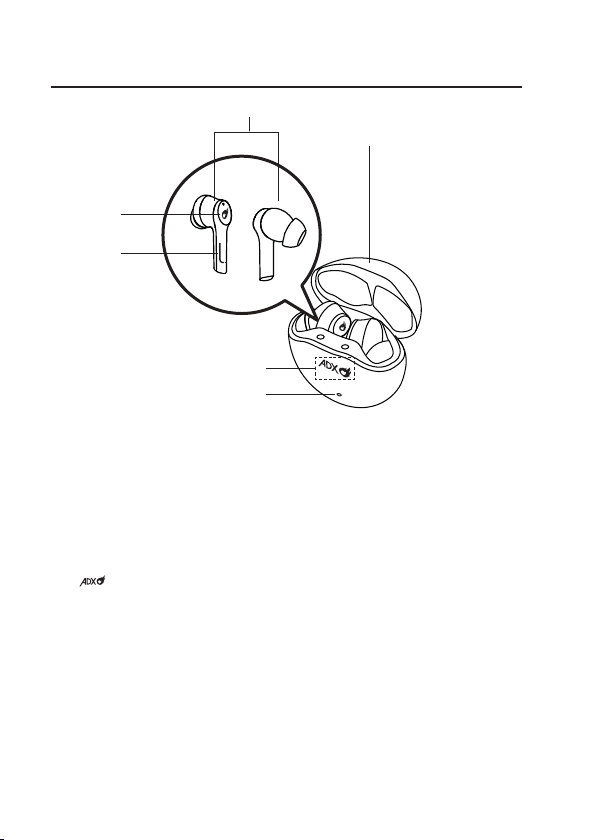
1. Earbuds
2. Touch Sensor
3. Earbuds LED indicator
4. Charging Case
5. Charging Indicator
6. Charging Case Charging Indicator
• Light up red while charging
• Switch o after the charging case is fully charged
Product Overview
4
2
3
1
6
5

8
Charging the Charging Case
1. Plug the type C charging cable into your charging case’s charging
socket.
2. Insert the other end of the charging cable into a powered USB device.
3. When the charging case is being charged properly, the charging
indicator lights up red.
4. After fully charged, the charging indicator lights up blue.
5. Remove the charging cable.
Charging Indicator
Charging the Earbuds
Fully charge the earbuds when using for the rst
time.
1. Place the earbuds into the charging case and
close the lid.
2. While charging, the Charging Indicator will
ash.
3. The Charging Indicator stops ashing after
the earbuds are fully charged.

9
Charging Indicator
While charging the earbuds, or the charging case is being charged, the
Charging Indicator will ash (from left to right).
100%
0%
Charging Indicator
To switch on/o the Charging Indicator, press the button at the rear of
the charging case.
Charging indicator
ON/OFF Button
Rear view of the charging case
You may also press the button to check the battery status of the
charging case.
• The logo indicates there are four stages of the battery
power.
• It will light up completely to show that the charging case has
been fully charged with 100% battery capacity.
10
How to Wear the Earbuds
Before wearing the earbuds, ensure to attach the ear tips to the earbuds.
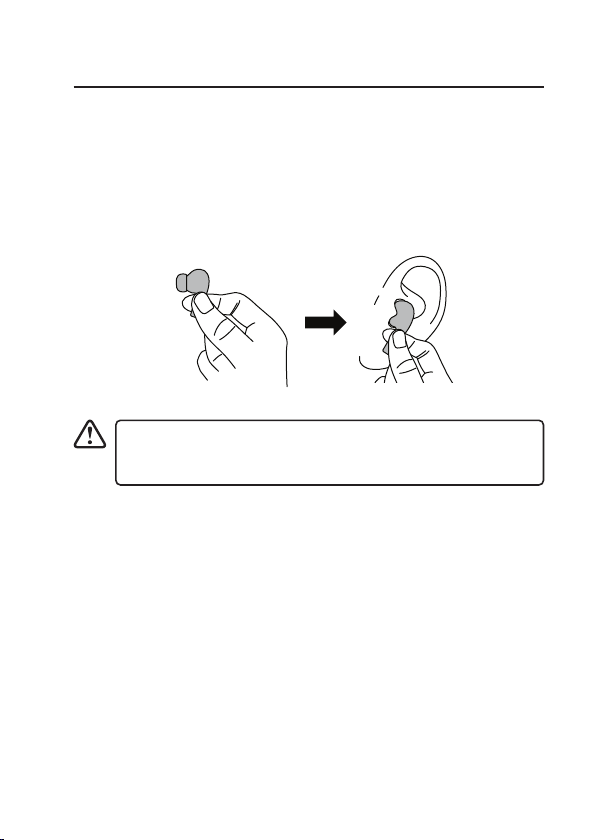
1. Open the lid, grab the earbuds out of the charging case.
2. Use the earbud tips that t your ears.
3. Check the direction of each earbud. Hold the plastic rod of the earbuds
then place the earbuds snugly into your ear canals.
4. Hold the plastic rod to adjust the angle of the earbuds until they t your
ears.
To avoid accidentally touching the earbuds sensors, always hold
the plastic rod of the earbuds while wearing, moving, adjusting
the angle or pulling out the earbuds.
Este manual sirve para los siguientes modelos
1
Tabla de contenidos


