
Adeunis RF Evolution 3 Manual de usuario

Vokkero Evolution 3
FHSS version
User Guide
Notice d‘emploi
Instrucciones para el uso
207906A-V1.1-UG_VOKKERO_EVOLUTION3_FHSS

207906A-V1.1-UG_VOKKERO_EVOLUTION3_FHSS
Preamble /Préambule / Preámbulo
• ThisguidedescribesthefunctionalityofthesystemVOKKERO,optionsandaccessories.Itexplainshowto
congureittoallowaconference-typecommunicationbetweenmultipleusers.
• CeguidedécritlesfonctionnalitésdusystèmeVOKKERO,sesoptionsetsesaccessoires.Ilexpliquecomment
lecongurerpourpermettreunecommunicationdetypeconférenceentreplusieursutilisateurs.
• EstaguíadescribelafuncionalidaddelsistemaVokkero,opcionesyaccesorios.Enélseexplicacómocongu-
rarloparapermitirunacomunicacióndetipoconferenciaentremúltiplesusuarios.
• Nopartofthisdocumentmaybereproducedortransmitted(inelectronicorpaper,orphotocopying)withoutthe
agreementAdeunisRF.Thisdocumentmaybechangedwithoutnotice.Alltrademarksmentionedinthisguide
arethesubjectofintellectualpropertyrights.AdeunisRF.
• Aucunextraitdecedocumentnepourraêtrereproduitoutransmis(sousformatélectroniqueoupapier,oupar
photocopie)sansl’accordd’AdeunisRF.Cedocumentpourraêtremodiésanspréavis.Touteslesmarques
citéesdansceguidefontl’objetd’undroitdepropriétéintellectuelle.
• Ningunapartedeestedocumentopuedeserreproducidaotransmitida(enfotocopiaselectrónicooenpapel,o)
sinelacuerdoADEUNISRF.Estedocumentopuedesermodicadasinprevioaviso.Todaslasmarcascomer-
cialesmencionadasenestaguíasoneltemadelosderechosdepropiedadintelectual.
ADEUNIS-RF
283, rue Louis Néel
38920 Crolles
France
Phone +33(0)4 76 92 07 77
Fax +33(0)4 76 08 97 46
Web www.vokkero.com

207906A-V1.1-UG_VOKKERO_EVOLUTION3_FHSS
Table of contents - Table des matières - Índice de materias
Preamble /Préambule / Preámbulo 2
English - Introduction 7
1. Vokkero Terminal 7
a. Descriptionofthescreenicons 7
b. Descriptionofthekeypadkeys 7
2. Start-up of the terminal – Important information 8
a. UsingtheVokkerosystem–Basicimplementation 8
b. Assignanumbertoasystem 8
c. FHSStables/Channelsetting 8
d. Settingthesystemsinconferencemode(encryptionprocedure) 9
e. Adjustingthelisteningvolume 10
f. Enteringandleavingthenetwork 10
g. Usingthe“listener”listeningmode 10
3. Options Menu 11
a. SpeakerModeOption 11
4. Optional functions 11
a. IntroductiontoOptionalfunctions 11
b. Adjustingthe«Sidetone» 11
c. «FastMode»Menu 12
d. «Group»functions 13
e. «Push-to-talk»(PTT)menu 14
5. Appendices 15
a. «Advancedsettings»menu 15
b. «Usermenulocked»menu 15
c. «Encryptionsetting»menu 15
d. «Filtertype»menu 16
e. «Mic.Settings»menu 16
f. «AECFilter»menu 16
6. Batteries 17
7. Antennas 17
8. Troubleshooting – FAQ 18
Français - Introduction 20
1. Terminal Vokkero 20
a. Descriptiondesicônesdel’écran 20
b. Descriptiondestouchesduclavier 21
2. Mise en route du terminal - Informations importantes 21
a. UtilisationdusystèmeVokkero-Miseenoeuvredebase 21
b. Attribuerunnuméroàunsystème 21
c. TablesFHSS/Réglageducanal 22
d. Réglerlessystèmesenmodeconférence(procédured’encryption) 22

207906A-V1.1-UG_VOKKERO_EVOLUTION3_FHSS
e. Réglageduvolumed’écoute 23
f. Entréeetsortiederéseau 23
g. Utilisationdumodeécoute«listener» 23
3. Menu Options 24
a. OptionSpeakerMode 24
4. Fonctions optionnelles 24
a. Introductionauxfonctionsoptionnelles 24
b. Réglagedu«Sidetone» 24
c. Menu«FastMode» 25
d. Fonction«Groupe» 26
e. Menu«Push-to-talk»(PTT) 27
5. Annexes 28
a. Menu«Advancedsettings» 28
b. Menu«Usermenulocked» 28
c. Menu«Encryptionsetting» 28
d. Menu«Filtertype» 29
e. Menu«Mic.Settings» 29
f. Menu«AECFilter» 29
6. Batteries 30
7. Antennes 30
8. Dépannage – FAQ 31
Español - Introducción 33
1. Terminal Vokkero 33
a. Descripcióndelosiconosdelapantalla 33
b. Descripcióndelasteclasdelteclado 33
2. Puesta en marcha del terminal – Informaciones importantes 34
a. UtilizacióndelsistemaVokkero–Utilizaciónbásica 34
b. Atribuirunnúmeroaunsistema 34
c. FHSSTablas/Reglajedelcanal 34
d. Reglajedelossistemasenmodoconferencia(procedimientodeencryption) 35
e. Reglajedelvolumendeescucha 36
f. Entradaysalidadelared 36
g. Utilizacióndelmododeescucha«listener» 36
3. Menú Opciones 37
a. OpciónSpeakerMode 37
4. Funciones opcionales 37
a. Introducciónalasfuncionesopcionales 37
b. Reglajedel«Sidetone» 37
c. Menú«FastMode» 38
d. Función«Grupo» 39
e. Menú«Push-to-talk»(PTT) 40
5. Anexos 41
a. Menú«Advancedsettings» 41
b. Menú«Usermenulocked» 41
c. Menú«Encryptionsetting» 41

207906A-V1.1-UG_VOKKERO_EVOLUTION3_FHSS
d. Menú«Filtertype» 42
e. Menú«Mic.Settings» 42
f. Menú«AECFilter» 42
6. Baterías 43
7. Antenas 43
8. Reparación – FAQ 43
Declarationofconformity-Australia 45
Declarationofconformity-NewZealand 45
CompliancetoFCCUS/CAN 46
Downloadtheuserguide 46

6
207906A-V1.1-UG_VOKKERO_EVOLUTION3_FHSS
ENGLISH

7
207906A-V1.1-UG_VOKKERO_EVOLUTION3_FHSS
Introduction
TheoperationsdescribedbelowenableyoutoimplementyourVokkerocommunicationsystemquicklyandeasily.
TheseoperationsarecommontotheversionsofVokkerolistedbelow:
USA/CANADA : ARF 7672AA / AN / AS / DA / DN / DS / DT / DU / DV / EA / EF / FA / GA
AUSTRALIA : ARF 7672AB / AO / AT / DB / DO / DW / EB / FB / GB
NEW ZEALAND : ARF 7672AC / AP / AU / DC / DP / DX / EC / FC / GC
Note:yourproductreferenceistobefoundonthelabelinyourterminal’sbatteryhousing.
1. Vokkero Terminal
1.1 Descriptionofthescreenicons
Thescreendisplayskeyinformationfortheuserwhenusinghisorherterminal.
1.2 Descriptionofthekeypadkeys
On/Off
Allowspoweringup,orshu-
tdownoftheterminal.
Menu
Access the conguration
menuoftheterminal.Also
allowsdirectaccesstothe
groupselection.
OK
Locking / unlocking the
keyboard.Thisbuttonalso
allowsyoutovalidateyour
selection,orquitthesetup
menuofthedevice
+/-
Allowsdirectaccessto
volumecontrolorchannel
selection.Inthesetup
menuofthedevicecan
adjustthesettings.
Push-to-talk
Allowstheopening/closing
ofthemicrophonewhenthe
Push-To-Muteisenabled.
Product ID (Role setting)
Speciesthedevicenumberintheconferenceor
thelistening(systemlistener).
System Status
Theicon indicates location of thedeviceinthe
system.Othernumbersrefertodevicesconnec-
tedtotheconference.
Channel (channel setting)
Indicatestheradiochannelinuse.
«US»forUSA/Canada
«T0»forAustralia
«NZ»forNewZealand
Battery Indicator
Provides information on the level of battery
charge,with5possiblelevels.
Adjusting the volume
Indicatesthevolumelevelon9levels.
Group mode
Indicatestheparentgroupoftheterminal.
« Push-to-talk » function
To visualize the status of the «Push-to-talk»
mode.Openorclosedmicrophone
Keyboard lock / unlock
Warning:This lock does not affecttheOn/Off
function.
US

8
207906A-V1.1-UG_VOKKERO_EVOLUTION3_FHSS
2. Start-up of the terminal – Important information
Beforestartingupyourterminal,makesurethatapre-chargedbatteryhasbeencorrectly
insertedintothebatterycompartment(onthebackofyourterminal).
• Toswitchonthedevice,presstheOn/Offkeyandkeeppressingituntilitstartsup,and
thenreleasethekey.
• Toswitchoffthedevice,presstheOn/Offkeyandkeeppressingituntilitisturnedoff.
Note1:Whenyouswitchonthedevice,thekeypadisautomaticallylocked.
Tounlockthekeypad,pressthe“OK”keyuntilthelockingkeydisappears.
Note2:Alltheparameters,includingthevolumesetting,areretainedandremainthesame
whenyouturnoffthedeviceorwhenthebatteryisremovedfromit.
2.1 UsingtheVokkerosystem–Basicimplementation
Principle:
Tosetupaconference,allyouhavetodois:
• Assignadifferentnumbertoeachdevicetakingpartintheconference.
• Denetheradiochannelwhichwillbeusedforcommunications.
• Pair upthedevicesinconferencemode(encryptionprocedure).
2.2 Assignanumbertoasystem
Tosetupaconference,rstlyyoushouldidentifyallthedevicesthatwilltakepartinitand
assignthemanumber(role).Aconferencecanbesetupinvolving2to6devices,whichwill
beidentiedbyanumberrangingfrom01to06.
Note1:Oneofthedevicesabsolutelymustbearthenumber01.
Note2:Donotassignthesamenumbertoseveraldevicesbecausethatwouldpreventthe
conferencefromrunningsmoothly.
Procedure:
• Unlockthekeypad
• Onthehomescreen,pressthe“Menu”keyuntilyoureachtheUser MENU(thecon-
gurationmenuwillbedisplayed).
• Usingthe“+”or“-”keys,accesstheRole sub-menu(rolesetting).Press“OK”tovali-
dateyourchoice.
• Selecttheidenticationnumberforthedevicebyusingthe“+”or“-”keys.
• Press“OK”tovalidateyourchoice.
• Press“Menu”toreturntothehomescreen.
2.3 FHSStables/Channelsetting
IMPORTANT:Beforeusingthedevice,pleaseobservethelegalprovisionsinforceinyour
country.
Inthese915MHzFHSSversions,Vokkeroistransmittinginfrequencyhoppingmode.
YoucansettheterminalVokkeroon4or5differenttablesofchannels,dependingonthe
congurationofyourmodule.
Therearedifferentgroupsoffrequenciestableavailabledependingonwhenthesystem
willbeused:

9
207906A-V1.1-UG_VOKKERO_EVOLUTION3_FHSS
«US tables» :canbeusedinNorthAmerica(USA/Canada)andmostoftheCentraland
SouthAmericancountries.
«T0 tables»:canbeusedinAustraliaandsomeAsiancountries.
«NZ tables»:canbeusedinNewZealandandsomeAsiancountries.
TABLE ID FREQUENCIES
US1 25channelswithinthe902MHzto918MHzband
US2 25channelswithinthe912MHzto928MHzband
US3 25channelswithinthe902MHzto928MHzband
US4 25channelswithinthe902MHzto928MHzband
US5 25channelswithinthe902MHzto928MHzband
T01 20channelswithinthe915MHzto928MHzband
T02 20channelswithinthe915MHzto928MHzband
T03 20channelswithinthe915MHzto928MHzband
T04 25channelswithinthe915MHzto928MHzband
NZ1 4channelswithinthe921.5MHzto924.5MHzband
NZ2 4channelswithinthe924.5MHzto927.75MHzband
NZ3 8channelswithinthe921.5MHzto928MHzband
NZ4 10channelswithinthe921.5MHzto928MHzband
Procedure:
• Onthehomescreen,pressthe“Menu”keyuntiltheUser MENUisdisplayed.
• Usingthe“+”or“-”keys,accesstheChannelsub-menu.Press“OK”tovalidateyour
choice.
• IntheChannelmenu,selectthechannel(US1toUS5forUSA/Canadaversion,T01to
T04forAustraliaversionandNZ1toNZ4forNewZealandversion)byusing“+”or“-”.
Youmustassignthesamechannelnumbertoalltheterminals.
• Press“OK”tovalidateyourchoice.
• Press“Menu”toreturntothehomescreen.
2.4 Settingthesystemsinconferencemode(encryptionprocedure)
Principle:Inordertocommunicate,thedevicesmustsaveanencryptionkeysuppliedby
apparatusnumber01.
Thisoperationisrequiredinorderto:
• Enableallthedevicestotakepartinaconference.
• Addadevicetoanexistingsystemthathasalreadybeencongured.
IMPORTANT
Adevicecannotcommunicatewithasystemiftheencryptionprocedurehasnotbeencar-
riedout.Ifyouwanttoaddaterminaltoanexistingsystem,youabsolutelymustcarryout
thisprocedurewithallthedevicesinthesystem(includingthedevicesconguredinListener
mode).
Makesurethateachofthefollowingcriteriaarefullledbeforestartingtheoperation:
• Allthedevicesmustusethesamechannel.
• OnlyonedevicebearstheID01.
Procedure:
• Oneachdevice,pressthe“Menu”keyuntiltheUser MENUisdisplayed.
• Usingthe“+”or“-”keys,accesstheNetworksub-menu.Press“OK”tovalidateyour
choice.
10
207906A-V1.1-UG_VOKKERO_EVOLUTION3_FHSS
• Usingthe“+”or“-”keys,accesstheStart sub-menu.
• Onterminals2to6,press“OK”tovalidateyourchoice.
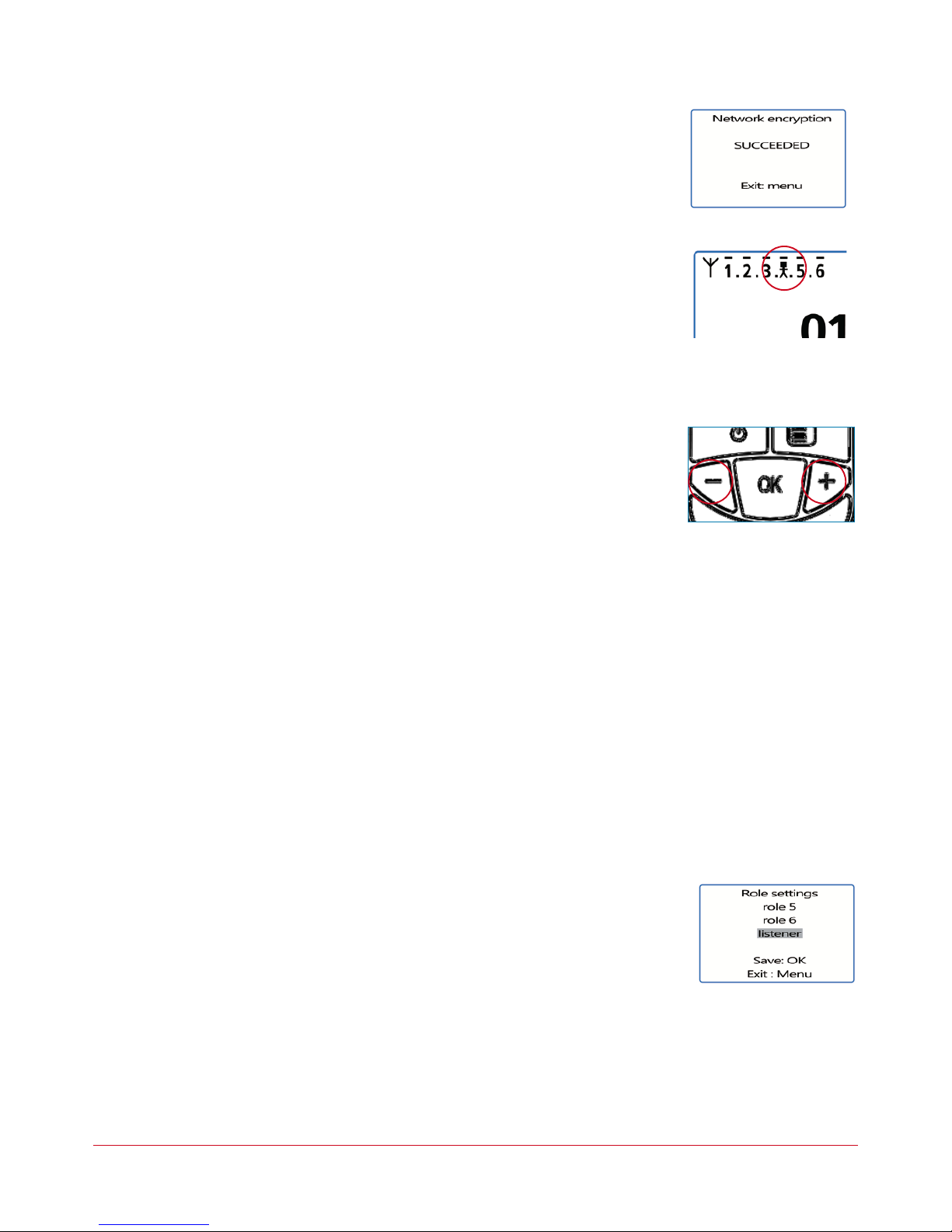
• Allthedevicesshoulddisplay“Network Encryption in progress... please wait”.
• Now,pressthe“OK”keyonterminal1.Apparatus01willdisplay“Sending Key. please
wait until process has succeeded”.
• Whenadevicehasreceivedtheencryptionkeyfromdevicenumber01,**SUCCEE-
DED**willappearon-screen.Pressthe“OK”keytovalidateit.Onlydevice01retains
thesamedisplay.
• Whentheencryptionoperationhasbeenvalidatedoneachoftheotherdevices,press
the“OK”keyondevicenumber01toendtheoperation.
Remark:Toquitthemenuwithoutsaving,pressthe“Menu”key.
Onthemainscreen,alloftheterminalsintegratedintothenetworkappearonthe“status”
icon,thusconrmingthattheproductsareproperlypairedup.
Oncethesethreestages(b,candd)havebeencarriedout,youcanuseyourVokkerocom-
municationsystem.
2.5 Adjustingthelisteningvolume
• Makesurethatthekeypadisunlocked.
• Makesurethatyouareonthehomescreen.Press“+”or“–”for2seconds.
• Youwillthenhearabeepintheearphone.
• Toadjustthevolume,press“+”or“–”.Thereare9volumelevels.Themaximumormini-
mumlevelisvisibleviathevolumeicon(cf.thedescriptionofthescreenicons)
• Press“OK”tovalidate.
2.6 Enteringandleavingthenetwork
Whenthecommunicationnetworkhasbeencreated,eachtimeyourterminalentersorlea-
vesthenetwork,thisisindicatedbytwobeeps:
*4rapidbeeps->enteringthenetwork
*2slowbeeps->leavingthenetwork
2.7 Usingthe“listener”listeningmode
Itispossibletouseadeviceinlisteningmodeonly.Thedevicecanthenonlyreceiveand
hearcommunicationsexchangedbetweentheotherdevicesintheconference.Itwillnotbe
possibletoheartheuser.
IMPORTANT
• Thelisteningmodecanonlyfunctioniftheusertookpartintheencryptionoperation.
• Thelisteningmodefunctionsonlywhenatleast2devices(01andanotherone)arein
conferencemode.
Procedure:
• Onthehomescreen,pressthe“Menu”keyuntiltheUser MENUisdisplayed.
• Usingthe“+”or“-”keys,accesstheRole sub-menu(rolesetting).Press“OK”tovali-
dateyourchoice.
• SelectListener fromthelistproposed,usingthe“+”or“-”keys.
• Press“OK”tovalidateyourchoice.
Este manual sirve para los siguientes modelos
1
Tabla de contenidos
Idiomas:


