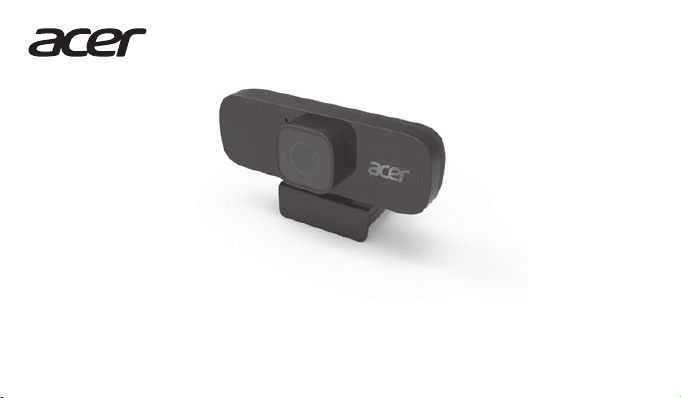
Acer ACR010 Manual de usuario

ACR010
Quick Start Guide
Guide de démarrage rapide
Kurzanleitung
Hurtigstartguide
Snabbstartsguide
Pika-aloitusopas
Guía de inicio rápido
Stručná referenční příručka
Skrócona instrukcja obsługi
Краткое руководство

Quick Start Guide
This guide outlines the operating procedures and safety
precautions. Please read it carefully to make sure you are using
your product properly and keep it for future reference.
Specications
• Model: ACR010
• Maximum resolution: 2560H x 1440V
• White balance/ Focusing method/ Zoom mode: Automatic
• Angel wide: 120 degree (Diagonal), F=1.8
• Audio input: Built-in microphone
• USB cable length: 250cm
• Unit size: 100x35x25mm
• Unit weight: 150g
System Compatibility
• Windows®10, Windows®8.1, Windows®8, Windows®7 or
Linux2.6.26. Android4.0 (Above), MAC OSX EI captain 10.11.4,
Chrome OS
• Interface: USB Port
Get Started
• Plug it into one of the USB ports ofyour computer. It is a plug
& playwebcam, so there is no extra driver needed. Please
note that there is no icon or message forthis webcam after it
is successfully installed, but it do work.
• To use it, you may need a third-party software like Skype.
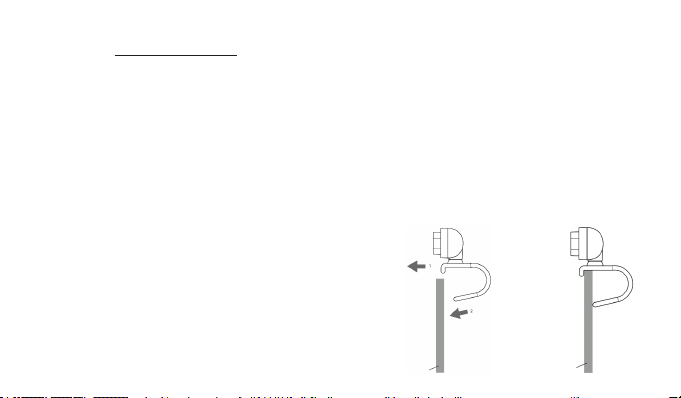
How to keep it in place
• Open the webcam stabilizer to a proper angle.
Monitor
Monitor
English

• Place it on the computer screen using the webcam stabilizer.
• Plug the USB of the Webcam into the computer.
Package Contents
• Webcam x1
• Quick Start Guide x1
• Warranty booklet x1
Caution
• Do not disassemble the device or operate the device under
abnormal conditions.
• Do not submerge the device in water.
• If the device could not be functional, or there was thermal
abnormal situation, please re-plug in the USB.
• If you still encounter problems after going through the
corrective measures, please contact your dealer oran
authorized service center for assistance.
• For more information regarding the Acer accessories, please
visit the Acerwebsite at www.acer.com
Environment
Temperature:
• Operating: 0 °C to 40 °C
• Non-operating: -20 °C to 60 °C
Humidity (non-condensing):
• Operating: 10% to 85%
• Non-operating: 10% to 95%
Manufacturer address
Acer Inc.
8F, 88, Sec. 1, Xintai 5th Rd. Xizhi, New Taipei City 221, Taiwan

Europe – EU Declaration of Conformity
We declare under our sole responsibility that
the product is conformity with all the essential
requirements and other provisions of the European
Council Directive RoHS Directive (2011/65/EU), EMC
Directive (2014/30/EU) on issued by the Commission of
the European Community.
This product must not be disposed ofwith your other
House hold waste or treat them in compliance with the
local regulations or contact your local city oce, your
household waste disposal service or the shop where
you purchased the product.
FEDERAL COMMUNICATIONS COMMISSION
(FCC) STATEMENT
This equipment has been tested and found to
comply with the limits for a Class B digital device,
pursuant to part 15 of the FCC Rules. These limits are
designed to provide reasonable protection against
harmful interference in a residential installation.
Thisequipment generates, uses and can radiate radio
frequency energy and, ifnot installed and used in
accordance with the instructions, may cause harmful
interference to radio communications.
However, there is no guarantee that interferencewill not occur
in a particular installation. If this equipment does cause harmful
interference to radio or television reception, which can be
determined by turning the equipment o and on, the user is
encouraged to try to correct the interference by one or more of
the following measures:
• Reorient or relocate the receiving antenna.
• Increase the separation between the equipment and receiver.
• Connect the equipment into an outlet on a circuit dierent
from that to which the receiver is connected.
• Consult the dealer or an experienced radio/TV technician for
help.
FCC Caution
Changes or modications not expressly approved by the part
responsible for compliance could void the user’s authority to
operate the equipment.
This device complies with Part 15 of the FCC Rules. Operation is
subject to the following two conditions: (1) this device may not
cause harmful interference, and (2) this device must accept any
interference received, including interference that may cause
undesired operation.

IC Statement
Operation is subject to the following two conditions: (1) This
device may not cause harmful interference, and (2) this device
must accept any interference received, including interference
that may cause undesired operation.
Déclaration IC
Son fonctionnement est soumis aux deux conditions suivantes:
(1) cet appareil ne doit pas causer d’interférence et (2) cet
appareil doit accepter toute interférence, notamment les
interférences qui peuvent aecter son fonctionnement.
Multi-language QSG download link: go.acer.com/acr010
Acer Incorporated
8F, 88, Sec. 1, Xintai 5th Rd.,Xizhi
New Taipei City 221, Taiwan
Declaration of Conformity
We,
Acer Incorporated
8F, 88, Sec. 1, Xintai 5th Rd., Xizhi, New Taipei City 221, Taiwan
And,
Acer Italy s.r.l.
Viale delle Industrie 1/A, 20020 Arese (MI), Italy
Tel: +39-02-939-921 ,Fax: +39-02 9399-2913
www.acer.it
Product: Acer Webcam
Trade Name: acer
Model Number: ACR010
We, Acer Incorporated, hereby declare underour sole responsibility that the product
described above is in conformity with the relevant Union harmonization legislation:
EMC Directive 2014/30/EU and RoHS Directive 2011/65/EU. The following
harmonized standards and/orother relevant standards have been applied:
EN55032:2015, Class B
EN55035: 2017
EN61000-2:2014
EN61000-3:2013
EN 50581: 2012
Year to begin affixing CE marking: 2020.
11/20/2020
RU Jan / Sr. Manager
Acer Incorporated (Taipei, Taiwan)
Date

Guide de démarrage rapide
Ce guide décrit les procédures d'utilisation et les précautions
de sécurité. Veuillez le lire attentivement pourvous assurerque
vous utilisez correctement votre produit et conservez-le pour
référence ultérieure.
Caractéristiques
• Modèle : ACR010
• Résolution maximale : 2560Hx 1440V
• Balance des blancs/Méthode de mise au point/Mode zoom:
Automatique
• Angle large : 120 degrés (en diagonale), F=1,8
• Entrée audio : Microphone intégré
• Longueur du câble USB : 250cm
• Taille de l’unité : 100x35x25mm
• Poids de l’unité : 150g
Compatibilité système
• Windows®10, Windows®8.1, Windows®8, Windows®7
ouLinux 2.6.26. Android 4.0 (ou supérieur), MAC OS X
EIcaptain 10.11.4, Chrome OS
• Interface : Port USB
Premiers pas
• Branchez-la sur un des ports USB de votre ordinateur. C’est
une webcam Plug-and-Play, il n’y a donc pas besoin de pilote
supplémentaire. Veuillez noter qu’il n’y a pas d’icône ou de
message pour cette webcam après son installation, mais elle
fonctionne.
• Pour l’utiliser, vous pourrez avoir besoin d’un logiciel tiers
comme Skype.
Comment la maintenir en place
• Ouvrez le stabilisateur de la webcam à un angle approprié.
Moniteur
Moniteur
Français

• Placez-la sur l’écran de l’ordinateurà l’aide du stabilisateur
de la webcam.
• Branchez la prise USB de la webcam dans l’ordinateur.
Contenu de l’emballage
• Webcam x1
• Guide de démarrage rapide x1
• Livret de garantie x1
Attention
• Ne démontez pas l’appareil et n’utilisez pas l’appareil dans
des conditions anormales.
• Ne plongez pas l’appareil dans l’eau.
• Si l’appareil ne fonctionne pas ou s’il y a eu une situation
anormale, veuillez rebrancher l’USB.
• Si vous avez toujours des problèmes après avoir passé en
revue les mesures correctrices, veuillez contacter votre
revendeurou un centre de service agréé.
• Pour plus d'informations concernant les accessoires Acer,
veuillez visiter le site Web d’Acer surwww.acer.com
Environnement
Température:
• En marche : 0 °C à 40 °C
• À l’arrêt : -20 °C à 60 °C
Humidité (sans condensation):
• En marche : 10% à 85%
• À l’arrêt : 10% à 95%
Adresse du fabricant
Acer Inc.
8F, 88, Sec. 1, Xintai 5th Rd. Xizhi, New Taipei City 221, Taiwan

Europe – Déclaration de conformité UE
Nous déclinons sous notre seule responsabilité
que le produit est conforme à toutes les exigences
essentielles et autres dispositions de la Directive du
Conseil Européen, Directive RoHS (2011/65/UE) et
Directive CEM (2014/30/UE) émises parla Commission
de la Communauté européenne.
Ce produit ne doit pas être jeté avec vos autres
ordures ménagères, traitez-le en conformité avec les
réglementations locales ou contactez votre bureau
municipal, votre service d'élimination des déchets
ménagers ou le magasin où vous avez acheté le produit.
Acer Incorporated
8F, 88, Sec. 1,Xintai 5th Rd., Xizhi
New Taipei City 221, Taiwan
Déclaration de conformité
Nous,
Acer Incorporated
8F, 88, Sec. 1, Xintai 5th Rd.,Xizhi, New Taipei City 221, Taiwan
Et,
Acer Italy s.r.l.
Viale delle Industrie 1/A, 20020 Arese (MI), Italie
Tél : +39-02-939-921, Fax: +39-02 9399-2913
www.acer.it
Produit : Webcam Acer
Nom commercial : acer
Numéro de modèle : ACR010
Nous, Acer Incorporated, déclarons sous notre seule responsabilité que le produit
décrit ci-dessus est en conformité avec les législations d’harmonisation de l’Union
pertinentes: Directive EMC 2014/30/UE et Directive RoHS 2011/65/UE. Les normes
harmonisées suivantes et/ou autres normes pertinentes ont été appliquées:
EN55032:2015, Classe B
EN55035: 2017
EN61000-2:2014
EN61000-3:2013
EN 50581: 2012
Année début d’apposition du marquage CE : 2020.
20/11/2020
RU Jan / Sr. Manager
Acer Incorporated (Taipei, Taiwan)
Date

Kurzanleitung
Diese Anleitung beschreibt die Bedienungsweise und
Sicherheitsvorkehrungen. Bitte lesen Sie sie sorgfältig durch,
um sicherzustellen, dass Sie Ihr Produkt richtig verwenden, und
bewahren Sie sie fürzukünftige Zwecke auf.
Technische Daten
• Modell: ACR010
• Maximale Auösung: 2560H x 1440V
• Weißabgleich/ Fokussiermethode/ Zoom-Modus:
Automatisch
• Winkelbreite: 120 Grad (Diagonal), F=1,8
• Audioeingang: Integriertes Mikrofon
• USB Kabellänge: 250cm
• Gerätegröße: 100x35x25mm
• Gerätegewicht: 150g
Systemkompatibilität
• Windows®10, Windows®8.1, Windows®8, Windows®7
oderLinux 2.6.26. Android 4.0 (oder höher), MAC OS X
EICapitan 10.11.4, Chrome OS
• Schnittstelle: USB-Anschluss
Los gehts
• Schließen Sie sie an einen der USB-Anschlüsse Ihres
Computers an. Es ist eine Plug & Play Webcam, es wird
also kein zusätzlicher Treiber benötigt. Bitte beachten Sie,
dass es kein Symbol odereine Nachricht für diese Webcam
gibt, nachdem sie erfolgreich installiert wurde, aber sie
funktioniert.
• Zur Nutzung benötigen Sie möglicherweise eine Software
eines Drittanbieters wie Skype.
Feste Position gewährleisten
• Önen Sie den Webcam Stabilisator in einem geeigneten Winkel.
Monitor
Monitor
Deutsch

• Platzieren Sie sie mit Hilfe des Webcam Stabilisators auf dem
Computerbildschirm.
• Verbinden Sie den USB-Anschluss der Webcam mit dem
Computer.
Lieferumfang
• Webcam x1
• Kurzanleitung x1
• Garantieheft x1
Vorsicht
• Nehmen Sie das Gerät nicht auseinander und betreiben Sie es
nicht unter ungeeigneten Bedingungen.
• Tauchen Sie das Gerät nicht in Wasser ein.
• Wenn das Gerät nicht funktionsfähig ist oder eine thermische
Störung auftrat, stecken Sie bitte den USB-Stecker wieder ein.
• Sollten Sie nach dem Durchführen der Korrekturmaßnahmen
weiterhin Probleme haben, wenden Sie sich bitte an Ihren
Händler oderein autorisiertes Servicezentrum, um Hilfe zu
erhalten.
• Weitere Informationen über Acer Zubehör nden Sie auf der
Acer Webseite unter www.acer.com
Umgebung
Temperatur:
• Betrieb: 0 °C bis 40 °C
• Nichtbetrieb: -20 °C bis 60 °C
Luftfeuchtigkeit (nicht kondensierend):
• Betrieb: 10% bis 85%
• Nichtbetrieb: 10% bis 95%
Adresse des Herstellers
Acer Inc.
8F, 88, Sec. 1, Xintai 5th Rd. Xizhi, New Taipei City 221, Taiwan
Tabla de contenidos
Idiomas:
Otros manuales de Cámara web de Acer