
Acard AEC-67160D Manual de usuario

AEC-67160D
Ultra160 SCSI Adapter
User’s Manual
Copyright ©2002 ACARD Technology Corp.
Release: October 2002
Version: 1.0

Copyright and Trademarks
The information of the products in this manual is subject to change without
prior notice and does not represent a commitment on the part of the vendor,
who assumes no liability or responsibility for any errors that may appear in
this manual.
ACARD and SCSIDE are the trademarks of ACARD Technology Corp.
Microsoft and the Windows Logo are the registered trademarks, and Win-
dows is the trademark of Microsoft Corporation. All brands and trademarks
are the properties of their respective owners.
ThismanualcontainsmaterialsprotectedunderInternationalCopyrightCon-
ventions. All rights reserved. No part of this manual may be reproduced in
any form or by any means, electronic or mechanical, including photocopy-
ing, without the written permission of the manufacturer and the author. All
inquiries should be addressed to ACARD Technology Corp.

Table of Contents
Chapter 1 Introduction ......................................5
1.1 Overview ..................................................................5
1.2 Features....................................................................5
1.3 Specifications..........................................................5
Chapter 2 Installation ........................................6
2.1 InstallingAEC-67160D ...........................................6
2.2 ConnectingARS-3010 ............................................6
Chapter 3 BIOS Settings ................................... 7
3.1 SCSI DEVICES .........................................................8
3.2 ADAPTERSETUP....................................................9
3.2.1 SCSI Speed Setup.................................................................10
3.2.2 Additional Setup Functions ...............................................10
3.3 DIAGNOSTICS ....................................................... 11
3.4 UTILITY...................................................................12
3.4.1 Preformat ................................................................................12
3.4.2 Verify ........................................................................................12
3.4.3 Quick Erase ............................................................................13
3.5 LOADDEFAULTS ..................................................14
3.6 EXITSETUP ...........................................................14
Chapter 4 Software Configuration ................. 15
4.1 Outline ....................................................................15
4.2 InWin95/98/ME.....................................................15
4.2.1 Install the Driver....................................................................15
4.2.2 Verify the SCSI Adapter.......................................................18
4.2.3 Update the Driver..................................................................20
4.3 In Win NT ................................................................22
4.3.1 Install the Driver....................................................................22
4.3.2 Power on from Disk Box.....................................................25
4.3.3 Verify the SCSI Adapter.......................................................26
4.4 In Win 2000/XP.......................................................26

4.4.1 Install the Driver....................................................................26
4.4.2 Power on from Disk Box ....................................................30
4.4.3 Verify the SCSI Adapter ......................................................30
Chapter 5 Troubleshooting.............................33

5
AEC-67160D User’s Manual
Chapter 1 Introduction
1.1 Overview
AEC-67160D is particularly developed for ACARD’s ARS-3010, the Disk Box. It is a
SCSI Ultra160 LVD (Low Voltage Differential) adapter acting as a stable and highly
effective host interface for the Disk Box.
1.2 Features
AEC-67160D has the following characteristics.
nPCI Bus Master relieving CPU from I/O task loading
nSynchronous transfer rate up to 160MB/sec
nSupports low profile for rack mount IPC
nPowerful advanced setup function
nSupports Scatter\Gather operation
nAutomatic FIFO threshold selection
nAutomatic termination control
1.3 Specifications
The specifications of AEC-67160D are listed below.
nOperating System --- Win 95/98/ME, Win NT/2000/XP, Linux
nPower required --- Voltage : 5V ± 5%
nPower consumption --- 0.4W (standby) ; 2.85W(max.)
nEnvironment --- Operating temperature in-between 0°C ~ 70°C
nDimensions --- 13cm (L) × 6.5cm (W)
nConnector --- One 68-pin external Ultra 160 LVD SCSI connector
nTerminator --- Active

6
AEC-67160D User’s Manual
Chapter 2 Installation
2.1 InstallingAEC-67160D
Please follow the 7 steps given below to install AEC-67160D.
Step 1:Turn off the power of host PC or DVR, ect.
Step 2:Remove the power cord and the cable for external device like ARS-3010.
Step 3:Remove the outer shell of the host PC. Please refer to related manual.
Step 4:Choose a spare PCI expansion slot. Unscrew and remove the cover.
Step 5:Take AEC-67160D out of the antistatic bag. Hold its metal bracket
carefully in order not to let the human static damage the adapter.
Step 6:Insert AEC-67160D into the PCI expansion slot (don’t damage the PCI
edge), and screw its metal bracket from outside.
Step 7:Replace the host PC’s outer shell. Then, connect the external SCSI
device according to 2.2.
2.2 ConnectingARS-3010
Please follow the 2 steps given below to connect ARS-3010, the Disk Box.
Step 1:Connect ARS-3010 to the external connector of AEC-67160D with a
SCSI LVD cable.
Step 2:After installing ARS-3010 (hardware installation and setting), turn on the
power of all serial ARS-3010s, and power on the host PC.

7
AEC-67160D User’s Manual
Chapter 3 BIOS Settings
After powering on the host PC, it will detect the newly installed AEC-67160D, and a
screen like the following one will appear. Now you can press <F1> or <F10> to
enter BIOS to do related settings.
PCI MASTER ULTRA160 LVD/SE SCSI ADAPTER
ACARD PCI MASTER Ultra160 LVD/SE SCSI ADAPTER
Model : AEC-67160D 07-29-2002 Ver 1.03.0
Press <F1> or <F10> To Issue Setup Utility
ROM Address : C8000h
I/O Ports : 6000
IRQ : 11 (Level)
NOTICE: If the screen shows “the IRQ Number : xx.......ERROR,
tested UNMATCH!!”, it means that the preset SCSI Adapter IRQ is
the same with PCI Slot IRQ. You can insert AEC-67160D into another
PCI slot, or modify the INT and IRQ settings in BIOS.

8
AEC-67160D User’s Manual
3.1 SCSIDEVICES
After entering BIOS, a screen like Figure 3-1 will appear.
Figure 3-1
Press Enter to see all SCSI devices connected to the adapter as the following
figure shows. Press any key to return to Setup Utility Screen. Use áâ ßà to
move the cursor.
Figure 3-2
9
AEC-67160D User’s Manual
3.2 ADAPTERSETUP
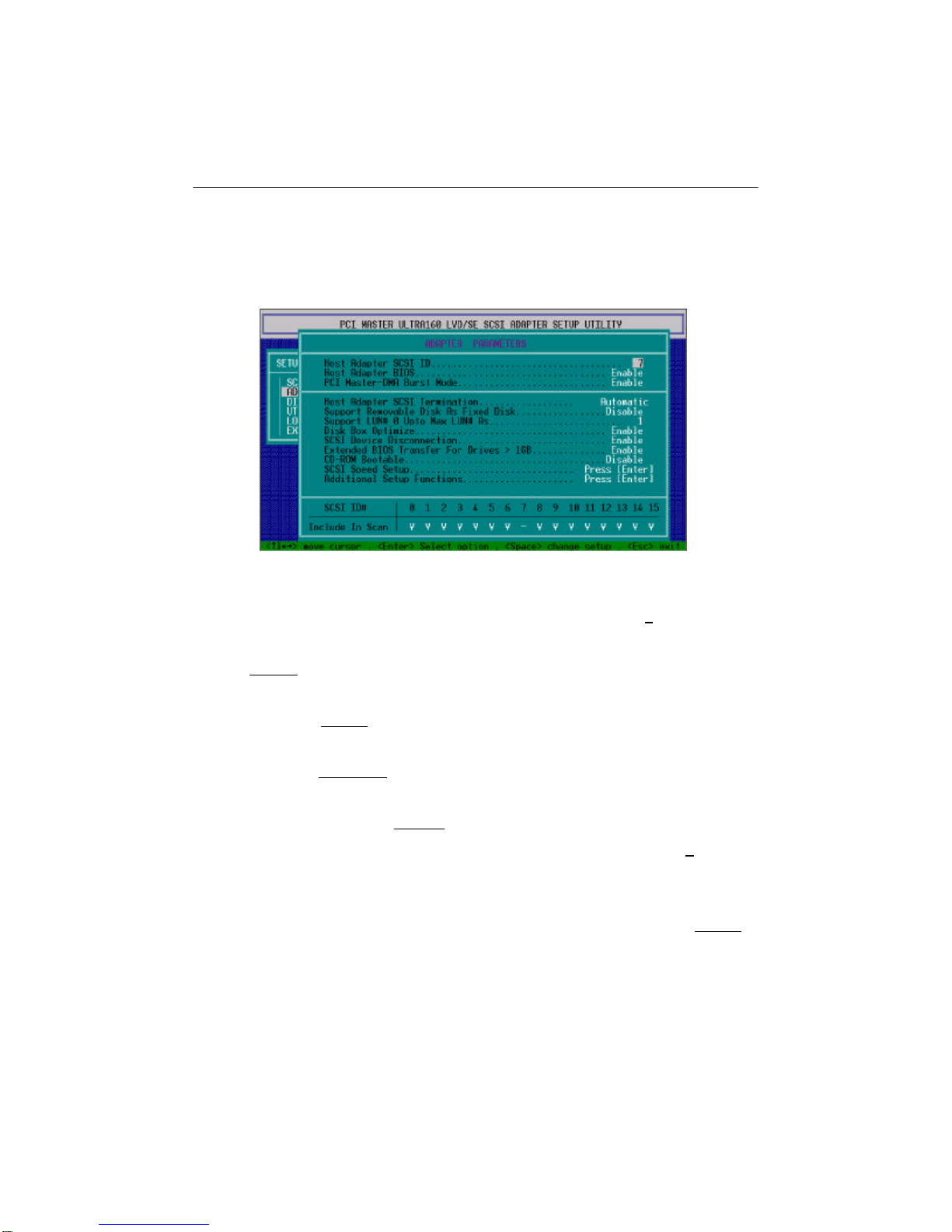
Move the cursor to ADAPTER SETUP, and press Enter to enter the following screen.
Figure 3-3
²Host Adapter SCSI ID: It is adapter ID number. Default is 7.
²Host Adapter BIOS: It is the host adapter BIOS you’re using. Default is
Enable.
²PCI Master-DMA Burst Mode: It is the burst mode for PCI Master-DMA.
Default is Enable.
²Host Adapter SCSI Termination: It is to activate the SCSI terminator or not.
Default is Automatic.
²Support Removable Disk AS Fixed Disk: It is to use a removable disk as
fixed disk. Default is Disable.
²Support Multiple LUN: It is to use multiple LUN or not. Default is 1. This will
make all 4 hard drives detected.
²Disk Box Optimize: It can be set to automatically detect the numbers of
connected Disk Boxes so as to adjust the transfer rate. Default is Enable. If
you set as Disable, you need to adjust the transfer rate manually.
²SCSI Device Disconnection: It is set to support SCSI device disconnection.

10
AEC-67160D User’s Manual
Default is Enable.
²Extended BIOS Transfer For Drives > 1GB: It is set to support drives bigger
than 1GB. Default is Enable. However, you can disable it to accommodate
to old drives.
²CD-ROM Bootable: It can be set to boot CD-ROM, but default is Disable.
²SCSI Speed Setup: Please refer to 3.2.1.
²Additional Setup Functions: Please refer to 3.2.2.
²SCSI ID# / Include In Scan: It is to select a needed ID number for scanning.
3.2.1 SCSI Speed Setup
Pressing Enter in ID/XFER lets you select an individual host to device transfer rate
(.XFER RATE) for each device. If you set “Disk Box Optimize” in 3.2 as Enable, you
don’t need this setup.
Figure 3-4
3.2.2 Additional Setup Functions
Reserve the default if there is no special condition.
Tabla de contenidos
Otros manuales de Adaptador de Acard

Acard
Acard AEC-6293 Manual de usuario

Acard
Acard AEC-67162M Manual de usuario

Acard
Acard AEC-6712TU Manual de usuario

Acard
Acard AEC-6290M Manual de usuario

Acard
Acard AEC-6710S Manual de usuario

Acard
Acard AEC-7722 Manual de usuario

Acard
Acard Mirror Smart Ultra160 Manual de usuario

Acard
Acard AEC-6290 Manual de usuario
Acard
Acard AEC-6293M Manual de usuario

Acard
Acard AEC-6885MLP Manual de usuario


