
Aardwolf RAINBOW EDITION Manual de usuario


English
WWW.SENJIN-CN.COM
2
1. Precautions
1) The fans are designed for cooling and decoration of the computer case. If the fans or
components that are included in the kit will be used inappropriately, the manufacturer
is not responsible for damage.
2) Avoid getting foreign objects or body parts into the fan while it is in working condition.
This will prevent your injuries and damage to the fan or its blades.
3) We advise you not to exert excessive effort when tightening the screws fastening the
fan, as this may lead to its damage and failure.
4) It is necessary to store and use the device in places not accessible to children.
5) Make sure that the device does not get liquid, and it is not exposed to extreme
temperatures. The optimum temperature of use is in the range from 5 to 40 degrees
with humidity of no more than 75%.
6) Carefully read the equipment and installation instructions before working with the
device. If you find a discrepancy with the stated information, contact the seller of the
goods to replace or retrofit it.
7) The appearance and equipment of the product can be supplemented or modified in
order to improve it or improve the quality of the product without prior notice.
8) The Supplier shall not be liable for any damage caused as a result of improper use
and installation of the device.

English
WWW.PERFORMA.COOL 3
2. Specifications
Kit of RGB fans with controller hub and remote control
Aardwolf APF-120RAINBOW-KIT
Product code: APF-120RAINBOW-KIT
Model APF-120RAINBOW-KIT
Material Plastic
Fansize 120 х 120 х 25 mm
Fancolor White/Black
Quantity of fans in kit 3 pcs
Type of light Rainbow RGB
Bearing type Hydravlic
Fan RPM 1000 RPM ± 20%
Fan noise 17 dBA
Connector 6 Pin
Input voltage 5V
Operating voltage 12V
Static pressure 0,86 mm/H2O
Fan Perfomance 34 CFM
Currents trength 0,34 А
Consuption 4,08 W
Controllers power 60W
Number of fans supported by the controller 10 pcs
LED strip connectors 2 pcs
Controller size 14 (W) х 9 (L) х 4,5 (H)
The total number of supported LED elements on
1 connector 50pcs
Package size 265 (W) x 270 (L) x 33 (H) mm
Weight of kit (without package) 580g
Weight of kit (with package) 820g



English
WWW.PERFORMA.COOL 7
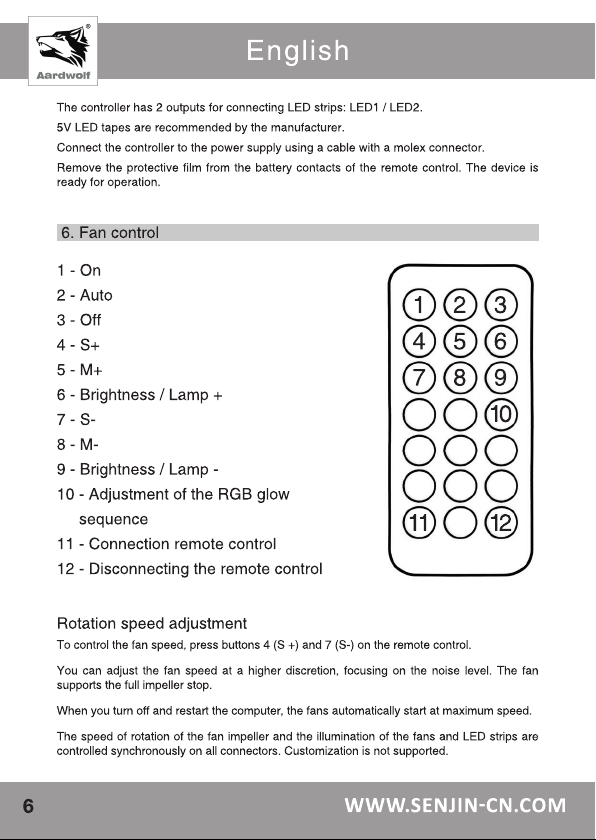
Backlight control
- Button (1) - turn on the backlight;
- Button (3) - turn off the backlight. Automatic saving of settings after shutdown;
- Button (2) - turn on the automatic reproduction of light effects;
In the off state, press this button to enter the setup menu, then press the (5) M + or (8)
M- button to adjust the LED pixels. Blue button is to adjust the sequence of RGB. After
finishing the settings, press the button (3) to save and exit.
- Button (1) - continue playback;
- Buttons (6) or (9) - increase or decrease the backlight brightness;
- Buttons (4) and (7) - speed adjustment;
- Buttons (5) or (8), - switching current lighting effects;
- Colored buttons - switch the monochrome backlight, the color of the button corresponds
to the color of the LED ribbon backlight;
- Button (10) - the function of adjusting the RGB sequence in the off state.
You must press the (2) AUTO button to enter the setup menu. The first three LED bars
will display the current RGB glow sequence. Press the button (10) to adjust the RGB
sequence until the red, green, and blue sequence is established. Then press the button
(3) OFF to save the settings.
To make the fan constant light - click on one of the 12 colors, shown in the bottom panel.
The current visual effects settings remain unchanged after the computer is turned off
and on again.
The red indicator (on the remote on top) - lights up each time you press any of the
buttons (confirms the operation of the buttons / transmission of the command over the
radio channel).
If the indicator does not light up or the controller does not respond to the commands
from the remote control, replace the battery in the remote control with the one indicated
in the specification, according to the information on the remote control.
Сontroller connection with remote control
- Button (11) - press and hold the button for 5 seconds - the remote control is tied to the fan
controller. The controller is controlled only from this remote control. The function is available
only for the radio version of the console.
- Button (12) - press and hold the button for 5 seconds - the remote control is decoupled from
the controller. The controller responds to signals from any suitable remote. The function is
available only for the radio version of the console.

English
WWW.SENJIN-CN.COM
8
7. Troubleshooting
While preparing to install the fans, check the product for completeness.
Causes of fan failure:
1) The fan impeller does not rotate:
– check the impeller for foreign objects, perhaps it jammed;
– turn off the fan and remove foreign objects;
– check fan connection to controller;
– check the controller connection to the power supply;
– press the button (4) on the remote control several times.
If all of the above does not help, try plugging the fan into another free connector on
the controller.
2) Backlight does not work:
– check the connection of fans to the controller;
– press the button (1) on the remote control.
If all of the above does not help, try plugging the fan into another free connector on
the controller.
3) Remote control does not work:
– place the remote control and the controller as close as possible to each other and
check their operation by pressing the buttons.;
– replace the battery in the remote control.
If all of the above does not help, contact the service center.
8. General limitations and safety
Storage, transportation and disposal considerations
This device should be stored in the warehouse or home and optionally transported to
existing retail package. The place of storage (transportation) must be inaccessible to
moisture, direct sunlight and to exclude the possibility of mechanical damage. This product
is recommended to store at air temperature from + 5 ° С to + 40 ° С and humidity up to 75%.
Subject to the rules and conditions of storage, the warranty period for storage of the device
in the manufacturer’s original packaging is 10 years.
Using device after expiration date
The calculated minimum service life of the device provided by the manufacturer for the fan is 10
years old and works only if using the product exclusively for their own needs, and if the consumer
observes the rules of operation, storage and transportation products. Provided careful handling
of the product and compliance with the rules of operation, the actual lifetime may exceed the
design life set by the manufacturer. At the end of the product’s service life, it is advisable to
contact an authorized service center for preventive maintenance of the product and determine
its suitability for further operation. Work on preventive maintenance of the product and its
diagnostics are performed by authorized service centers for a fee.

English
WWW.PERFORMA.COOL 9
9. Conforming to the standards and warranty of the manufacturer
Warranties of the manufacturer (seller)
If the user observes the operation rules, taking into account the precautions described in this
user manual, the device is safe to use and does not harm the environment, human and is
usable. The warranty period of the device is 12 months from the date of purchase and without
taking into account the period of being in repair (provided that the operating rules are observed).
The right to a guarantee is provided when filling in the information in the warranty card that is
issued upon the purchase of the goods.
The guarantee is a supplement to the rights that are granted in accordance with the current
consumer rights laws of the country to which the goods were purchased. These laws differ
in different countries. Read the full warranty information to get an understanding of consumer
rights and additional consumer protection features that are provided under the current device
warranty.
Utilization and environmental protection
The rules for disposal of this product differ from the rules for disposing of household waste. In
contrast to household waste, the device must be handed over to the appropriate point for the
reception of electrical and electrical equipment for the purpose of disposal and processing.It
contributes to the preservation of natural resources. If you ensure independent disposal of the
product, you prevent possible negative consequences for the environment and human health,
as a result of improper processing.Transfer the device to a central waste disposal center or
contact the seller who purchased the cooling system for the processor. Competent organizations
for the disposal of this device will determine its safe environment for processing. For incorrect
disposal of waste provides for fines, according to the current legislation of the country
where the device was purchased.

Русский
WWW.SENJIN-CN.COM
10
Русский
WWW.SENJIN-CN.COM
10
1. Меры предосторожности
1) Вентиляторы предназначены для охлаждения и декорации компьютерного
корпуса. За использование не по предназначению вентиляторов или компонентов,
которые входят в комплект набора, производитель ответственности не несет.
2) Для предотвращения травм и повреждения вентилятора или его лопастей,
избегайте попадания посторонних предметов или частей тела в вентилятор, пока
он находится в рабочем состоянии.
3) Желательно, не прилагать излишних усилий при затяжке шурупов крепления
вентилятора, так как это может привести к его повреждению и выходу из строя.
4) Необходимо хранить и использовать устройство в местах, недоступных для детей
и животных.
5) Следите, чтобы на устройство не попадала жидкость, и оно не подвергалось
воздействию экстремальных температур. Оптимальная температура
использования - в диапазоне от 5 до 40 градусов при влажности не более 75%.
6) Внимательно изучите комплектацию и инструкцию по установке перед началом
работы с устройством. Если вы нашли несоответствие с заявленной информацией,
обратитесь к продавцу товара, чтобы заменить или доукомплектовать его.
7) Внешний вид и комплектация товара могут быть дополнены или изменены с целью
его усовершенствования или улучшения качества товара без предварительного
уведомления.
8) Поставщик не несет ответственности за любые повреждения, возникшие в
результате, неправильного использования и установки устройства.
Este manual sirve para los siguientes modelos
1
Tabla de contenidos
Idiomas:


