
3D Histech Pannoramic 250 FLASH III Manual de usuario

Pannoramic 250 FLASH
1.14 SP1
User’s Guide
March 30, 2011
Rev. 1

Pannoramic 250 FLASH 1.14 SP1 User’s Guide
Contents
Disclaimer....................................................................................................................... 5
Charac er Forma s and Symbols.......................................................................................7
1 Produc Descrip ion...................................................................................................... 8
1.1 Product Overview......................................................................................................................8
1.1.1 Intended Use....................................................................................................................................................8
1.1.2 Features and Benefits.......................................................................................................................................8
1.1.3 Main arts of the Base Unit.............................................................................................................................9
1.2 System Overview......................................................................................................................10
1.2.1 Pannoramic 250 FLASH system......................................................................................................................10
1.2.2 Hardware O tions..........................................................................................................................................11
1.2.3 Control Software............................................................................................................................................15
2 Ins alla ion................................................................................................................. 17
2.1 Control com uter orts...........................................................................................................17
2.2 Connectors and cables.............................................................................................................18
2.3 Mounting the Lumencor S ectra unit......................................................................................18
3 Opera ing Slides and Magazines..................................................................................21
3.1 Pre aring Slides and Magazines..............................................................................................21
3.2 Affixing Barcode Stickers to Slides...........................................................................................22
3.3 Inserting and Removing Slides.................................................................................................23
3.3.1 Insert slides into a magazine..........................................................................................................................23
3.3.2 Insert and remove magazines........................................................................................................................24
3.3.3 O ening/Closing the FL rotective cover.......................................................................................................27
4 Sof ware Descrip ion.................................................................................................. 28
4.1 Starting / Exiting Pannoramic Scanner Software.....................................................................28
4.1.1 Starting the software......................................................................................................................................28
4.1.2 Exiting the software........................................................................................................................................29
4.2 O tions.....................................................................................................................................29
4.2.1 Barcode Settings.............................................................................................................................................29
4.2.2 Image Com ensation.....................................................................................................................................33
4.2.3 Microsco e Settings.......................................................................................................................................36
4.2.4 External A lication Call Settings...................................................................................................................41
4.3 Using Brightfield Manual Mode...............................................................................................42
4.3.1 Routine work tab............................................................................................................................................43
4.3.2 Scan O tions window.....................................................................................................................................45
4.3.3 Preview tab.....................................................................................................................................................46
March 30, 2011 3 HISTECH Ltd. 2(130)

Pannoramic 250 FLASH 1.14 SP1 User’s Guide
4.3.4 Preview area scanned by review camera.....................................................................................................49
4.3.5 Focus tab........................................................................................................................................................56
4.3.6 Service tab......................................................................................................................................................58
4.3.7 Dis lay field and toolbar for live images........................................................................................................59
4.3.8 Start Scan........................................................................................................................................................61
4.4 Using Brightfield Automatic Mode..........................................................................................62
4.4.1 Routine work tab............................................................................................................................................62
4.4.2 Barcodes tab...................................................................................................................................................64
4.4.3 Preview tab.....................................................................................................................................................68
4.4.4 Focus tab........................................................................................................................................................69
4.4.5 Service tab......................................................................................................................................................70
4.4.6 Start Scan........................................................................................................................................................71
4.5 Using Fluorescent Manual Mode.............................................................................................73
4.5.1 Routine work tab............................................................................................................................................73
4.5.2 Scan O tions...................................................................................................................................................78
4.5.3 Preview tab.....................................................................................................................................................82
4.5.4 Preview area scanned by review camera.....................................................................................................84
4.5.5 Hardware tab..................................................................................................................................................85
4.5.6 Service tab......................................................................................................................................................88
4.6 Using Fluorescent Automatic Mode........................................................................................90
4.6.1 Routine work tab............................................................................................................................................90
4.6.2 Barcodes tab...................................................................................................................................................95
4.6.3 Preview tab.....................................................................................................................................................99
4.6.4 Focus tab......................................................................................................................................................100
4.6.5 Service tab....................................................................................................................................................100
4.7 Scan To Server........................................................................................................................102
4.8 Using Profiles.........................................................................................................................108
5 Troubleshoo ing and Main enance............................................................................110
5.1 Safety Information.................................................................................................................110
5.1.1 Cleaning the device......................................................................................................................................111
5.1.2 Cleaning the magazine.................................................................................................................................111
5.1.3 Preventive maintenance...............................................................................................................................111
5.2 Troubleshooting.....................................................................................................................112
5.2.1 Fluorescent A lications (o tional).............................................................................................................114
5.3 Maintenance..........................................................................................................................115
5.3.1 O ening the rotective cover.......................................................................................................................115
5.3.2 Re lacing fuses of the main ower switch...................................................................................................116
5.3.3 Re lacing Lam Module (for Fluorescent O tion).......................................................................................117
5.3.4 Removing a slide...........................................................................................................................................119
5.3.5 Installing and Removing the Filter Module (Fluorescent O tion)................................................................121
5.3.6 Removing a Magazine from the Trans orting System..................................................................................122
5.3.7 Trans orting.................................................................................................................................................124
Technical Da a............................................................................................................. 126
March 30, 2011 3 HISTECH Ltd. 3(130)

Pannoramic 250 FLASH 1.14 SP1 User’s Guide
Index........................................................................................................................... 130
March 30, 2011 3 HISTECH Ltd. 4(130)

Pannoramic 250 FLASH 1.14 SP1 User’s Guide
Disclaimer
Co yright © 2001-2011 3DHISTECH Ltd.
All rights reserved.
Intellectual ro erty related to the 3DHISTECH roducts are as follows:
EP 1,789,831; US 7,663,078; EP 2,024,772; JP 2009-512685; US 12/301,781; EP 1,644,767; JP 2007-
516451; US7,327,515; EP 1,994,398; JP 2008-557835; US 12/281,566; U0700210; US 6,246,785;
HU0900142; HU0700404; PCT/HU2007/000065; EP 08762668.5; US 12/663,537;
PCT/AT2006/000492; JP 2008-542552; EP 06817469; US 12/095,545; PCT/AT2006/000493; EP
06817470.5; US 12/095,596; HU0900741; US 61/264,732; US 11/826,752; P0401870;
PCT/IB2005/050344; US 11/662,976; HU0700409; US 12/042,050; US 77/636,144 and 007502032.
The above mentioned granted atents, granted utility model, registered trademarks, ending
international and national atent a lications and the other corres onding IP are the sole ro erties
of the 3DHISTECH Ltd.
3DHISTECH L d. is no liable for damage of wha ever na ure (including, bu no limi ed o, general
or specific damage, indirec damage, consequen ial damage or inciden al damage, including he
resul s of he analysis of he digi ized slides, for example, change of heal h s a us rela ed o
erroneous diagnosis from he digi alized slide(s)) ha s ems from or is associa ed wi h use of
Produc , digi alized slides, quali y of s aining, quali y of s ained slides, quali y of used me hod of
s aining. 3DHISTECH L d. assumes no responsibili y for he func ionali y and faul -free condi ion of
your “applica ion programs” (Workflows, VBA macros, Commander scrip s).
CAUTION
For research and education uses only, not for use in diagnostic rocedures. This roduct has not been
a roved or cleared as a medical device by the U.S. Food and Drug Administration, nor any other
regulatory authority. The data and images obtained or viewed using this roduct are not intended for
clinical or diagnostic use.
For erformance evaluation only, the erformance characteristics of this roduct have not been
established.
March 30, 2011 3 HISTECH Ltd. 5(130)

Pannoramic 250 FLASH 1.14 SP1 User’s Guide
Third-Party Disclaimer (LibTIFF – TIFF Library and Utilities)
3DHISTECH Ltd. is not liable for damage of whatever nature (including, but not limited to, general or
s ecific damage, indirect damage, consequential damage or incidental damage, including damage
resulting from lost rofits, interru tion of business, loss of business information, ecuniary loss or
similar damage) that stems from or is associated with the incor orated art of this Product that is
made by Silicon Gra hics Inc.
THE SOFTWARE IS PROVIDED “AS IS” AND WITHOUT WARRANTY OF ANY KIND, EXPRESSED,
IMPLIED OR OTHERWISE, INCLUDING WITHOUT LIMITATION, ANY WARRANTY OF
MERCHANTABILITY OR FITNESS FOR A PARTICULAR PURPOSE.
IN NO EVENT SHALL SAM LEFFLER OR SILICON GRAPHICS BE LIABLE FOR ANY SPECIAL, INCIDENTAL,
INDIRECT OR CONSEQUENTIAL DAMAGES OF ANY KIND, OR FOR ANY DAMAGES WHATSOEVER
RESULTING FROM LOSS OF USE, DATA OR PROFITS, WHETHER OR NOT ADVISED OF THE POSSIBILITY
OF DAMAGE, AND ON ANY THEORY OF LIABILITY, ARISING OUT OF OR IN CONNECTION WITH THE
USE OR PERFORMANCE OF THIS SOFTWARE.
Fur her Informa ion
For the latest information on 3DHISTECH roducts and services, lease visit our website at the
following URL: htt ://www.3dhistech.com .
Com any Address: 29-33 Konkoly-Thege Miklos street, Building 18
1121 Buda est – HUNGARY
March 30, 2011 3 HISTECH Ltd. 6(130)

Pannoramic 250 FLASH 1.14 SP1 User’s Guide Character Formats and Symbols
Charac er Forma s and Symbols
Example Words or characters that a ear on the screen. These include field names, screen
and window titles, ushbuttons and menu names, aths or o tions.
Keys on the keyboard. For exam le, function keys (such as F11) or the C rl+M key
combination.
Example Cross-references to other documents.
Warning! It might cause irreversible damage or harm to the user of the roduct or the
roduct itself if this instruction is not followed.
Cau ion! It might cause the roduct not to work ro erly if this instruction is not followed.
No e: Calls attention to some im ortant features.
March 30, 2011 3 HISTECH Ltd. 7(130)

Pannoramic 250 FLASH 1.14 SP1 User’s Guide 1 Product escription
1 Produc Descrip ion
1.1 Produc Overview
1.1.1 In ended Use
Pannoramic 250 FLASH is designed to use transmitted light and reflected light fluorescence to digitize
biological sam les and s ecimens (ty ically histological sections). The target users of the roduct can
work for exam le, in education, research, industry or medical sectors.
1.1.2 Fea ures and Benefi s
The Pannoramic 250 FLASH offers world class brightfield and fluorescent whole slide scanning on u
to 9 channels.
An outstanding 0.16 µm / ixel resolution is achieved with 0.95 NA (equivalent to 62× magnification)
Carl Zeiss Plan-A ochromat objective.
Key features of the Pannoramic 250 FLASH Scanner:
•Extreme fast brightfield scanning mode:
•Continuously moving stage during scanning
•The new brightfield camera sees 30% larger field of view with better ixel resolution
and has double frame rate
•Light source is a Xenon flash lam
•Im roved image quality:
•Image shar ening feature which im rove the visual a earance of digital slides
•New faster focus algorithm find the focus which is more a ealing to the human
eye
•Motorized camera changer for a 3CCD camera for brightfield and a cooled monochrome CCD
camera for fluorescence
•Motorized Objective changer for two objectives
•10 times higher resolution for barcode reading and review image
March 30, 2011 3 HISTECH Ltd. 8(130)
Pannoramic 250 FLASH 1.14 SP1 User’s Guide 1 Product escription
•Com act design:
•Cameras are laced inside the unit
•Built-in ower su ly
•Fewer cables
•Im roved fluorescent scanning mode:
•3 times faster and more silent filter change
•Magazine stack cover to rotect every slides against hoto bleaching
•250 slide automatic loading and scanning
This device is recommended for customers, who need high quality daily through ut granted by the
biggest loading ca acity of 250 slides. The device has many advanced im rovements like software
controlled motorized camera- and objective changer, and high resolution color review.
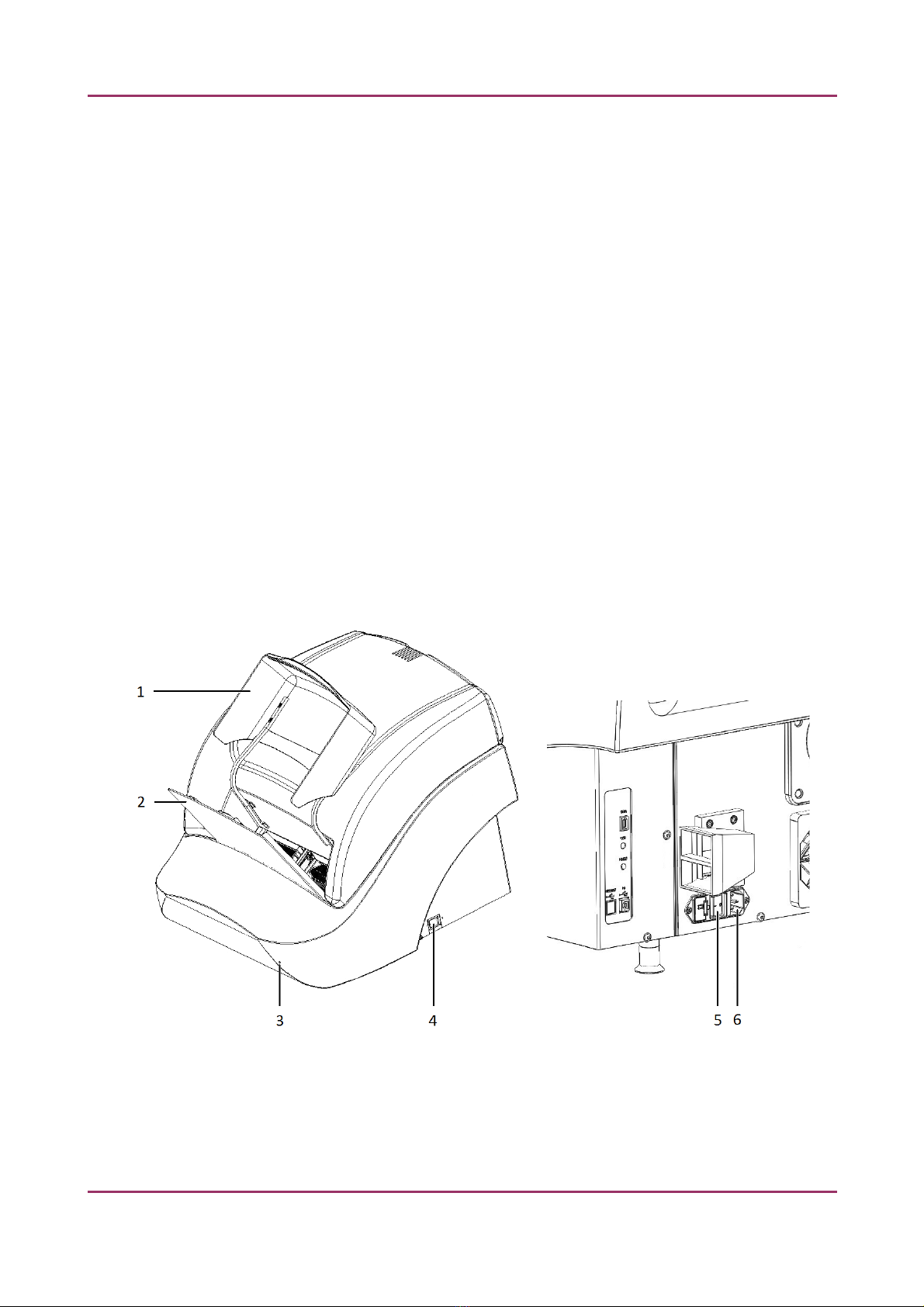
1.1.3 Main par s of he Base Uni
The following figures show the main arts of the base unit.
Figure 1 – Main parts of base unit
1. Protective FL cover
2. In ut and out ut stack for magazines
March 30, 2011 3 HISTECH Ltd. 9(130)

Pannoramic 250 FLASH 1.14 SP1 User’s Guide 1 Product escription
3. Cover release hole
4. Power su ly switch
5. Main ower switch
6. Power su ly cable connector
1.2 Sys em Overview
The standard sco e of delivery of the roduct includes the following hardware and software
com onents.
1.2.1 Pannoramic 250 FLASH sys em
The following figure shows the main arts of the Pannoramic 250 FLASH system.
Figure 2 – Pannoramic 250 FLASH system overview
1. Pannoramic 250 FLASH base unit
2. monitor
3. mouse
4. control com uter
March 30, 2011 3 HISTECH Ltd. 10(130)
Otros manuales para Pannoramic 250 FLASH III
1
Tabla de contenidos
Otros manuales de Microscopio de 3D Histech


Manuales populares de Microscopio de otras marcas


VWR
VWR VisiScope 384 Series Manual de usuario

Nikon
Nikon ECLIPSE E200 POL Manual de usuario

Leica
Leica DI C800 Manual

ThermoFisher Scientific
ThermoFisher Scientific Continuµm Manual de usuario

ThermoFisher Scientific
ThermoFisher Scientific Continuµm Manual de usuario

Olympus
Olympus SZ61 Manual de usuario